 MyRecover



How to Recover Myspace Photos
Looking for how to recover photos from Myspace effectively? Learn where old Myspace images may exist, how to request archives, use backups, and try recovery tools to rebuild your photo collection while avoiding common mistakes and saving time and effort.

By Vera / Updated on December 29, 2025


Understanding the Myspace Photo Loss Issue
Before jumping into recovery methods, it helps to understand why Myspace photos disappeared in the first place.
Why Myspace Photos Were Deleted
Back in 2018, Myspace confirmed that a server migration error caused the permanent loss of content uploaded before 2016. This included:
- Photos
- Videos
- Audio files
In short, millions of memories were wiped out during a technical transition. Think of it like moving houses and accidentally throwing away old photo albums.
What Happened to Old Myspace Servers
Myspace moved data from legacy servers to newer systems. Unfortunately, the migration didn’t go as planned. While some data survived, a massive chunk—especially older photos—did not.
Can You Really Recover Old Myspace Photos?

Here’s the honest answer: sometimes yes, sometimes no. It depends on where else those photos might exist.
Official Myspace Photo Recovery Explanation
Myspace has publicly stated that:
- Photos uploaded before 2016 are likely gone
- Photos uploaded after 2016 may still exist
Which Photos Are Permanently Lost
If a photo:
- Was uploaded before 2016
- Was never downloaded
- Wasn’t backed up anywhere
Then unfortunately, Myspace itself can’t restore it. But don’t click away yet—there are many alternative recovery paths.
[7 Alternative Ways] How to Recover Myspace Photos
There are 7 ways to help you restore your Myspace photos.
1. Check Your Original Myspace Account
Sounds obvious, but many people skip this step.
👉 Logging into Your Old Myspace Profile
Try logging in using:
- Old email addresses
- Previous usernames
- Password recovery options
Even if photos are gone, sometimes profile images or album thumbnails remain.
👉 Browsing Archived Albums
Some users report finding:
- Cached images
- Partial albums
- Low-resolution previews
It’s not perfect, but even a small win is still a win.
2. Recover Myspace Photos via Email Notifications
Here’s a clever trick many people forget.
👉 Searching Old Email Accounts
Search your inbox for:
- "Myspace photo"
- "You uploaded a photo"
- "Myspace notification"
Sometimes Myspace emails included direct image links or attachments. Old Gmail and Yahoo accounts are gold mines for this.
3. Use the Internet Archive (Wayback Machine)
This is one of the most effective free methods. The Wayback Machine takes snapshots of websites over time. If your Myspace profile was public, there’s a chance it was archived.
1. Go to the Wayback Machine.
2. Enter your Myspace profile URL.

3. Select a year before 2016.
4. Click through archived pages.
5. Right-click and save any visible images.
It’s like digital archaeology—you’re digging through internet history.
4. Recover Myspace Photos from Old Devices
Sometimes the answer is sitting in your drawer.
👉 Check Old Hard Drives and USBs
Look for:
- Old laptops
- External hard drives
- USB flash drives
Search folders named "Myspace", "Photos", or even random dates.
👉 Look Through Old Phones and SD Cards
Early smartphones and digital cameras often stored photos locally. You might be surprised what’s still there.
5. Search Cloud Storage and Backup Services
Cloud backups often save us without us realizing it.
👉 Google Photos and Google Drive
Search by:
- Year
- Location
- Keywords like "Myspace"
Google Photos especially loves resurfacing forgotten memories.
👉 iCloud, Dropbox, and OneDrive
Check:
- Old backups
- Trash folders
- Archived files
Sometimes deleted doesn’t mean gone—just hidden.
6. Ask Friends for Tagged Photos
This one works more often than you’d think. Your photos might still exist:
- On friends’ Myspace profiles
- In Facebook albums
- On Instagram throwbacks
A simple message like, "Hey, do you still have those old Myspace pics?" can unlock memories you thought were lost forever.
7. Use Data Recovery Software for Lost Myspace Photos
If you ever downloaded your Myspace photos to a computer, external hard drive, USB stick, or SD card—and later deleted them—there’s still hope. This is where data recovery software becomes your secret weapon.
Note: Recovery software cannot retrieve photos that were lost directly from Myspace’s servers. It only works for files that once existed on your own devices.
One of the easiest and most effective tools for this task is MyRecover. It’s designed specifically for everyday users who want powerful recovery results without technical headaches.
Why MyRecover stands out:
- Supports photo formats like JPG, PNG, JPEG, and more.
- Works with hard drives, SSDs, USB drives, and memory cards.
- Offers deep scanning to locate long-lost files.
- Simple, beginner-friendly interface.
- Allows previewing photos before recovery.
 100% Secure
Whether your Myspace photos were deleted years ago or recently, MyRecover scans deeply to uncover recoverable files—even if you don’t remember where they were stored. Recovering your photos with MyRecover is straightforward:
1. Install and launch MyRecover on your computer.
2. Select the drive where your Myspace photos were originally saved. Start a scan.
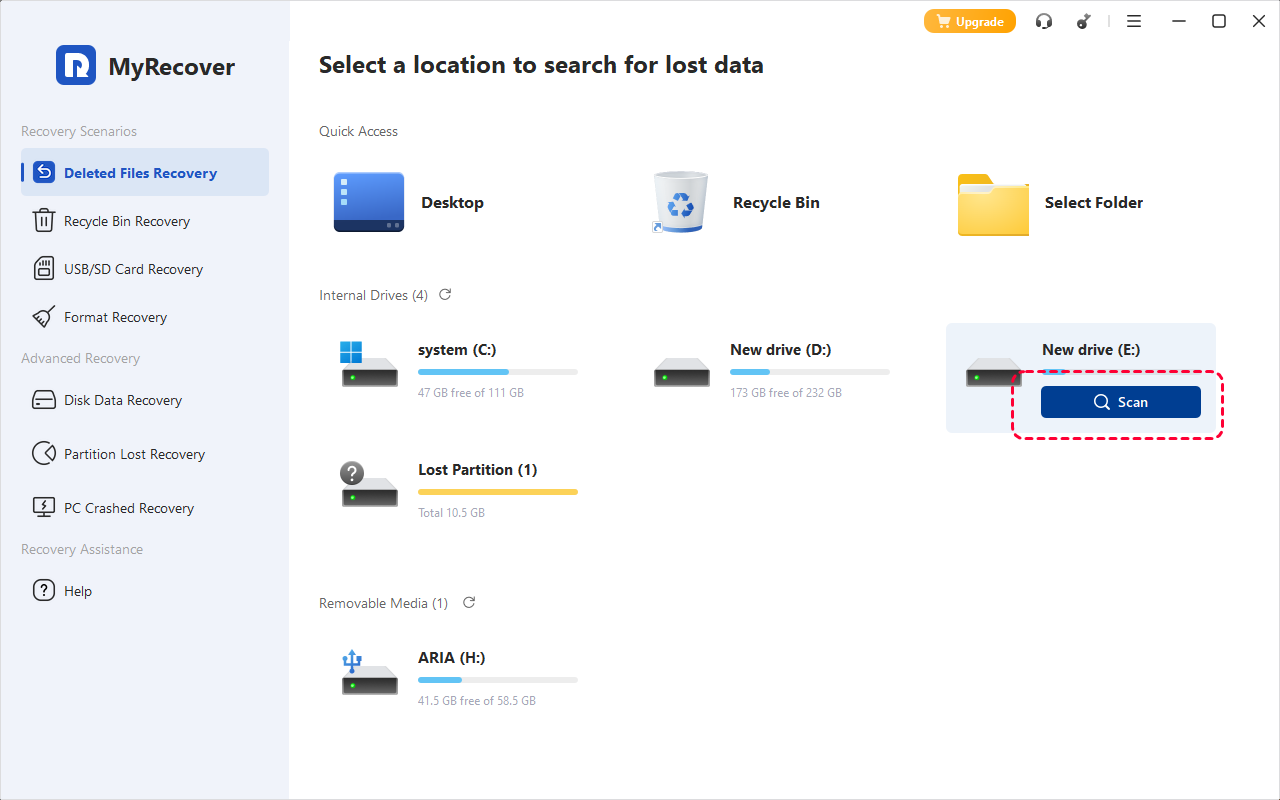
3. Preview found photos to confirm they’re the ones you want.
4. Recover them to a different storage location.
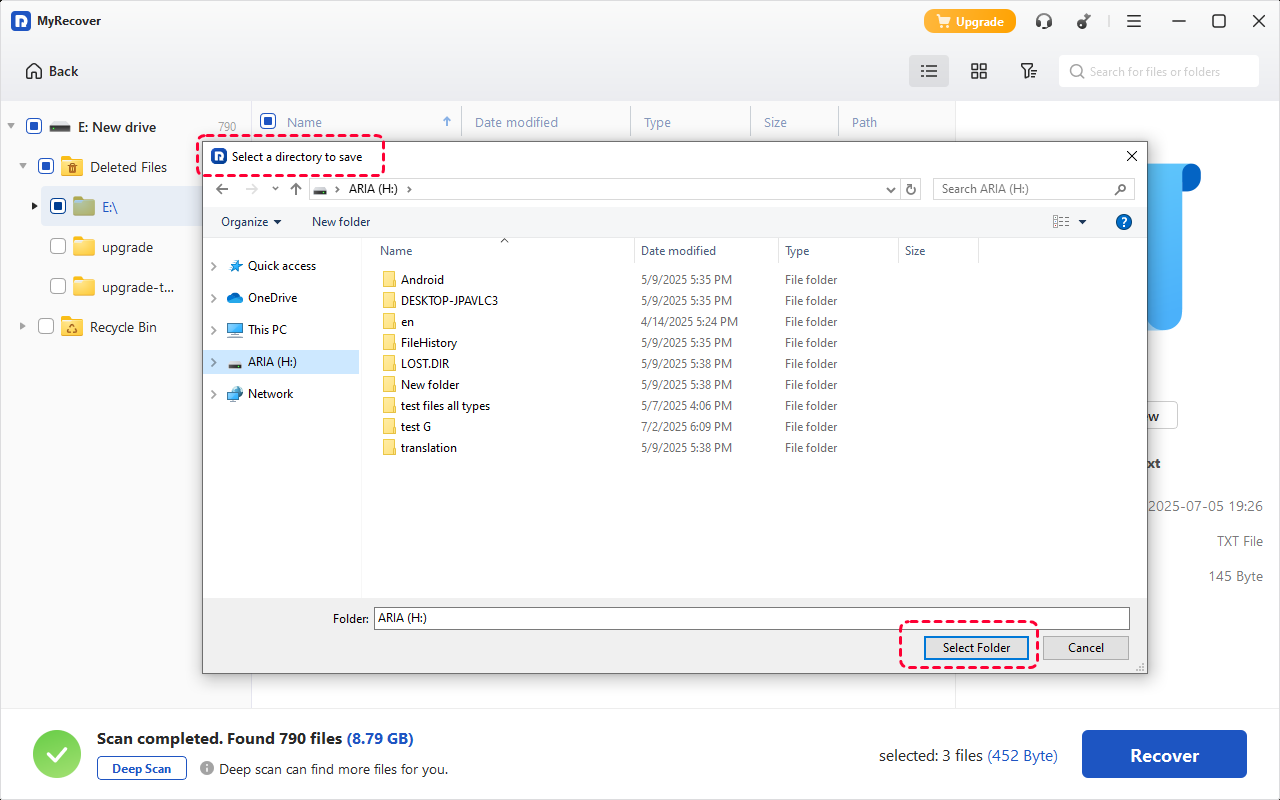
That’s it—no complicated settings, no technical jargon.
To maximize your chances of success:
- Stop using the affected drive immediately.
- Don’t install recovery software on the same drive you’re scanning.
- Save recovered photos to another disk or external drive.
How to Prevent Losing Photos Again
Once you recover even one photo, protect it.
1. Create Multiple Backups
Follow the 3-2-1 rule:
- 3 copies
- 2 different storage types
- 1 offsite backup
2. Use Cloud and Offline Storage Together
Cloud for convenience, external drives for safety. It’s like wearing both a seatbelt and having airbags.
Conclusion
Losing Myspace photos can feel like losing a piece of your personal history. While Myspace itself may not restore them, your memories might still live on through emails, backups, friends, archived websites, or old devices. The key is persistence. Try every method, explore every backup, and don’t underestimate the power of digital nostalgia. Those photos are worth the effort.

Stay Updated With Our
Latest Tips
Add us as a preferred source on Google to never miss helpful guides.
 Add as preferred source >>