 MyRecover



Lost Your Precious RAW Photos? Expert CR2 File Recovery Here
Learn the causes of CR2 data loss and the most effective solutions. This article provides a complete workflow for successful CR2 file recovery, including how to identify corruption and expertly repair corrupted CR2 files to salvage your valuable RAW images.

By Delores / Updated on March 12, 2026


Can I Recover CR2 Files for Free?
Cr2 files
I lost my photos somehow and used Disk Drill to find the files, and was able to find them. They are under reconstructed files > cr2 files. Is there any way or another program that can find these photos for free instead of me having to pay for them?
- Question from reddit.com
What Are CR2 Files?
CR2 (Canon Raw 2) files are large, high-quality, uncompressed digital photo files from Canon cameras, containing unprocessed data directly from the sensor, similar to a digital negative, offering maximum flexibility for professional editing of details like color, exposure, and white balance without losing quality, though they require specific software (like Adobe Photoshop, Canon DPP, or other RAW converters) to open and edit.
Why You Need CR2 File Recovery?
So, how do these valuable CR2 files go missing or get corrupted?
- Accidental deletion. You’re clearing space and wiping the wrong folder.
- Improperly ejecting your SD card from a computer can corrupt the file system.
- A card error might prompt you to format it, wiping everything in an instant.
- Physical damage to the card itself.
- Sudden power loss while writing data.
- Viruses can all lead to that sinking feeling.
- File corruption due to the bad sectors, file system errors, and other issues on the SD card.
Essentially, any event that interrupts the smooth conversation between your camera and the memory card can put your CR2 files in jeopardy.
Besides, you might find that the CR2 files get corrupted for some reason. How to repair corrupted CR2 files? Don’t worry, you can find solutions here.
How to Recover CR2 Files from SD Card
The moment you realize files are lost, stop using the SD card immediately. Every new photo you take or file you save risks overwriting the deleted CR2 data, making recovery impossible.
Besides, you need a powerful data recovery software to recover CR2 files because of the complexity of CR2 files, instead of manually recovering them.
Fortunately, you can try MyRecover as your CR2 file recovery software. Enjoy the following strengths:
- Easy to Use: It's designed for recovering files from any complex situation, even for a novice. So, you can recover files from a crashed computer, a formatted SSD, a damaged partition, a corrupted SD card, a RAW partition, etc.
- High Recovery Rate. MyRecover provides quick and deep scan modes, so that you can recover files with a very high chance. Because it can scan sector by sector to find all your missing files.
- 500+ Devices. You can recover files from any device, including external hard drives, internal hard drives, HDDs, SSDs, SD Cards (SDHC, SDXC, etc), music players, video players, PS4/5, Camera devices, etc.
- 1000+ File Formats: You can recover any type of files, like JPEG, MP4, CHK, FOUND.000, PNG, TIF, MOV, AVI, ASF, TXT, DOC, XLSX, CSV, CR2, PDF, PPT, ODP, etc.
- Easy Preview Before Recovery. It allows you to preview the CR2 files before recovery, ensuring they are intact to recover.
Here is how to recover CR2 files from Cannon SD card with MyRecover on Windows 11, 10:
1. Please connect your affected Canon SD card (needing CR2 file recovery) to your computer and make sure it can be detected by Windows. Download and install MyRecover.
 100% Secure
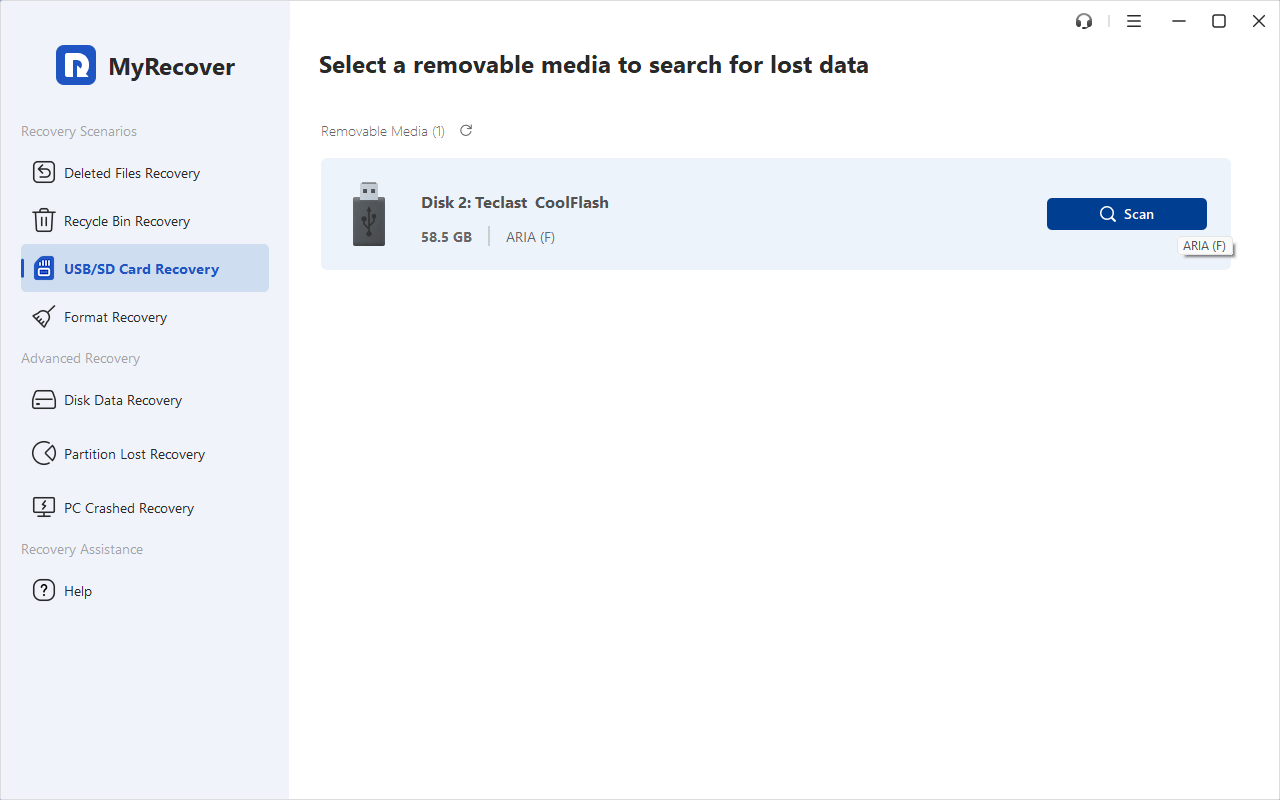
2. Run MyRecover, tap USB/SD Card Recovery, choose the Canon SD card, and tap Scan while pointing at it.
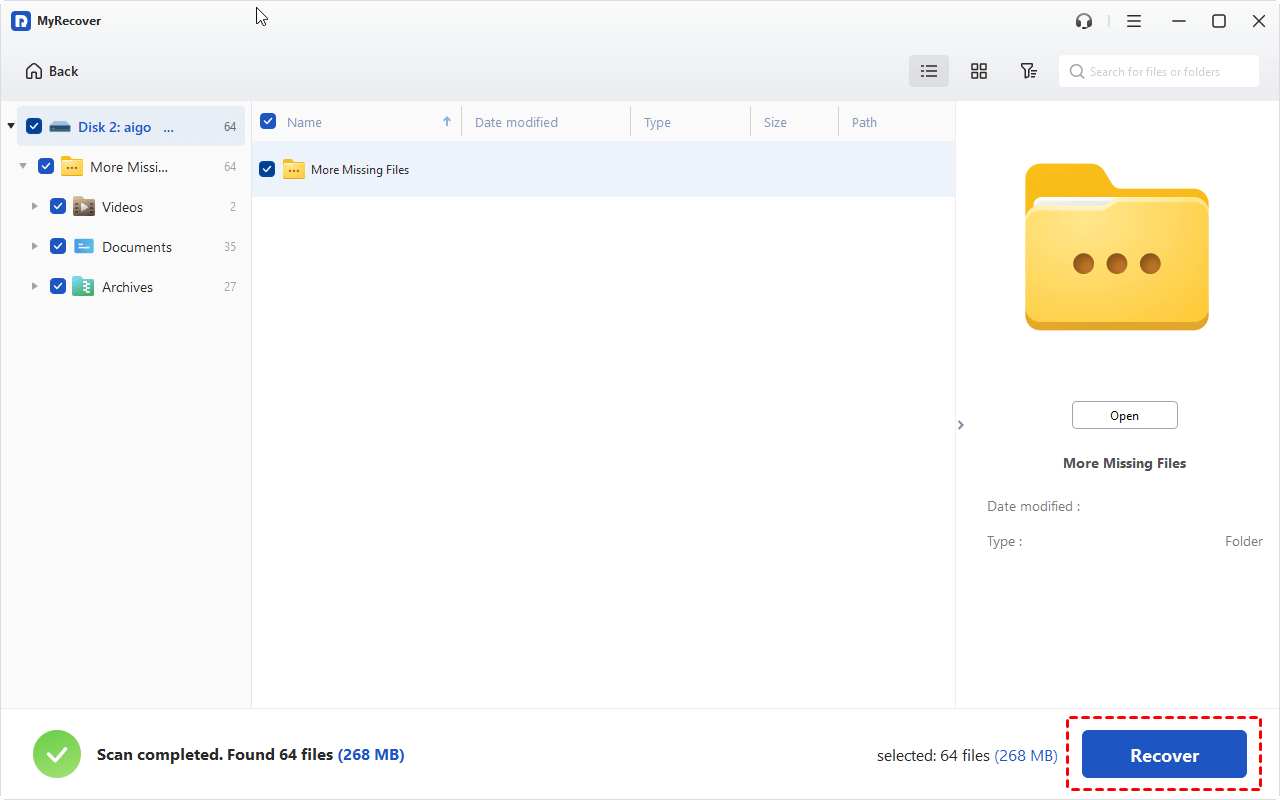
3. It will perform a deep scan to find all the CR2 files and other files, and hit OK. These files will be listed by type by default.
Tip: You can tap the CR2 type to find them quickly once scanned.
4. Double-click the files or hit Preview to preview them. Then tick all the files you need, and hit Recover.
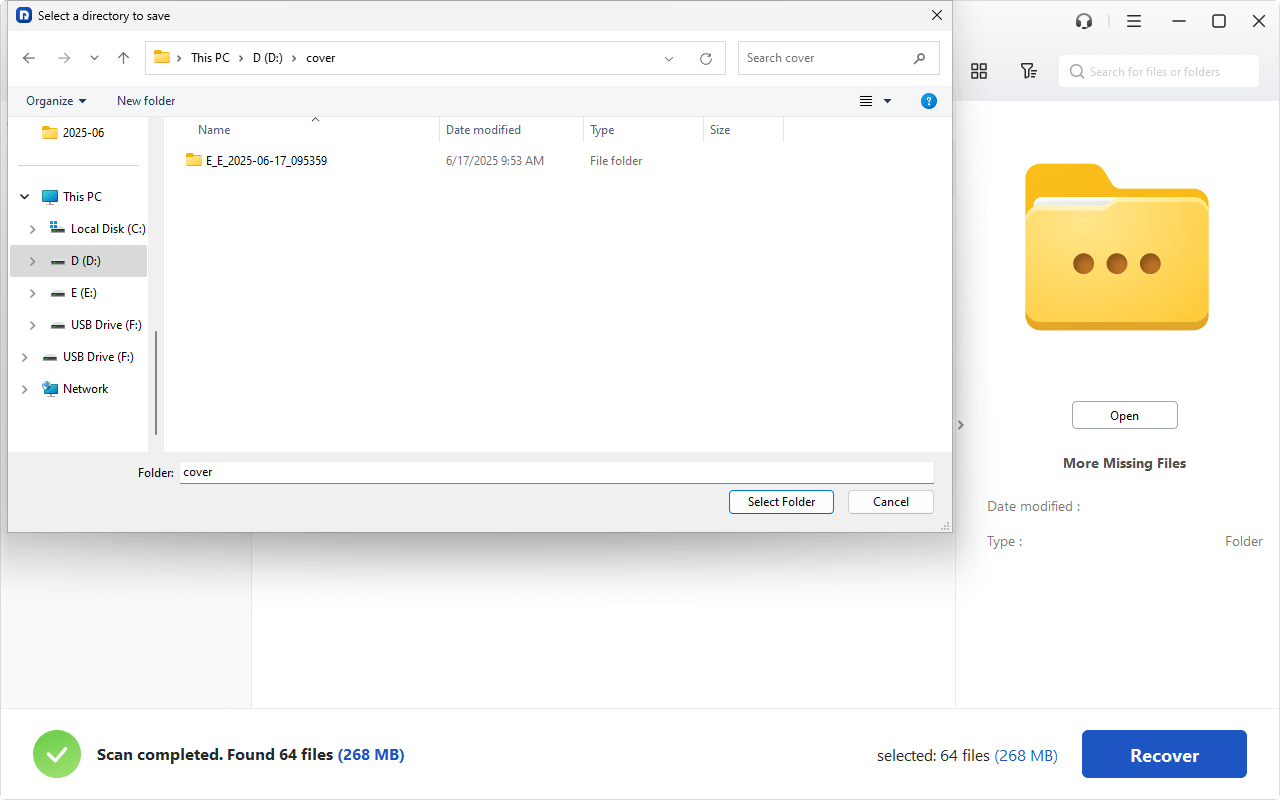
5. Select a safe location and hit Select Folder to keep them.
- Notes:✎...
- You can perform unlimited file recovery with MyRecover Professional.
- It provides a powerful filter and search function to find your files quickly. You can find them by folder structure, file name, file size, modified date, and more.
- If you are an administrator of a company, you can upgrade to MyRecover Technician to recover files from unlimited computers if necessary.
 MyRecover
- Recover Deleted Files Easily with Simple Clicks
- 1000+ File Formats Supported
- Support HDD, SSD, External Hard Drive, USB Drive, SD Card, etc.
- Quickly Find Files Using File Types, Name, Size, etc.
- Preview Files Before Recovering
- Recover Unlimited Data
 100% Secure
How to Repair Corrupted CR2 Files?
Sometimes, the CR2 files get corrupted, not deleted. What should you do? You have to repair the corrupted CR2 files using Adobe Photoshop or Lightroom’s built-in repair functions. Occasionally, they can read a damaged file when other programs fail.
Besides, you can try other manual ways. Some advanced converters can read a corrupted CR2 and output it as a DNG or TIFF, effectively salvaging the image data. You can also try the header swap trick—a more technical process where you copy the header data from a healthy CR2 file (taken with the same camera model and settings) and use a hex editor to apply it to the corrupted file. This can sometimes convince software to read the file correctly.
FAQs About CR2 Recovery
Is it possible to recover permanently deleted CR2 files?
A: Yes. "Permanent deletion" usually just marks the file's space as available. The data remains until overwritten. Using professional CR2 file recovery software like MyRecover quickly offers the best success rate.
Can I recover CR2 files after formatting my SD card?
A: Usually, yes. Formatting often just rewrites the file system, leaving the old data intact. A deep scan can find these files by their signature. Recover before reusing the card.
What are the signs of a corrupted CR2 file, and can it be fixed?
A: Signs include opening errors, gray/black previews, or partial images. You can often repair corrupted CR2 files using RAW repair tools, conversion methods, or header replacement, depending on the damage.
Does free data recovery software work for CR2 files?
A: Sometimes, but with limits like data caps, weak scans, no previews, or bundled ads. For a few files, they may work. For reliable CR2 recovery from serious issues, a dedicated paid tool is better.
Why should I not save recovered files back to the same SD card?
A: It risks overwriting the very data you're trying to save. Always save recovered files to a different drive, like your computer's hard drive, to protect the original data.
How can I tell if my SD card is failing and might cause data loss?
A: Warning signs: slow saving, "Card Error" messages, missing/files, corrupted images, or read/format errors on a computer. Stop using the card immediately if you see these.
Conclusion
Losing your CR2 files is quite annoying. To recover your important CR2 files, choose robust recovery software like MyRecover. If your CR2 files get corrupted, you need to repair them with the right tools.
Besides, with MyRecover, you can recover files from an emptied Recycle Bin, a write-protected disk, an unformatted partition, etc.

Stay Updated With Our
Latest Tips
Add us as a preferred source on Google to never miss helpful guides.
 Add as preferred source >>