 MyRecover



Solved: Load Failed No Backup Found Terraria
Learn how to resolve 'Terraria load failed no backup found' with practical troubleshooting, file repair methods, backup strategies, and proven recovery steps designed to protect progress, restore corrupted worlds, and keep Terraria running smoothly long term.

By Vera / Updated on December 25, 2025


What Does "Load Failed No Backup Found" Mean in Terraria?
My world is not loading "Load Failed No backup found"
So I did a little research and found how to access my world files in Terraria. I noticed that all my worlds have a wld.bak file and those worlds can be loaded. One of my worlds doesn't and is a lone .wld file. How can I play my world again
- Question from Reddit
When Terraria displays this error, it simply means it tried to load your world or character file but couldn’t find a usable version. Normally, Terraria automatically creates backup files to prevent permanent data loss. If both the main file and its backup are corrupted or missing, the game can’t load your world, so it stops the process to avoid crashing.
Why This Error is So Common
Terraria relies heavily on local save files. Any interruption—such as a PC crash, forced shutdown, or even a mod conflict—can corrupt these files. Many players never manually back up their worlds, so when a file goes bad, there’s nothing to restore it from. That’s why this error seems to pop up out of nowhere.
In short, Terraria is saying: "I can’t read your world file, and I have no backup to fall back on".
Main Causes of Load Failed No Backup Found Terraria
Understanding the root causes can save you time and frustration. Here are the most common reasons this error appears:
Corrupted World Files
World files can get corrupted if Terraria crashes during a save or if your PC loses power unexpectedly. Even minor interruptions while saving can damage the .wld file.
Missing or Deleted Backup Files
Sometimes backups are accidentally deleted, or they may never have been created properly. Without these backups, Terraria has nothing to restore, which triggers the error.
Improper Game Shutdown
Force-closing the game, Windows crashing, or sudden power outages can corrupt world and character files. Always exit the game properly and wait for the save icon to finish.
Steam Cloud Sync Issues
Steam Cloud is convenient, but it can occasionally overwrite healthy local files with corrupted cloud versions, causing conflicts that result in this error.
How Terraria Save and Backup Files Work
Before diving into fixes, it helps to understand how Terraria manages save files.
World Files vs Character Files
Terraria uses .wld for world files and .plr for character files. Each also has backup versions ending in .bak. Corruption or loss of either can trigger the load failed error.
Automatic Backups Explained
Terraria periodically creates automatic backups, but they aren’t foolproof. Multiple crashes or corruption events can make backups unusable. That’s why manual backups are essential.
Where Terraria saves files on PC? On Windows, you can usually find your saves here:
- Documents > My Games > Terraria > Worlds (for world files)
- Documents > My Games > Terraria > Players (for character files)
Quick Checks Before Trying Advanced Fixes
Before diving into complex solutions, try these simple checks:
Restarting Terraria and Steam
Sometimes the error is temporary. Restarting both the game and Steam can clear memory conflicts and refresh file access.
Checking Antivirus Interference
Some antivirus programs may block Terraria from accessing save files. Temporarily disabling your antivirus can help determine if it’s causing the problem.
Top 5 Fixes for "Load Failed No Backup Found Terraria"
Let’s know about the most effective fixes.
Fix 1: Restore Terraria World from Backup Manually
If a backup exists, this is usually the fastest and safest solution.
Step-by-Step Instructions
1. Open Documents > My Games > Terraria > Worlds.
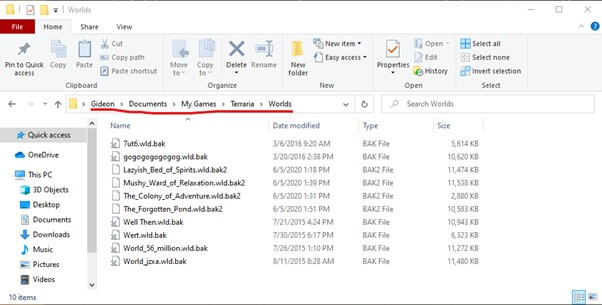
2. Locate files ending in .bak.
3. Delete the corrupted .wld file.
4. Rename the backup by removing .bak.
5. Launch Terraria and check if the world loads.
The restored file must have the exact same name as the original world, or Terraria won’t recognize it.
Fix 2: Recover Deleted Terraria World Files
If your files are completely gone, you’ll need recovery tools. Deleted files may still exist on your drive until they’re overwritten. Acting quickly increases the chances of recovery.
Using Professional Data Recovery Software (MyRecover)
MyRecover is a powerful, user-friendly tool designed to recover deleted or lost files safely. It can locate missing Terraria worlds and characters even if the Recycle Bin is empty or the files were deleted long ago.
Step-by-Step Guide with MyRecover
1. Download and install MyRecover on your PC.
2. Open the program and select the drive where Terraria saves are stored.
3. Click "Scan" and wait as MyRecover scans for lost .wld and .plr files.
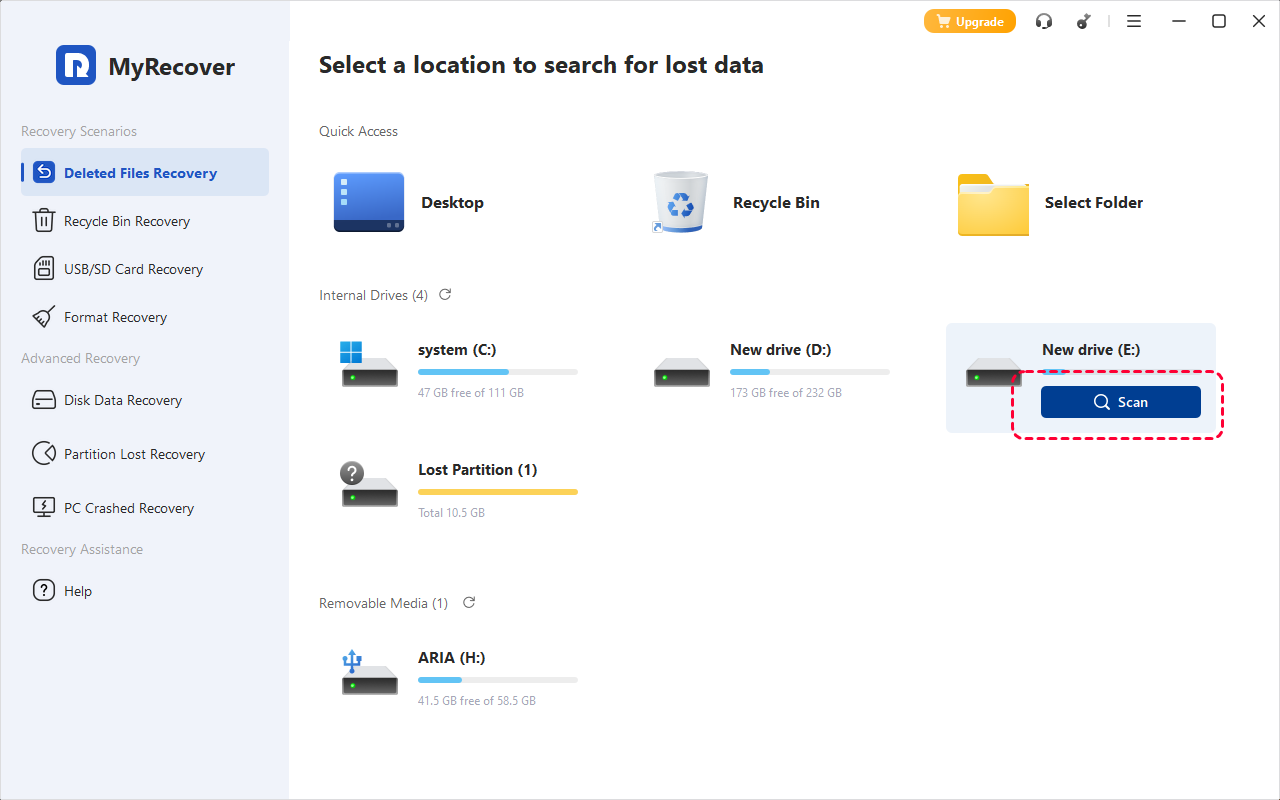
4. Use the search bar to filter results for Terraria save files.
5. Select the files you want to recover and click "Recover", saving them to a different drive to avoid overwriting other data.
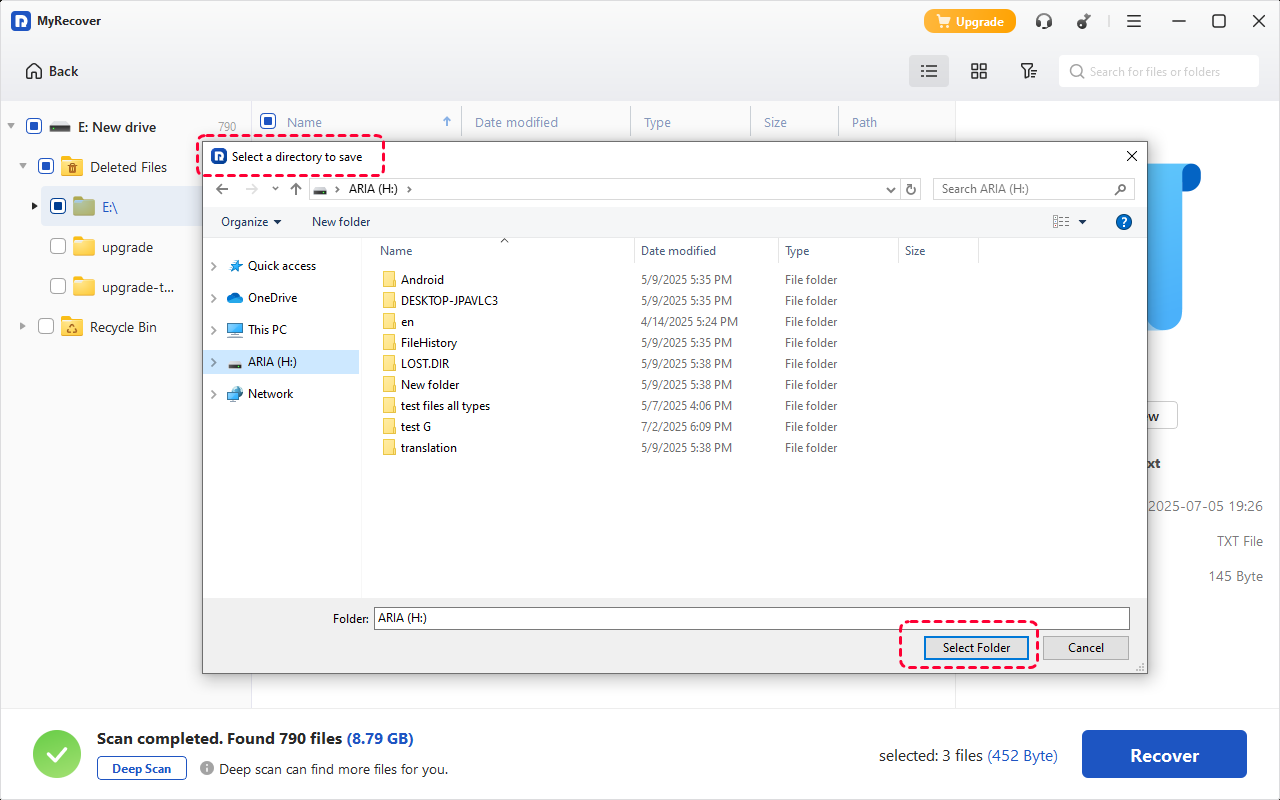
6. Move the recovered files back to Documents > My Games > Terraria > Worlds or Players.
7. Launch Terraria and check if your world or character is restored.
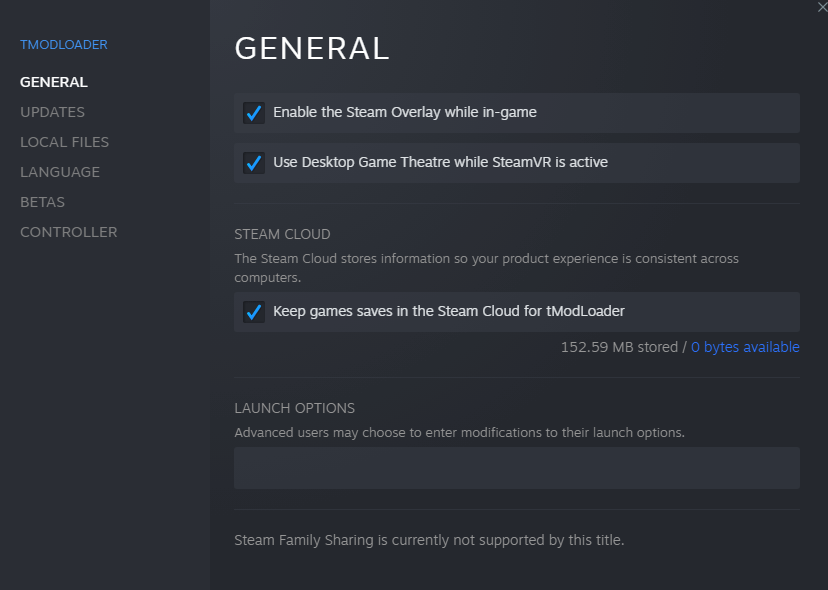
Fix 3: Disable Steam Cloud for Terraria
While Steam Cloud can protect your files, it sometimes causes conflicts that overwrite local saves with corrupted versions.
Why Steam Cloud causes save conflicts? If a corrupted cloud file is uploaded, it can replace your healthy local save without warning. To prevent this, go to Terraria in Steam > Properties > General and uncheck "Keep game saves in the Steam Cloud".
Fix 4: Verify Integrity of Game Files
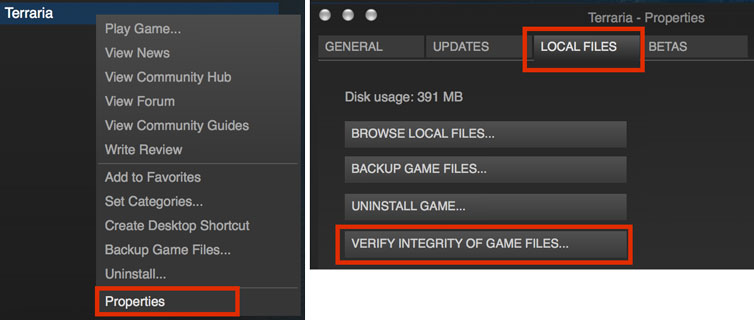
Sometimes the game’s installation files contribute to the issue. How to do it on Steam?
Right-click Terraria in Steam > Properties > Local Files > Verify Integrity of Game Files. Steam will check for missing or corrupted files and replace them automatically.
Fix 5: Create a New World Using the Same Seed
If recovery isn’t possible, creating a new world with the same seed is a smart workaround. When recovery is impossible?
Using the same seed recreates the terrain, biomes, and resource layout of your original world, allowing you to rebuild quickly while preserving the feel of your old world.
How to Prevent Load Failed No Backup Found Terraria
Prevention is always better than recovery. Here are some tips:
Enable Manual Backups
Regularly copy your Worlds and Players folders to an external drive or cloud storage. This simple step can save hours of frustration.
Avoid Force Closing the Game
Always exit properly and wait for the save icon to finish. Interrupting the save process is one of the leading causes of corruption.
Best Backup Practices for Long-Term Safety
Think of backups as insurance: keep multiple copies in different locations, especially after major progress like defeating bosses or completing large builds.
Conclusion
The "load failed no backup found Terraria" error can feel catastrophic, but in most cases, your worlds are recoverable. Whether restoring backups, using recovery software like MyRecover, or preventing future problems with careful habits, you can protect your progress and continue enjoying Terraria without fear. With the right approach, even corrupted files don’t have to mean the end.

Stay Updated With Our
Latest Tips
Add us as a preferred source on Google to never miss helpful guides.
 Add as preferred source >>