 MyRecover



What Happens If You Don’t Activate Windows?
Curious about what happens if you don't have Windows activated? Without activation, Windows limits customization, repeatedly prompts activation messages, and may restrict updates. Explore the full impact on your system performance and security.

By Vera / Updated on December 19, 2025


Understanding Windows Activation
Before we get into the consequences, it’s important to understand what Windows activation actually is and why Microsoft insists on it.
What is Windows Activation?
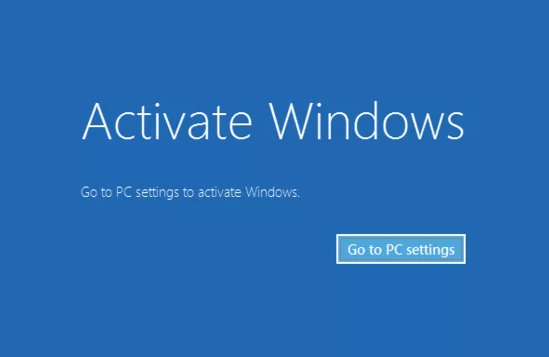
Windows activation is Microsoft’s way of verifying that your copy of Windows is genuine. Think of it like a ticket to a concert—you can get into the venue without a ticket sometimes, but to enjoy the full experience, you need one. When Windows is activated, you unlock all features, receive timely updates, and ensure your system remains secure.
Why Microsoft Requires Activation
Microsoft requires activation to prevent piracy and make sure every user has a legitimate copy of Windows. Without activation, there’s no guarantee that the software is authentic, and certain updates and features may be blocked. Activation also helps Microsoft protect your system from potential security threats that can occur with unauthorized copies.
What Happens If You Don’t Activate Windows?
What actually happens if you don’t activate Windows? Does your PC stop working? Will Microsoft knock on your digital door? Let’s break it all down in plain English so you know exactly what to expect.
👉 Immediate Effects of Not Activating Windows
You might wonder: "If I don’t activate Windows, will my computer just stop working?" The answer is no, but you will notice some limitations almost immediately.
1. Limited Personalization Options
One of the first things you’ll notice is that you can’t customize your desktop. Backgrounds, themes, and accent colors will be locked. It’s like having a brand-new car but being unable to adjust the seat or mirror—functional, but not exactly comfortable.
2. Persistent Activation Notifications
Windows doesn’t want you to forget that you haven’t activated it. You’ll see constant pop-ups reminding you to activate. These messages can be a minor nuisance, interrupting your workflow and becoming a constant little reminder in the corner of your screen.
3. Watermark on Your Desktop
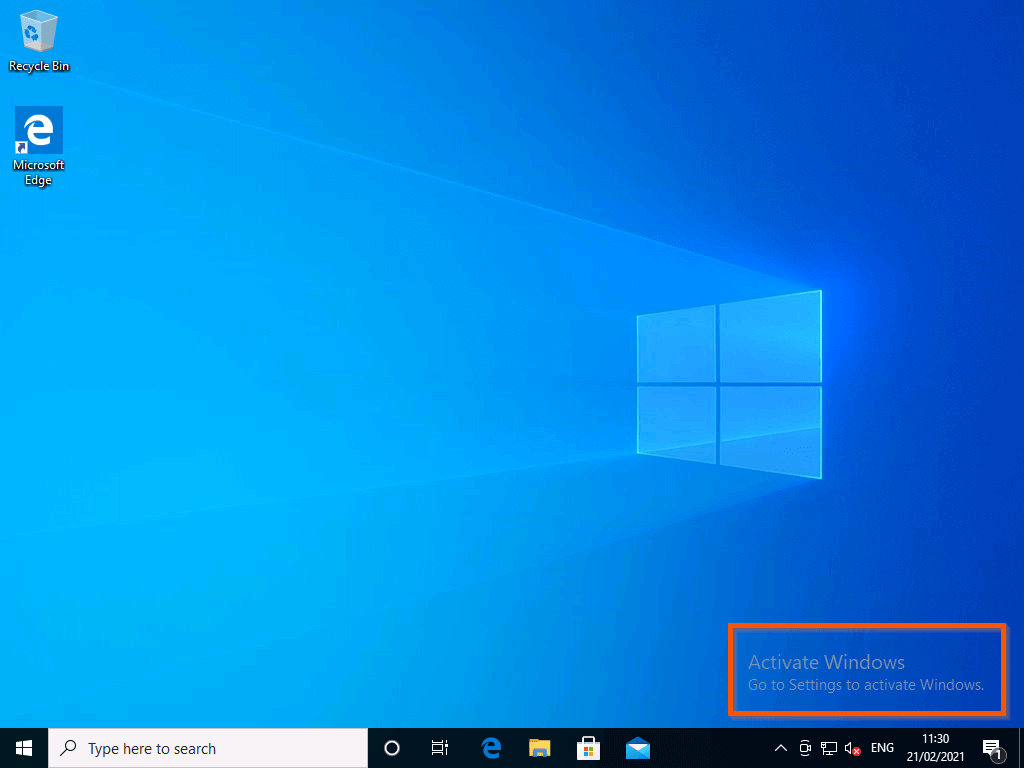
Perhaps the most obvious effect is the "Activate Windows" watermark on the bottom-right corner of your screen. It doesn’t affect functionality, but it can be annoying, especially if you’re presenting your screen or taking screenshots.
👉 Functional Limitations Without Activation
Beyond aesthetics, not activating Windows can affect how your system works.
1. Missing Windows Updates
Updates are vital—they patch security holes, improve performance, and sometimes even add new features. Without activation, certain updates may be restricted. Running an outdated system makes your computer more vulnerable to bugs, crashes, and security threats.
2. Limited Access to Microsoft Features
Some features, like syncing your settings across devices, downloading apps from the Microsoft Store, or using certain personalization options, may be limited. It’s like having a smartphone with the Wi-Fi turned off—you can still make calls, but you’re missing a big chunk of functionality.
3. App and Software Restrictions
Some software might not run properly on an unactivated Windows system. This can be particularly problematic if you rely on specific programs for work or creative projects. Even everyday apps might throw errors or refuse to install in some cases.
👉 Security Risks of an Unactivated Windows
Skipping activation isn’t just inconvenient—it could expose your computer to security risks.
1. Vulnerability to Cyber Threats
Without proper updates, your system becomes an easier target for malware, ransomware, and other cyberattacks. Hackers love exploiting outdated systems because they know users haven’t received the latest security patches.
2. Compatibility Issues with New Software
Developers design their apps with the latest Windows updates in mind. Using an unactivated system may result in software crashes or bugs because your Windows version isn’t fully up to date. It’s like trying to run the newest video game on a five-year-old graphics card—not impossible, but far from ideal.
👉 Legal and Ethical Considerations
Even if skipping activation doesn’t immediately break your computer, there are legal and ethical implications.
1. Understanding Microsoft Licensing
Microsoft’s licensing terms clearly state that each copy of Windows must be activated. Using unactivated Windows, especially in corporate or commercial environments, may breach these terms. Activation ensures compliance and protects both Microsoft and the user.
2. Risks of Using Unactivated or Pirated Windows
Some people attempt to bypass activation using pirated tools or hacks. This is risky for two reasons: it can infect your system with malware, and it’s a violation of Microsoft’s terms of service, which could have legal consequences.
Workarounds and Temporary Fixes
Wondering if there are ways to keep using Windows without activation? There are, but they come with limitations.
1. Trial Periods and Grace Periods
Windows usually offers a grace period after installation, during which most features are accessible. However, once this period ends, you’ll face the limitations discussed above. Think of it as a free trial—useful, but temporary.
2. Using Third-Party Tools to Activate Windows
Some third-party tools claim to bypass activation. While they may unlock features temporarily, they’re often illegal and can compromise your system’s security. It’s like fixing a leaky pipe with duct tape—it might work briefly, but it’s not a permanent solution.
How MyRecover Can Help You in an Unactivated Windows Environment
Even if your Windows isn’t activated, your files are still important. That’s where MyRecover comes in.
MyRecover is a data recovery tool designed to help you recover lost, deleted, or corrupted files. Even if your system is unactivated, MyRecover works efficiently to restore important documents, photos, videos, and more.
- Recovering Lost Files Without Activation: An unactivated Windows might limit updates, but it doesn’t stop MyRecover from functioning. You can retrieve lost files, recover deleted partitions, or fix corrupted data without worrying about activation status. It’s like having a safety net for your digital life.
- Ease of Use and Reliability: MyRecover is user-friendly and works with most Windows versions. Even with an unactivated system, it ensures your files are safe and easily recoverable, making it an essential tool for anyone who values their data.
 100% Secure
Conclusion
Not activating Windows won’t immediately break your computer, but it introduces limitations—cosmetic, functional, and security-related—that can become frustrating over time. Activation ensures a smooth, fully functional, and secure experience. However, if your Windows isn’t activated yet, tools like MyRecover allow you to protect and recover your files safely. Ultimately, activating Windows is the safest choice, but MyRecover provides peace of mind along the way.

Stay Updated With Our
Latest Tips
Add us as a preferred source on Google to never miss helpful guides.
 Add as preferred source >>