 MyRecover



Recover Deleted Files Now with Our Free Undelete Software Picks
Searching for reliable undelete freeware? We evaluate the safest free undelete software options, including solutions for Windows 10 and 11, providing step-by-step recovery instructions to get your valuable files back quickly.

By Delores / Updated on December 5, 2025


Preface
You're tidying up your desktop, a quick shift-delete here, an empty recycle bin there, and then—oh no. That crucial project file, a year's worth of family photos, or an important document vanished.
Don't worry, take a deep breath. This guide dives deep into the world of free undelete software, reviews, and shows you the best free undelete software. Whether you're a Windows 10 user searching specifically for free undelete software or just someone in a panic, you can get your lost files back.
What Happens When You delete files?
When you save a file, it's broken into pieces and stored in various locations on your drive. The operating system keeps a file table to piece it all together.
When you delete a file, especially if you bypass the Recycle Bin, your computer doesn't immediately scrub it from existence. Deleting a file simply removes the index from the file system map—your data is still on the disk, but the system no longer knows how to find it. That space is marked as available for new information.
Undelete software works by scanning these "shelves" directly, looking for your files before they get overwritten by new data.
How Undelete Software Works
The best undelete freeware performs what's called a "raw scan" or "deep scan".They ignore the corrupted or missing file system map and instead scan the drive sector by sector, looking for known file signatures—the unique headers and footers that mark the beginning and end of files like JPEGs, PDFs, DOCX, etc. When it finds these signatures, the software attempts to recover the files back to you.
If the files have been overwritten, they cannot be recovered. This is why acting fast is the golden rule of data recovery.
Factors to Find the Best Undelete Software
The best free undelete software should be like this:
- Recover files for free. Under some circumstances, you need to try the feature if it recovers data before going next step. So it's important for most users.
- It offers a deep scan to find every possible file on your hard disk, which scans sector by sector.
- A user-friendly interface that doesn't require a degree in computer science.
- File preview. The ability to peek inside a recoverable file before you commit to saving it ensures you're restoring the right version and that it's intact.
- Filtering and search. If you've lost one file in a sea of thousands, robust filters by file type, date, or size are invaluable.
- Safety. The software should be read-only during scanning, meaning it doesn't write new data to the drive you're trying to recover from.
- Look at what the free undelete software actually offers. Some are fully-featured trials, while others are permanently free but with limits, like a recovery cap or speed restrictions.
- Compatibility with All Windows Systems. Older recovery tools might balk at newer file systems like NTFS, SSDs, etc. Ensure any tool you choose explicitly states support for your operating system and drive type.
Best Free UnDelete Software - MyRecover
There are so many undelete freeware programs in the market. And today, we will show you the best free undelete software called MyRecover, and it meets all the above requirements. Check these now:
- MyRecover provides a free version, a trial, and paid versions for you to recover files. To recover files for free (up to 500MB), try the MyRecover free version.
- It offers a quick scan and a deep scan to meet your different demands.
- A user-friendly interface. You can easily recover files in just a few clicks, even for a novice.
- You can upgrade to MyRecover Professional or higher to preview files before recovery.
- After scanning, you can use a filter or search to find your files quickly instead of recovering everything.
- You can run it on any Windows computer, including Windows 11, 10, 8.1, 8, 7, Vista, XP, and Server 2025, 2022, 2019, 2016, 2012, 2008.
- Supports 1,000+ file formats, including videos, images, PDFs, audios, documents, and so on.
- You can recover files from 500+ devices, such as HDD, SSD, SD Card, USB flash drive, PS4/5, and more.
- Highest recovery rate (up to 99%), which helps you to recover files easily.
How to Use the Best Free Undelete Software in Windows 10/11?
First things first: the moment you realize your mistake, stop using the affected drive immediately.
- If you deleted a file from your internal C: drive, try not to install new programs or save files.
- If it's an external drive, unplug it safely.
This minimizes the risk of overwriting.
Use MyRecover to undelete files in Windows 10/11:
1. Download and install MyRecover on your computer other than the one you're trying to recover from.
 100% Secure
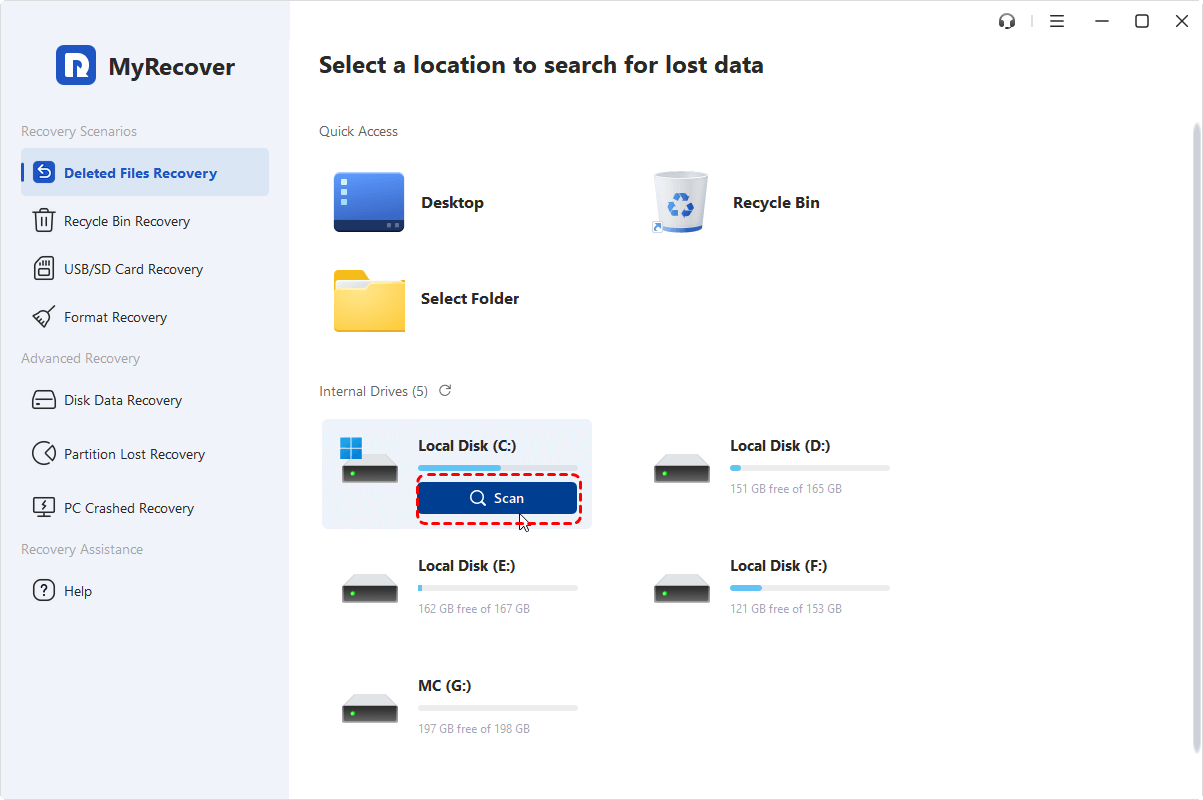
2. Run MyRecover, tap Deleted Files Recovery, choose the drive you need to recover files, and hit Scan.
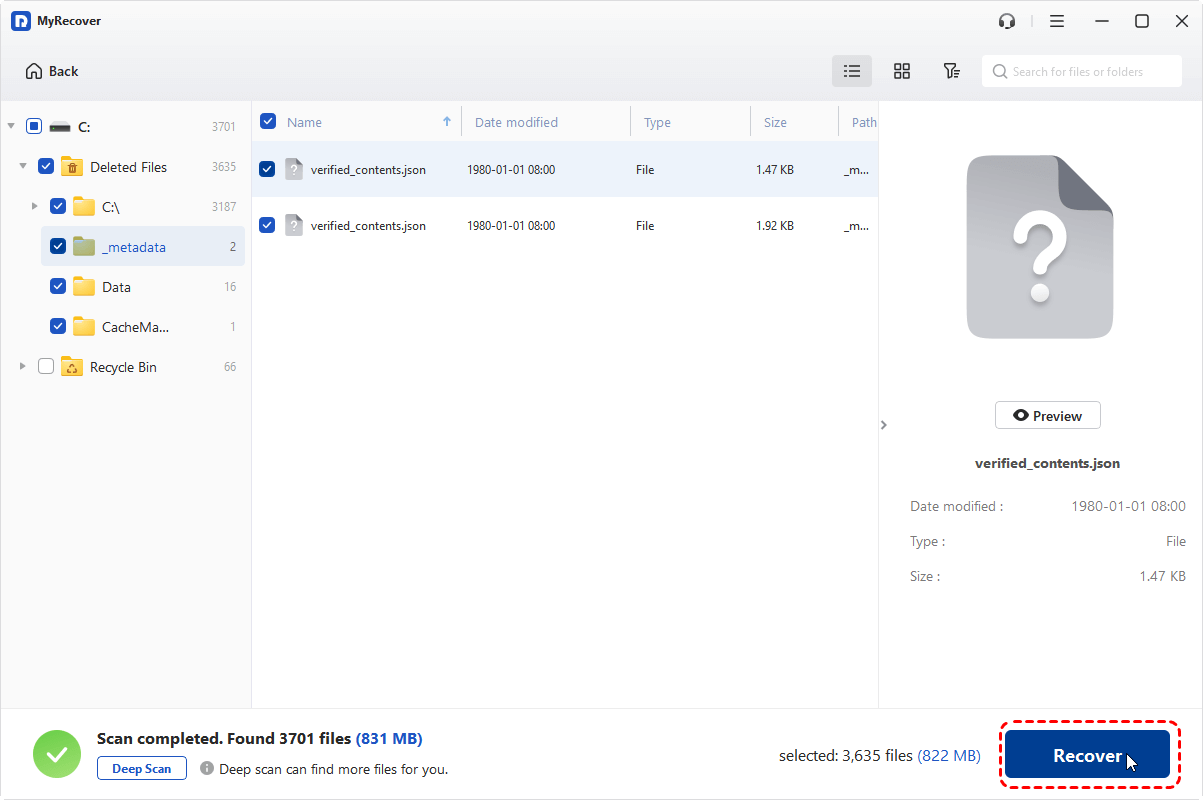
3. Hit OK when the scanning is finished.
4. Choose the files you need, and hit Recover.
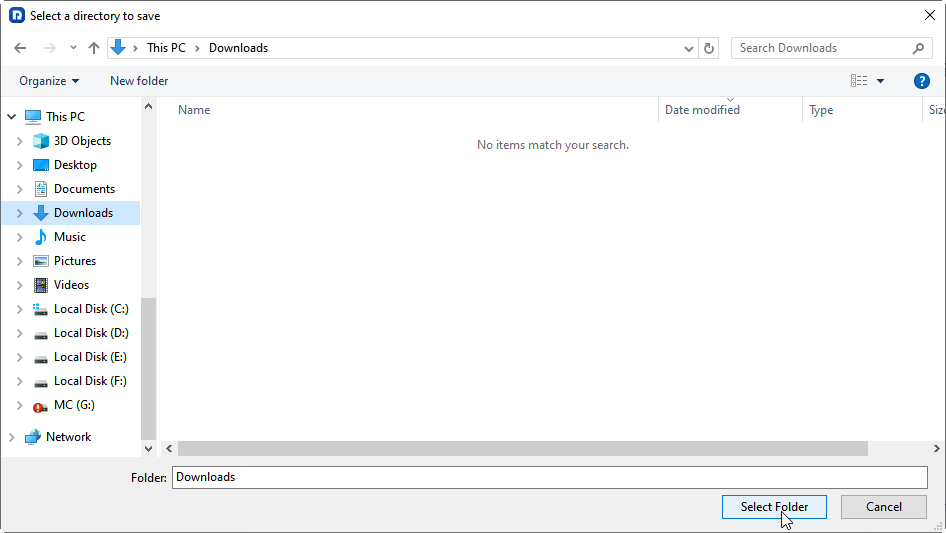
5. Select a location to keep them safe.
- Tips:✎...
- MyRecover free version only allows you to recover files up to 500MB. If you need to recover more, please upgrade to enjoy.
- It lists files by file type by default. You can also use file path, file name, and file size to find files quickly.
- You can recover files from unlimited computers with MyRecover Technician.
 MyRecover
- Recover Deleted Files Easily with Simple Clicks
- 1000+ File Formats Supported
- Support HDD, SSD, External Hard Drive, USB Drive, SD Card, etc.
- Quickly Find Files Using File Types, Name, Size, etc.
 100% Secure
FAQs about Free Undelete Software
Can free undelete software recover files from a formatted hard drive?
Often yes, especially after a quick format, using a “Deep Scan” or “Format Recovery” mode. Success drops if the drive was fully formatted or overwritten with new data.
How long does it take to recover files using free undelete software?
A Quick Scan takes minutes. A Deep Scan—required for formatted drives or older deletions—can take several hours, especially on large drives. Saving recovered files is usually faster.
Is it safe to use free undelete software from download portals?
Be cautious. Portals sometimes bundle unwanted software. Download directly from the developer’s official website to avoid security risks.
What are the main differences between free and paid undelete software?
Free versions are often sufficient for basic recovery. Paid versions typically offer larger recovery limits, advanced features (RAID, failing drive support), and priority support.
Can I recover files deleted a year ago with free undelete software?
It’s possible only if the data hasn’t been overwritten—unlikely on an actively used system drive. Chances improve on rarely used drives or partitions.

Stay Updated With Our
Latest Tips
Add us as a preferred source on Google to never miss helpful guides.
 Add as preferred source >>