Recover Files After Emptying Recycle Bin Easily

  • Built as free deleted file recovery software, MyRecover makes lost files easier to find with a dedicated Recycle Bin recovery mode.
  • Works with HDDs, SSDs, USB drives, SD cards, and 500+ storage devices.
  • Recover documents, photos, videos, archives, and 1000+ types after accidental Recycle Bin emptying.
  • Fast scan plus deep scan helps find files deleted from the Recycle Bin or lost permanently.

Built for Recovering Files After Emptying Recycle Bin

Dedicated Recycle Bin Recovery

Designed with support for emptied Recycle Bin recovery, making it easier to target and recover deleted files from recycle bin after empty.

Fast Scanning to Locate Lost Files

Quickly scans your drive for deleted data so you can locate missing files faster after accidental permanent deletion.

Preview Before Restoring

Preview recoverable files before recovery to help identify the right documents, photos, videos, and other items with more confidence.

Supports 1000+ File Types

Recover a wide range of file types, including documents, images, videos, archives, emails, and more.

How to Recover Files after Deleting from Recycle Bin

  • Step 1

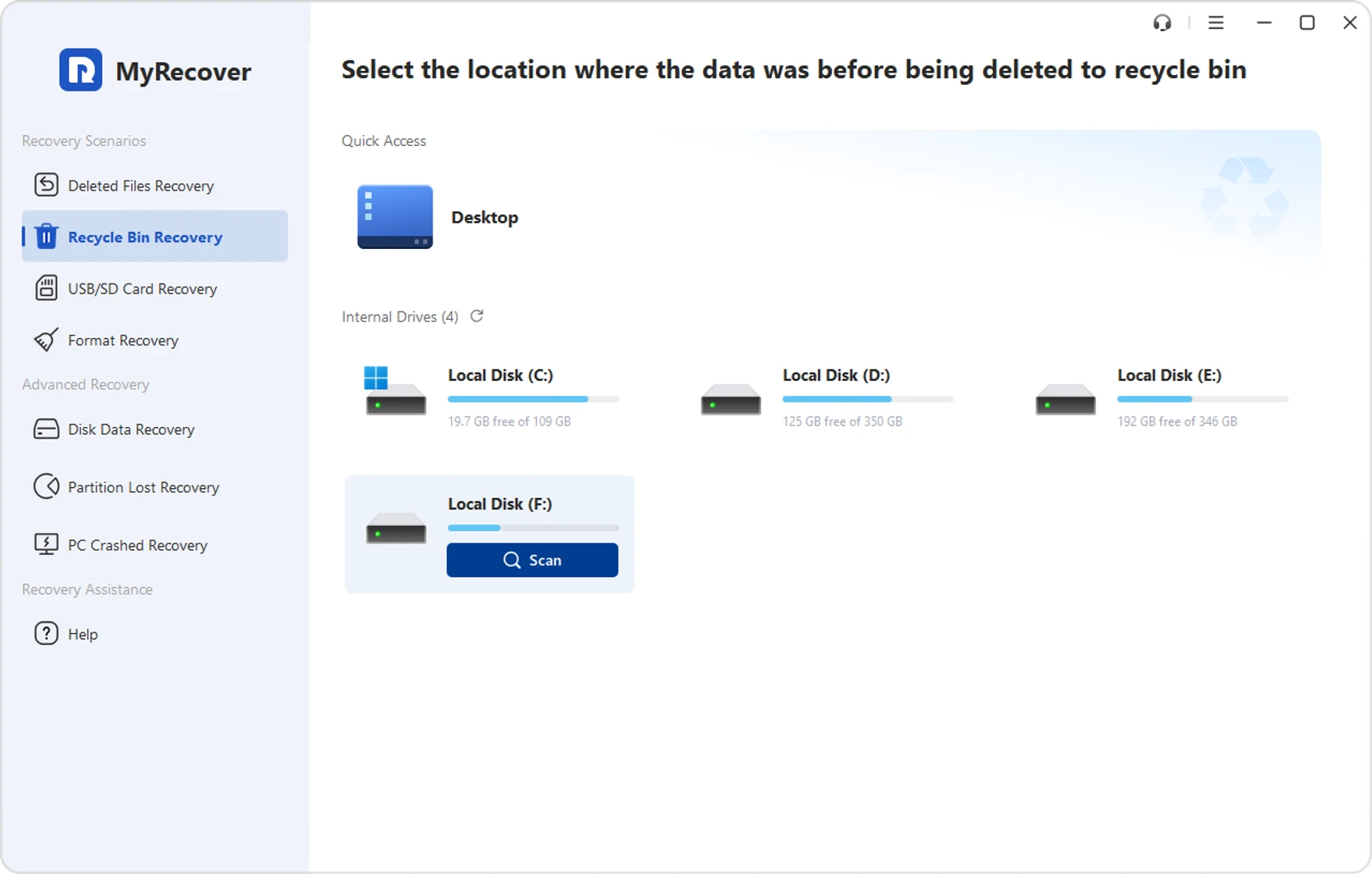
    Select the Drive

    Launch MyRecover, choose Recycle Bin Recovery, select the drive where the deleted files were originally stored, and click Scan.

  • Step 2

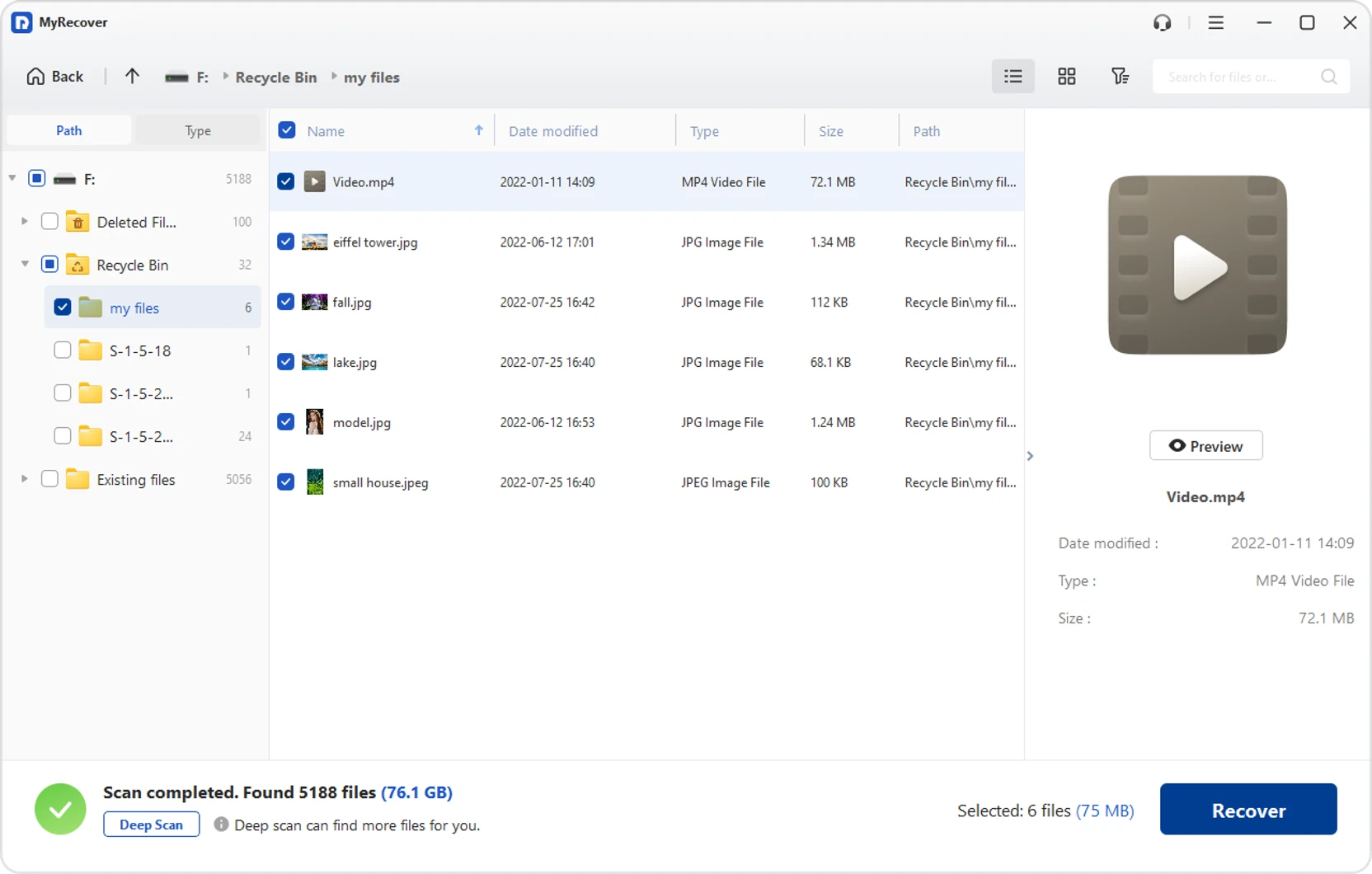
    Scan and Preview

    Once the Quick Scan is complete, browse recoverable files by type, search for them by name, or preview specific items before recovery. If you can’t find the lost file, try Deep Scan.

  • Step 3

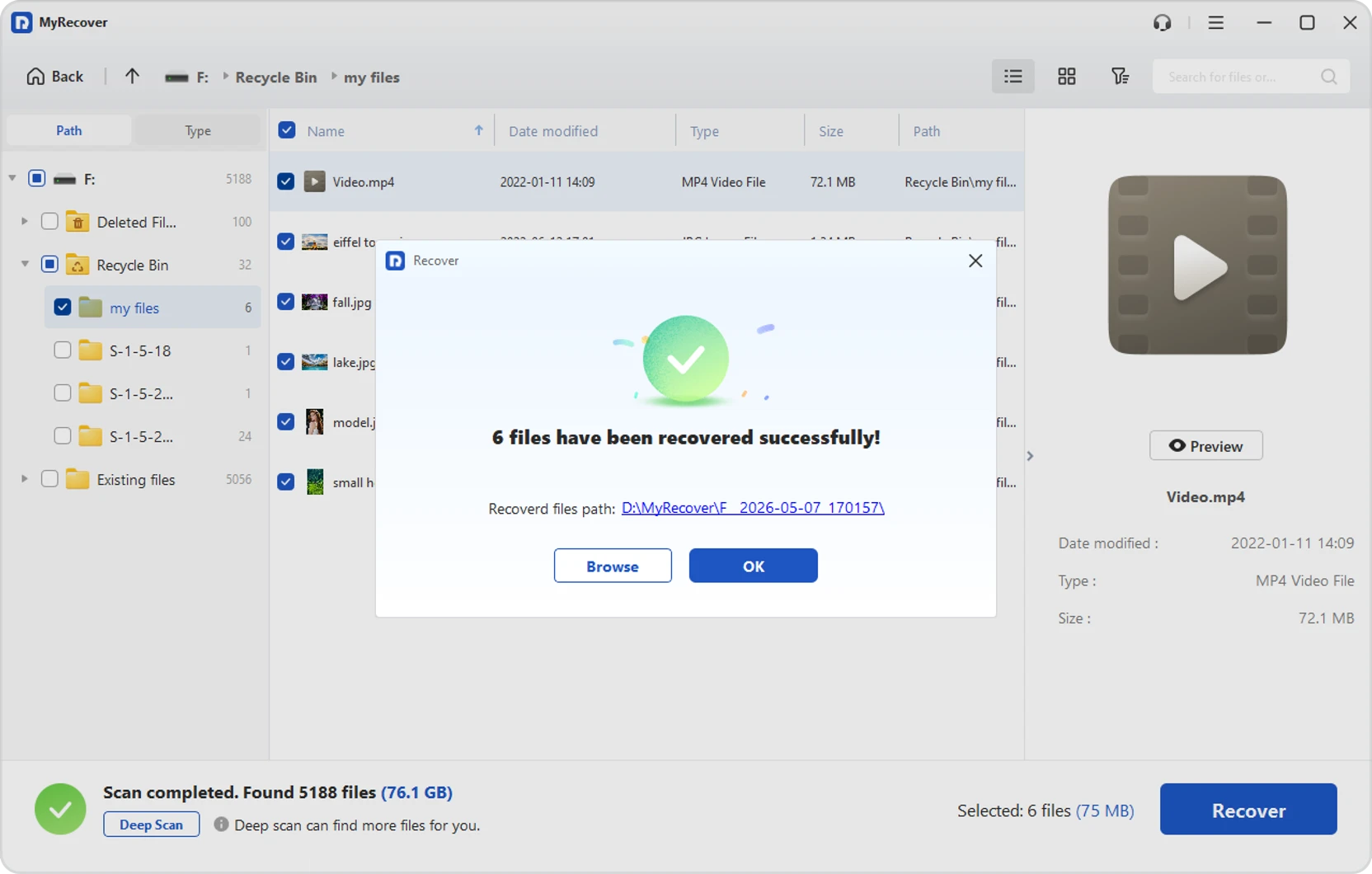
    Recover to a Different Location

    Select the files you want and save them to another drive or folder to avoid overwriting lost data.

Accidentally Emptied the Recycle Bin

Recover recycle bin after emptying quickly and easily on Windows.

  • Recover deleted documents, photos, videos, and more.
  • Restore permanently deleted files with ease.
  • Get lost files back with simple Windows recovery.

Deleted Work Documents by Mistake

Recover deleted work files before they disrupt your tasks or deadlines.

  • Restore Word, Excel, PowerPoint, PDF, and more.
  • Recover permanently deleted office documents fast.
  • Find lost work files with an easy recovery process.

Lost Precious Photos or Videos

Recover lost files deleted by mistake during PC cleanup.

  • Restore files removed with unwanted data.
  • Recover deleted documents, photos, videos, and more.
  • Use quick Windows file recovery to get data back.

MyRecover, Deleted File Recovery Specialist

Discover More MyRecover Features

Formatted Drive Recovery

Retrieve files from formatted partitions and drives.

Partition Recovery

Recover deleted or lost partitions on HDD, SSD, and external drives.

1000+ File Types Supported

Recover documents, photos, videos, emails, archives, and more.

500+ Device Support

Work with HDDs, SSDs, USB drives, memory cards, and more.

Preview Before Recovery

Check recoverable files before restoring them.

Beginner-Friendly Interface

Designed for easy use without technical skills.

Frequently Asked Questions

How to recover files after emptying the recycle bin?

Use a data recovery tool like MyRecover to scan the original drive, find deleted files, preview them, and recover them safely even after the Recycle Bin has been emptied.

Can I recover permanently deleted files without backup?

In many cases, yes. MyRecover can scan your drive and recover permanently deleted files without backup.

Is there any professional data recovery service for emptied Recycle Bin files?

Yes. MyRecover is a professional data recovery solution for recovering files deleted from an emptied Recycle Bin.

How to recover permanently deleted photos after emptying the recycle bin?

To recover permanently deleted photos, use MyRecover to scan, preview, and restore the files you need.

What is the best software to recover emptied recycle bin files?

MyRecover is professional recovery software for emptied Recycle Bin files and other permanently deleted data.

Why are emptied Recycle Bin files sometimes still recoverable?

Because emptying the Recycle Bin usually removes file references, not the actual data right away. The files may still be recoverable until they are overwritten.

What should I do right after emptying the Recycle Bin by mistake?

Stop using the drive immediately and avoid saving new data to it, as this may overwrite the deleted files.

How long do I have to recover files after emptying the Recycle Bin?

There is no fixed time limit. Recovery is possible until the deleted data is overwritten.

Deleted File Recovery Specialist