 MyRecover



Proven Guide: How to Recover CCTV Hard Disk Data Successfully
This guide explains how to recover CCTV hard disk data. We cover professional cctv hard disk data recovery methods, using specialized software to restore deleted footage and fix a DVR hard disk that is not detected in your PC. Get your evidence back.

By Delores / Updated on December 1, 2025


Is It Possible to Recover Deleted CCTV Footage?
Data recovery from the CCTV hard disk
I unplugged my CCTV hard disk from the DVR and inserted it into the computer to copy some files, but unfortunately, the disk got corrupted, and now we are in big trouble. We need those files, but the drive is blank. Some of the technicians told me that the drive has been formatted. I am trying Rescue to recover my files, but it stops intermittently. Can you please help get those important files from the corrupted hard disk? It detects the files, but it doesn't show the list. All blank...
thank u
- Question from community.ccleaner.com
Whether you're a homeowner or a business manager, losing surveillance footage can feel like a security breach in itself. Don't worry, this guide will walk you through the entire process, from understanding why drives fail to a step-by-step walkthrough using powerful software, demystifying how to recover CCTV hard drive content effectively.
Why Does Your CCTV Footage Get Lost?
A CCTV hard drive isn't your average computer hard disk. It’s a workhorse, constantly writing and overwriting data 24/7, which puts it under immense, relentless strain. This constant operation makes it more susceptible to failure than a standard drive.
So, what causes a CCTV hard drive to fail prematurely? Several culprits are typically to blame.
⭕ Power surges are another silent killer—a sudden spike in electricity, perhaps from a storm or faulty wiring, can fry the drive's delicate circuitry in an instant.
⭕ Manufacturing defects, the hidden time bombs that can cause a drive to fail prematurely. Logical issues are just as common.
⭕ The file system can become corrupted if the system is unplugged improperly during a write operation, leading to a major headache when you try to recover CCTV hard drive data. You may encounter error messages such as "Disk Not Formatted" or "File System Unrecognized."
⭕ Physical Damage to the DVR or NVR Hard Drive. If you hear a recurring clicking, grinding, or whirring sound from your DVR/NVR unit, that’s the death rattle of a mechanically failing drive. It’s the sound of the read/write head struggling to find its position.
Before Recovering CCTV Hard Disk Data
Now, the single most important rule is to stop all operations immediately. The more you tinker with a failing drive, the higher the risk of permanently overwriting your data.
Run through this checklist before CCTV hard disk data recovery.
✔️ Second, if you are technically inclined, you can carefully remove the hard drive and connect it to a desktop computer as a secondary drive. Handle it with extreme care, avoiding static electricity and physical shocks.
✔️ Third, ensure the computer you use for recovery has a stable power supply and ample free space to save the recovered files.
✔️ A reliable NVR data recovery software. You need software specifically designed to handle the proprietary file formats used by CCTV systems from brands like Hikvision, Dahua, and others.
Now, let's get into the details of using specialized software to scan for and reclaim your lost footage.
How to Recover CCTV Hard Disk Data?
In fact, a CCTV hard disk can be detected in a Windows computer, but it often cannot be read directly because it uses a proprietary file system incompatible with Windows.
To access the footage, you will need to connect the hard drive to the original CCTV DVR/NVR and use the system's software to export the video files in a standard format, such as MP4.
Here is how to access CCTV footage easily:
- Reinstall the Hard Drive: Place the hard drive back into its original DVR/NVR unit.
- Connect to a Computer: Link the DVR/NVR to your Windows PC.
- Use the Official Software: Install and run the CCTV system's software (like SmartPSS Lite, SmartPSS, or SCI View) on your computer to access the footage.
- Export the Recordings: Use the software to save the video clips in a universal format like MP4 for easy viewing.
Best Data Recovery Software - MyRecover
You can go to your computer to find your backup to recover CCTV video files if you have backed up all your CCTV video files on your computer. Alternatively, you can use professional data recovery software such as MyRecover to recover CCTV video files if you have lost your backup.
Enjoy the following features of MyRecover:
- It’s a specialized NVR data recovery software that is engineered to understand the complex, chunk-based video files from surveillance systems.
- It scans the drive sectors directly to reassemble video clips that other programs would miss entirely.
- It supports a wide range of CCTV brands and file formats (e.g., .264, .dav, .mp4).
- Preview before recovery. Any reputable company will let you see what can be recovered before you pay a dime.
Here is how to recover CCTV hard disk data easily with MyRecover:
1. Please install MyRecover on your computer instead of the drive you’re recovering files from. Launch MyRecover now.
 100% Secure
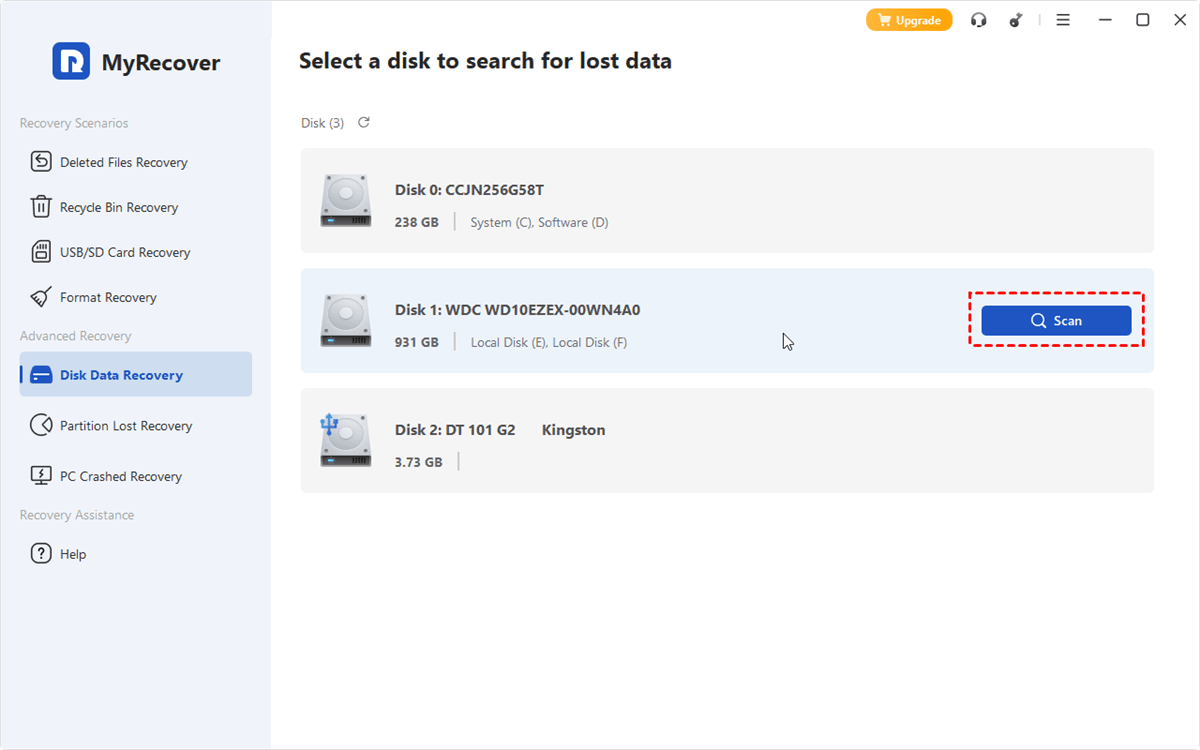
2. Tap Disk Data Recovery, choose the drive where your CCTV footage was stored, and hit Scan.
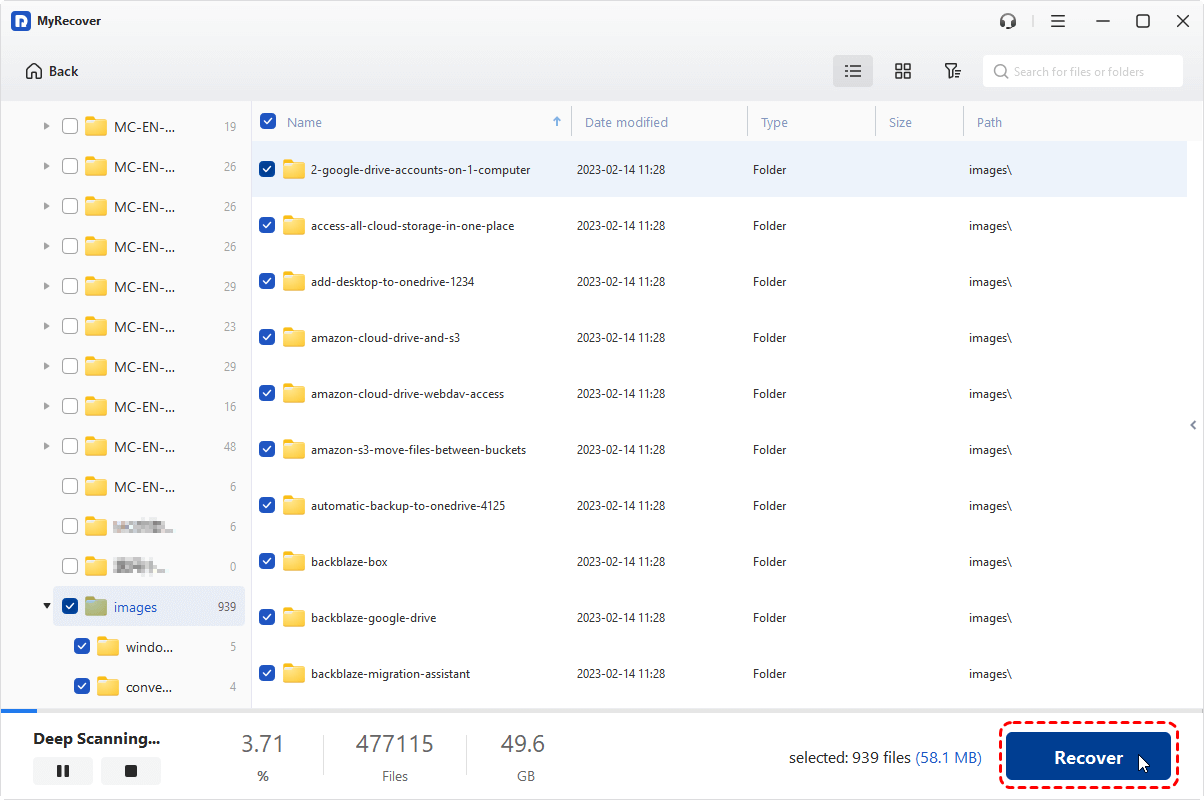
3. Wait for it to complete, and hit OK to confirm.
4. Preview and choose the CCTV footage, like MP4 files, and hit Recover.
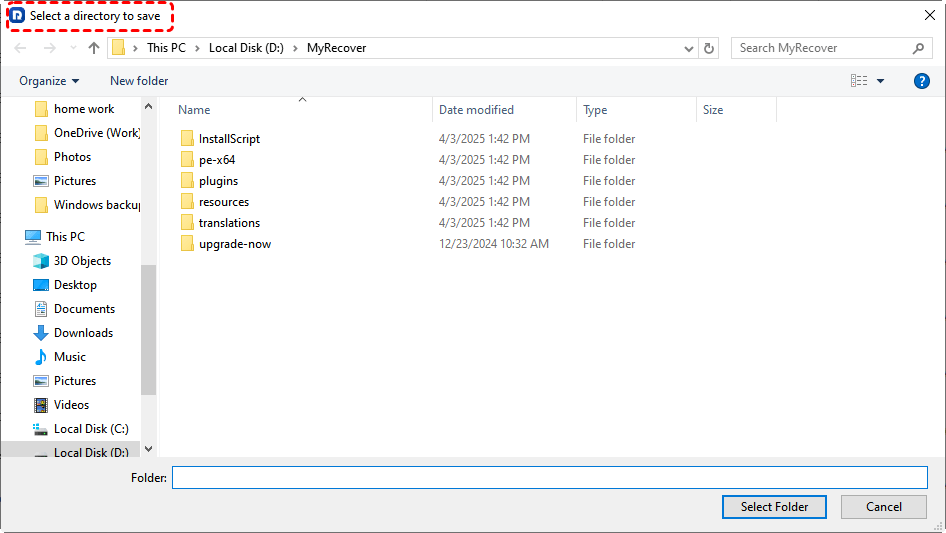
5. Select a safe location to save these recovered files.
- Tips:✎...
- If you need to recover unlimited files, just try and enjoy.
- MyRecover organizes files by file type, allowing you to find your files quickly. Besides, you can search them by file name, file size, and file path.
- You can also recover files from unlimited computers with MyRecover Technician; you can upgrade to enjoy.

 MyRecover
 - Recover Deleted Files Easily with Simple Clicks
- 1000+ File Formats Supported
- Support HDD, SSD, External Hard Drive, USB Drive, SD Card, etc.
- Quickly Find Files Using File Types, Name, Size, etc.
- Preview Files Before Recovering
- Recover Unlimited Data
 100% Secure
Fixed: DVR Hard Disk Not Detected in PC
It's frustrating when you encounter a "Disk not detected" error while trying to figure out how to recover CCTV hard disk data. Your PC powers on, but the CCTV drive did not show up in Disk Management at all. Generally, it's often a solvable problem.
Why Your CCTV Hard Drive is Not Showing Up
- It could be a simple connection issue—a loose SATA cable or a faulty power supply from your computer's PSU.
- Sometimes, the drive's PCB (printed circuit board) has been damaged by a power surge.
- In other cases, the drive's firmware has become corrupted, preventing it from initializing properly and establishing a connection with your computer.
Methods to Fix Connection and Detection Issues
- Try a different SATA cable and a different power connector from your PC's power supply.
- Test the drive in another computer if possible.
- If it's still not detected, listen closely. If the drive is spinning up without unusual noises, the problem might be logical or firmware-related, which is a good sign.
- However, if it's not spinning or making clicking sounds, the issue is physical. For physical issues, your best bet for a successful CCTV hard disk data recovery is to consult a professional service immediately to avoid causing further damage.
FAQs About Recovering CCTV Footage
Q: Can I recover overwritten CCTV footage?
A: No. Once new data overwrites the old, the original footage is permanently destroyed.
Q: My DVR hard disk is not detected in my PC. What are my first steps?
A: First, check all physical connections and try a different SATA port or computer. If it's still not detected, the drive itself is likely faulty.
Q: How long does the typical CCTV data recovery process take?
A: It varies. A simple recovery can take hours, while a deep scan of a failing drive can take days. Professional recovery in a lab can take one to two weeks.
Q: Why can't I just use standard data recovery software for my CCTV hard drive?
A: CCTV systems use a unique, fragmented format. Standard software can't reconstruct these video files properly, so specialized tools are required.
The End
Until now, you may have gotten your CCTV data back. Besides, you can recover files from a formatted SSD, a corrupted SD card, an uninitialized disk, etc, with MyRecover. But most importantly, back up important files before they’re gone! Or you have to spend much more time recovering files.

Stay Updated With Our
Latest Tips
Add us as a preferred source on Google to never miss helpful guides.
 Add as preferred source >>