 MyRecover



How to Recover Deleted CCTV Footage: 3 Proven Methods
Wondering how to recover deleted footage from CCTV systems? This guide explains practical recovery methods for DVR, NVR, and hard drives, including backups, recovery software, and professional techniques to restore lost surveillance recordings safely and efficiently.

By Vera / Updated on May 7, 2026


Introduction
CCTV (Closed-Circuit Television) systems are the backbone of modern security architecture. Whether protecting a home, monitoring a retail storefront, or securing a corporate office, these systems provide a continuous "digital eye" that records events crucial for evidence and peace of mind.
However, the "missing footage" nightmare is a common challenge for security managers and homeowners alike. Whether it's a critical incident that was accidentally deleted or a system that automatically overwrote a recording you now realize you need, the loss feels permanent. If you are currently panicking and wondering, how to recover lost CCTV footage effectively, you are in the right place.
In this guide, we will explore three professional-grade methods to recover deleted CCTV footage, ranging from simple backup restoration to advanced data recovery software and professional hardware services.
Common Causes of CCTV Footage Deletion
Several factors may lead to the loss of CCTV recordings. Understanding these causes helps determine the most appropriate recovery method.
- ⭕Automatic Overwriting (Loop Recording): Most DVR/NVR systems use a FIFO (First-In, First-Out) logic. When the hard drive is full, the system automatically writes new data over the oldest footage.
- ⭕Human Error: Accidental deletion during routine maintenance or while trying to export a specific clip is the most frequent cause of data loss.
- ⭕Intentional Tampering: In cases of theft or break-ins, intruders may attempt to delete recordings or format the drive to hide their tracks.
- ⭕File System Corruption: Power surges or improper shutdowns can corrupt the storage device's file system, making recordings "disappear" from the playback menu.
- ⭕Storage Hardware Failure: Hard drives used in CCTV systems run 24/7, making them prone to mechanical wear and "bad sectors" that lead to data loss.
Is It Possible to Recover Deleted CCTV Footage?
Many users reach out to forums asking, "Can you retrieve deleted CCTV footage if it was deleted by the system?"
Restore deleted videos from CCTV.
Either prove the truth, or the authority will win, Is these is a way to restore deleted videos from CCTV? It got deleted automatically, if i an get the deleted videos even for 5 days, tech me, Now I need your expertise the most. I hope you can help me defeat the authorities and show the truth, thanks for reading.
- Question from Reddit
The short answer: Yes. Because of how digital storage works, the data often remains on the drive until it is physically replaced by new information. The success of recovery hinges on the "Overwriting Factor." When a file is deleted, the operating system simply marks that space as "available." Until the camera records new footage onto that exact physical sector of the hard drive, the original video is still there.
In a word, success depends on several factors:
- Whether the footage has been overwritten
- The condition of the storage device
- The time elapsed since deletion
- The recovery method used
3 Professional Ways: How to Recover Deleted CCTV Footage
There are 3 feasible ways to recover deleted CCTV footage.
| Feature | Method 1: Backup | Method 2: MyRecover | Method 3: Pro Service |
|---|---|---|---|
| Success Rate | 100% (If configured) | High (For logical loss) | Highest (For physical damage) |
| Cost | Free / Subscription | Affordable / User-friendly | Expensive ($300 - $2,000+) |
| Time Required | Minutes | 1-2 Hours | 1-2 Weeks |
| Best For | Proactive users | Accidental deletion/Formatting | Broken/Clicking Hard Drives |
Method 1: Restore CCTV Footage from Backup (The Proactive Approach)
This method is based on the principle of Redundancy. Many modern surveillance systems are configured to sync data to a secondary location. This is the most reliable recovery method because it doesn't involve "mining" for lost data; rather, it involves retrieving a mirrored copy of the original file. This is the ideal first step if you have a Cloud-enabled system or a secondary Network Attached Storage (NAS).
👉Applicable Scenarios:
- Accidental local deletion where a cloud sync exists.
- Physical damage to the primary DVR/NVR.
- Systems set up with "Dual Stream" recording.
Step 1: Identify Available Backup Sources
Determine if your system was linked to a Cloud service (like Nest Aware, Arlo Secure, or Hik-Connect) or an external backup server.
Step 2: Access the Backup Storage
Log in to the cloud platform or connect the external backup device to a computer. Navigate to the directory where recordings are stored.
Step 3: Search for the Required Footage
Use the search function to input the specific date and time of the incident. Unlike local hard drives, cloud backups often have different retention policies.
Step 4: Download & Verify
Select the required clips and download them to a secure, external device. Always verify the video plays correctly before concluding the task.
Method 2: Use MyRecover Software (The Most Effective Local Recovery)
When no backup is available, you may feel at a loss on how to recover lost cctv footage from a drive that appears empty. This is where Logical Recovery comes in. When a DVR "deletes" a file, it only removes the "pointer" to that file. MyRecover acts as a deep-scanning tool that bypasses the DVR’s restricted interface to communicate directly with the storage media's sectors. It scans for the underlying video headers and fragments to reconstruct the footage.
Why MyRecover is Tailored for CCTV Recovery:
CCTV footage is unique—it often consists of massive files (MP4, AVI, or proprietary formats like H.264/H.265) that are highly prone to fragmentation. MyRecover is specifically optimized for:

 MyRecover
- 💙Deep Scanning Large Video Files: Its advanced algorithms can piece together video fragments that other software might miss.
- 💙Support for Diverse File Systems: Whether your DVR uses FAT32, NTFS, or exFAT, MyRecover can navigate the structure.
- 💙High-Speed Retrieval: Surveillance drives are often multi-terabyte; MyRecover’s optimized scanning engine saves hours compared to standard tools.
- 💙Preview Capability: You can filter by "Type" (Video) and preview files to ensure you are recovering the correct event before committing to the process.
 100% Secure
These features allow users to locate and recover hidden surveillance files that may not be accessible through the CCTV system itself.
Step 1: Install the Recovery Software
Download and install MyRecover on a computer that is separate from the CCTV storage device.
Step 2: Connect the CCTV Storage Device
Connect the DVR hard drive, SD card, or other storage device to the computer.
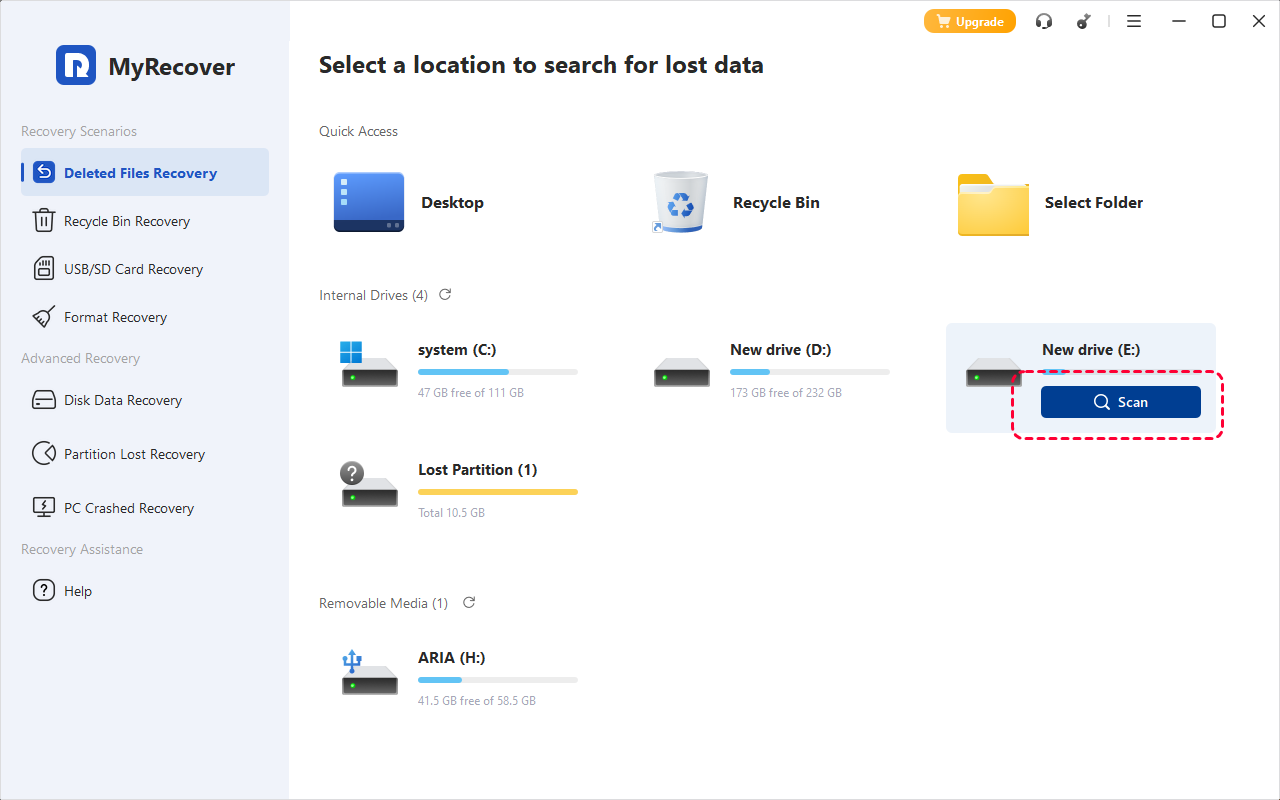
Step 3: Launch the Software and Select the Storage Device
Open MyRecover and select the connected drive containing the deleted CCTV footage.
Step 4: Initiate a Quick Scan
Start the scanning process to allow the software to locate recoverable files.
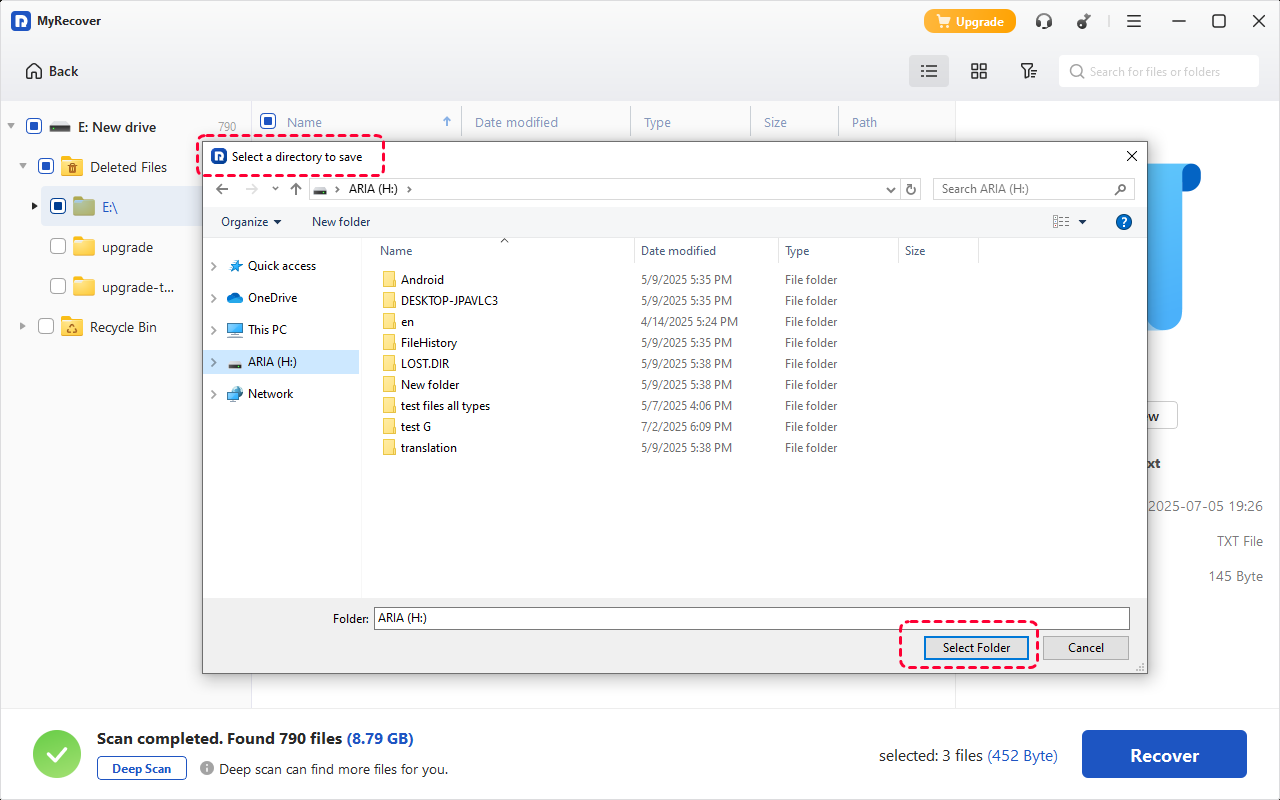
Step 5: Review Scan Results
Once scanning is completed, review the list of recoverable video files. MyRecover allows file previews before restoration.
Step 6: Recover the Selected Files
Select the required footage and restore it to a different storage location to avoid overwriting existing data.
Method 3: Use Professional Data Recovery Services (The Hardware Solution)
While software like MyRecover is the best solution for deleted or formatted files, some situations involve Physical Intervention. If a hard drive has a mechanical failure (broken read/write heads or a seized motor), software cannot communicate with the data. Professional services use "Cleanroom" environments to manually disassemble the drive and read the magnetic platters.
Situations That Require Professional Recovery
Professional assistance is recommended when:
- The hard drive is not detected by any computer.
- The drive produces clicking or unusual noises.
- The storage device is physically damaged.
- Previous recovery attempts were unsuccessful.
Professional recovery laboratories use specialized equipment and controlled environments to retrieve data from damaged storage devices. Process:
1. Consultation: Ship your drive to a certified lab for evaluation.
2. Physical Repair: Engineers replace damaged components in a dust-free environment.
3. Bit-by-Bit Imaging: They create a clone of your drive to extract data without further damaging the original hardware.
4. Delivery: You receive your recovered footage on a new, encrypted external drive.
❗Cost Considerations
The cost of professional recovery varies depending on the severity of the damage. Prices typically range from several hundred to several thousand dollars.
However, when the footage contains critical evidence or legal information, professional recovery may be the most reliable solution.
Conclusion
Deleted CCTV footage does not always mean permanent loss. In many situations, recordings can be recovered using the correct methods and tools.
The 3 primary recovery approaches include restoring from backup, using professional recovery software such as MyRecover, and contacting specialized data recovery services when physical damage occurs.
The most important factor in successful recovery is acting quickly. Once footage is deleted, any new recordings may overwrite the existing data. By stopping system use and applying appropriate recovery techniques, you can significantly improve the chances of retrieving valuable surveillance recordings.
Frequently Asked Questions (FAQ)
1. How long does CCTV footage stay on a hard drive?
Retention periods depend on the hard drive capacity, camera count, and resolution. Most systems are set for 14 to 30 days. After this, the system begins overwriting the oldest data.
2. Can I use MyRecover to retrieve footage from a formatted DVR hard drive?
Yes. MyRecover is highly effective at recovering data from formatted partitions. As long as you haven't written a large amount of new video over the formatted drive, MyRecover can often reconstruct the previous file directory and retrieve the "lost" videos.
3. Why is my recovered video file corrupted or unplayable?
This usually happens when part of the video file was already partially overwritten. However, MyRecover attempts to minimize this by identifying the most intact file headers. If a file is unplayable, you might need a specialized video repair tool to fix the metadata.
4. Is there a way to recover CCTV footage if the DVR was stolen?
If the physical hardware is gone, local recovery software cannot help. Your only option is if Method 1 (Cloud Backup) was enabled. Brands like Ring, Nest, or Arlo store data on their servers, which can be accessed even if the camera or DVR is stolen.
5. Does MyRecover support proprietary CCTV video formats?
Yes. While many systems use MP4 or AVI, some use proprietary H.264/H.265 streams. MyRecover’s Deep Scan is designed to recognize these raw video streams based on their unique binary signatures, making it a robust choice for surveillance recovery.
6. Can I recover CCTV footage that has been overwritten?
Generally, no. Once new data is physically written over the old video sectors on a hard drive or SD card, the original information is gone. While some high-end forensic labs claim they can sometimes salvage "residual fragments" of overwritten data, this is extremely expensive and rarely successful for playable video. This is why it is critical to turn off the DVR immediately if you realize footage is missing.

Stay Updated With Our
Latest Tips
Add us as a preferred source on Google to never miss helpful guides.
 Add as preferred source >>