 MyRecover



How to Recover Norton Deleted Files in 4 Quick Ways
This article explains how to recover Norton deleted files using multiple proven methods. Learn to perform a successful norton file recovery by accessing the Virus History log, checking the Recycle Bin, and utilizing file recovery software to retrieve documents, photos, and more.

By Delores / Updated on February 12, 2026


Norton Deleted My Files, Please Help!
It's frustrating when your files get deleted after running Norton software, such as Norton Utilities Premium or Norton Cleaner. Is there any way to restore Norton deleted files?
This happens all the time, and it’s usually an easy fix. Norton normally quarantines files instead of deleting them. Follow this step-by-step guide, from the simplest solutions to more advanced methods, to get your files back safely.

Why Norton Deletes Your Files?
First, it’s important to understand that Norton is not intentionally targeting you. It is performing its core function—protecting your system—sometimes with excessive caution. Norton’s purpose is to defend against malicious software (malware). It scans files using an updated database of known threats and behavior analysis.
When it identifies a file that matches a threat or acts suspiciously, such as attempting unauthorized changes to your system, it takes action to neutralize the risk. Typically, this means the file is quarantined. Quarantine involves moving the file to a secure, isolated folder on your computer where it cannot operate or cause harm.
Certain files are more likely to be mistakenly quarantined. These include executable files (.exe, .msi) from independent developers, patches or activation tools for legal software, and automation scripts (.bat, .vbs). Documents with embedded macros or links (.doc, .pdf) and specialized helper files from development or business software can also trigger alerts.
These quarantines are typically the result of false positives—an unavoidable byproduct of security software that is designed to act with maximum caution. While it is frustrating when a trusted file is flagged, understanding that this stems from Norton's protective protocols—not from a permanent deletion—is key. The files in question are usually held intact in quarantine, which provides a direct path to restoration.
In the following sections, we will walk through the precise steps to safely review and recover these files, restoring both your access and your peace of mind.
4 Ways to Recover Norton Deleted Files on Windows 11/10?
Now, here are some proven solutions ca help you out of the trouble, check them now.
Way 1. Check the Norton Quarantine Folder Immediately
Norton’s quarantine isn’t a physical folder you can easily browse in File Explorer; it’s a secure vault managed by the software. To access it:
1. Open your main Norton Security window.
2. Tap "Security" > "History" or "Security History".
3. Choose Quarantined in the Show section, then choose your file, and tap Restore.
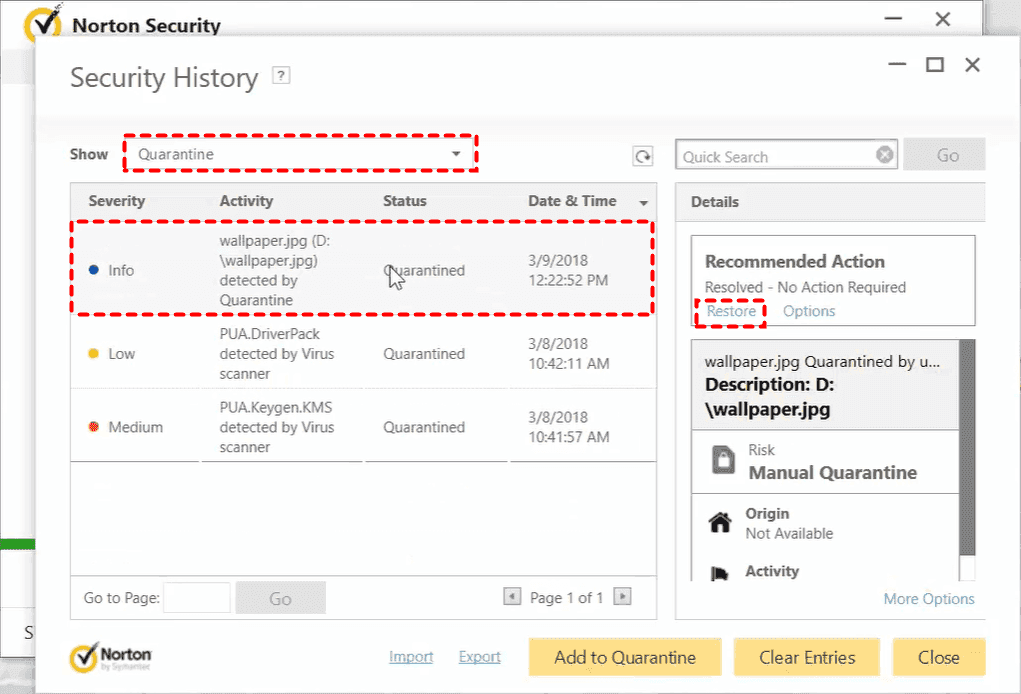
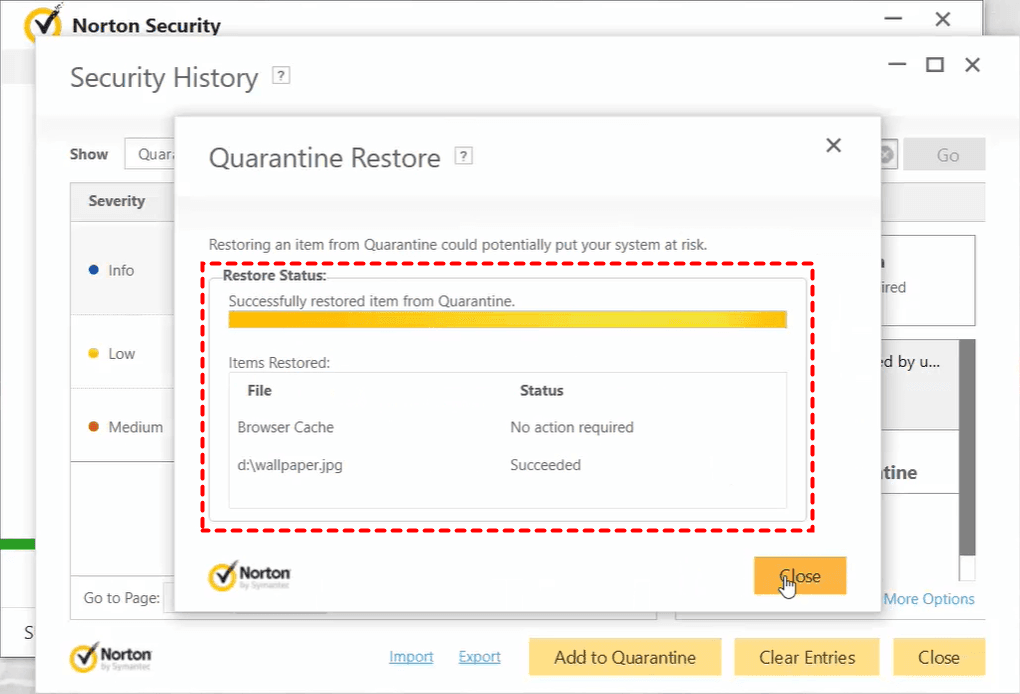
4. Tap Yes to start the restore, and wait for it to complete.
- Notes:✎...
- The restored Norton deleted files will be movedback to their original location.
- If the file was truly malicious, restoring it is not advised, but if you are 100% certain of its safety (e.g., it’s your own software), restoration is safe.
- Immediately try to open the filesto confirm their integrity.
For an even more thorough approach, you can navigate to "Settings" > "Antivirus" > "Scans and Risks" and find the "Items to Exclude from Scans" section. After restoring, you can add the file’s path here as a permanent exclusion.
For maximum safety, create a dedicated folder for your sensitive projects or trusted software (e.g., C:\Trusted). Place all your critical files there. Then, add this single folder path to Norton’s exclusion list. This is cleaner than scattering exclusions everywhere and easier to manage.
Way 2. Locate Norton Deleted Files in Windows Recycle Bin
Sometimes, Norton’s action is logged as "Deleted" rather than "Quarantined". In some cases, especially with older threats or if quarantine is full, the software may send the file to the Windows Recycle Bin. It’s always worth a quick double-check.
1. Open your Recycle Bin, sort by date, and look around the time you noticed the file was missing.
2. If it’s there, a simple right-click and "Restore" will put it back on your desktop or its original folder.
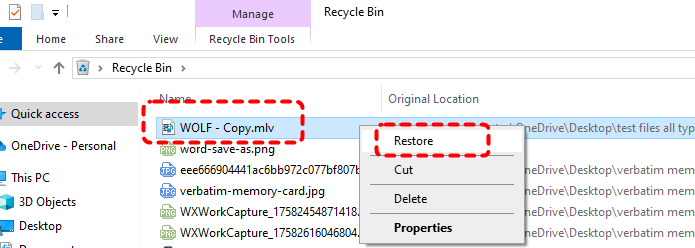
This is a less common but pleasantly simple solution when it happens.
Way 3. Restore from Norton Cloud Backup
1. Open your Norton device security product on your computer.
2. Click Security and then tap Cloud Backup (or just Backup in some versions).
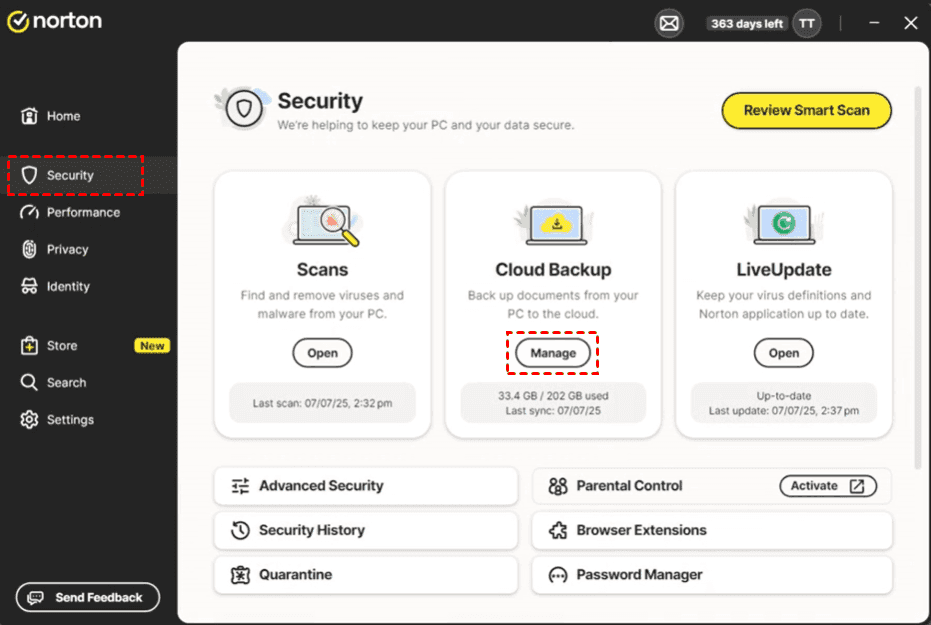
3. Click Restore Files or the icon next to your backup set.
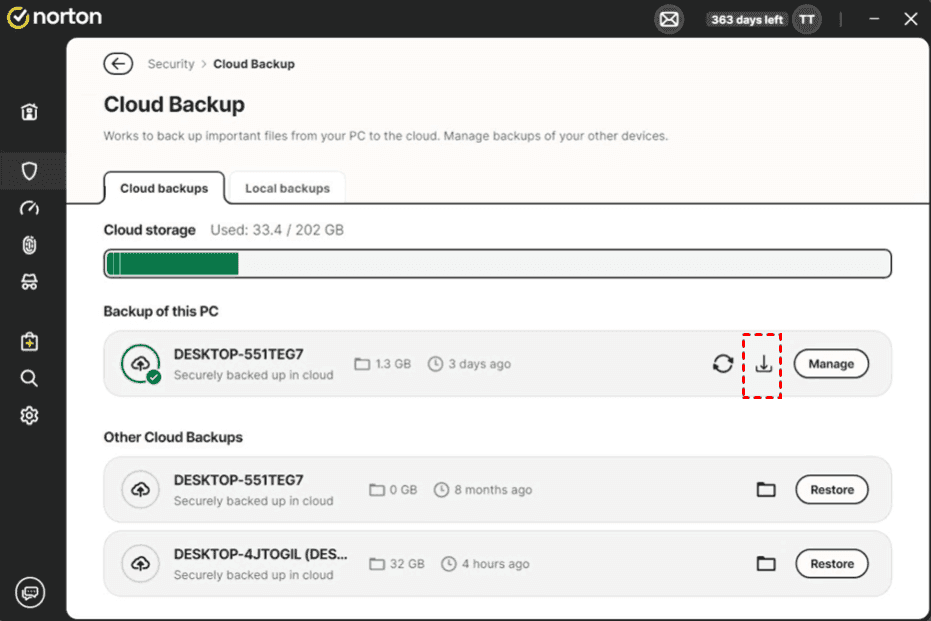
4. Select the files and folders you wish to restore, or choose to restore all files.
5. Select either Original Location (to put them back where they were) or Choose Location to select a new folder.
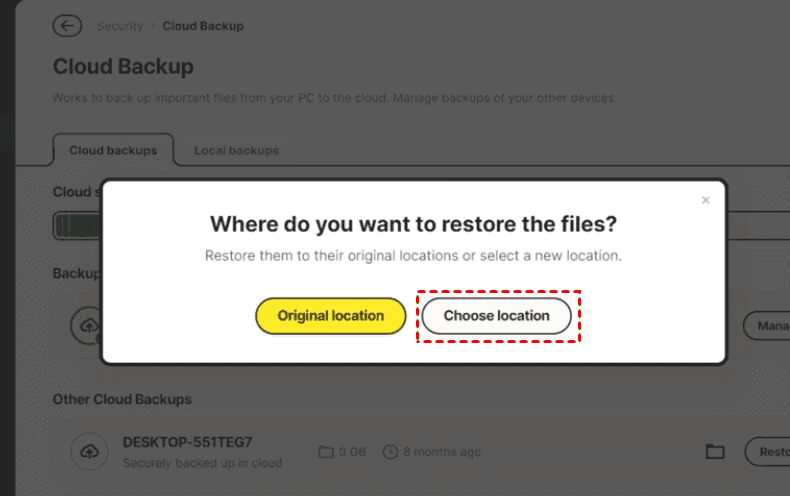
6. Click Restore and wait for the process to finish, then click Done.
Way 4. Restore from Previous Version
Restoring Norton deleted files from the previous version is another way if you have enabled File History or created a system restore point for your deleted files. Try this:
1. Please locate the folder where your deleted files were located before, right-click it, and choose Restore previous version.
2. You'll see a list of folders from specific dates and times. Select one from before the deletion, click "Open" to explore, and you can copy the missing file out of that historical snapshot and into your current folder to restore.
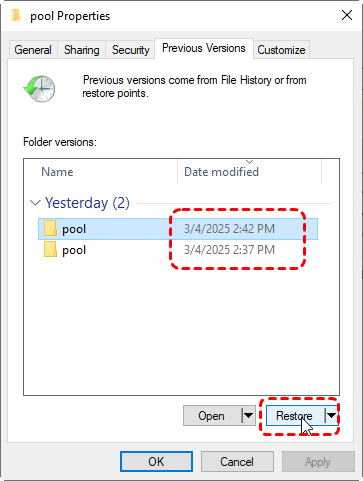
3. Or you can click Restore to recover Norton deleted files.
Recover Files Removed by Norton Cleaner on Mac
By default, Norton Cleanermoves junk files to your trash or bin folder but does not delete them. If you want to retrieve the files that are removed using Norton Cleaner, you need to retrieve them from the Trash or Bin folder manually.
You can't use the Put Back option to restore the files that are removed using Norton Cleaner. But you can try this:
1. On your dock, click the Trash or Bin icon.
2. In the Trash or Bin folder, select the files you need and then drag them out of the Trash or Bin folder to a safe location.
Fast Recover Norton Deleted Files via MyRecover
What if the file isn’t in quarantine or the Recycle Bin? If Norton performed a permanent deletion, or if you emptied the quarantineor Recycle Bin without realizing what was inside, the situation becomes more serious. The file data might still reside on your hard drive until it’s overwritten. That's why you can use a data recovery software, MyRecover, to recover Norton deleted fileseasily.
MyRecover performs a deep scan of your hard drive’s sectors, looking for file signatures and data patterns that haven’t yet been overwritten. It also provides a user-friendly interface and high recovery rates for common file types. Besides, you can preview photos before recovery, saving time.
Here is a detailed, step-by-step guide to perform Norton file recovery with MyRecover.
1. Download and install MyRecover on a safe driveinstead of the drive where you are recovering files from.
 100% Secure
2. Tap Deleted Files Recovery, choose the drive you need to recover, and hit Scan.
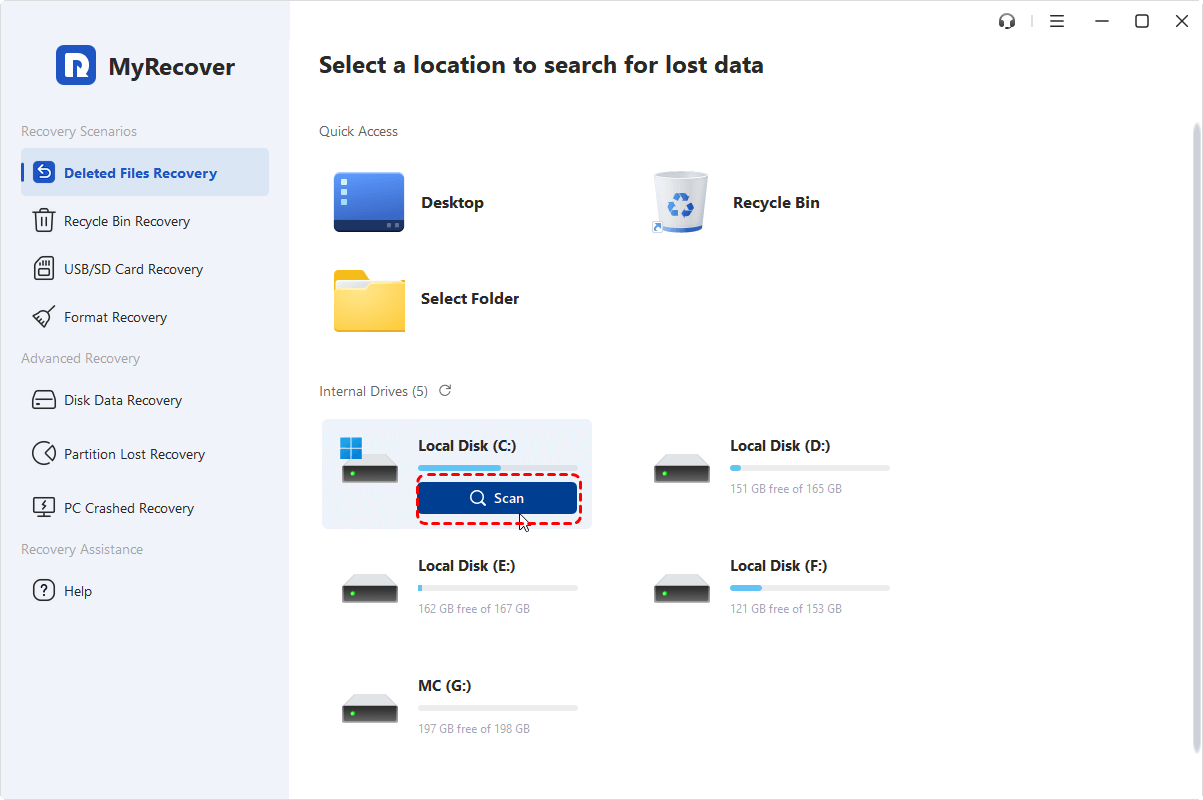
3. Hit OK when it’s done, and these files will be sorted by file type by default.
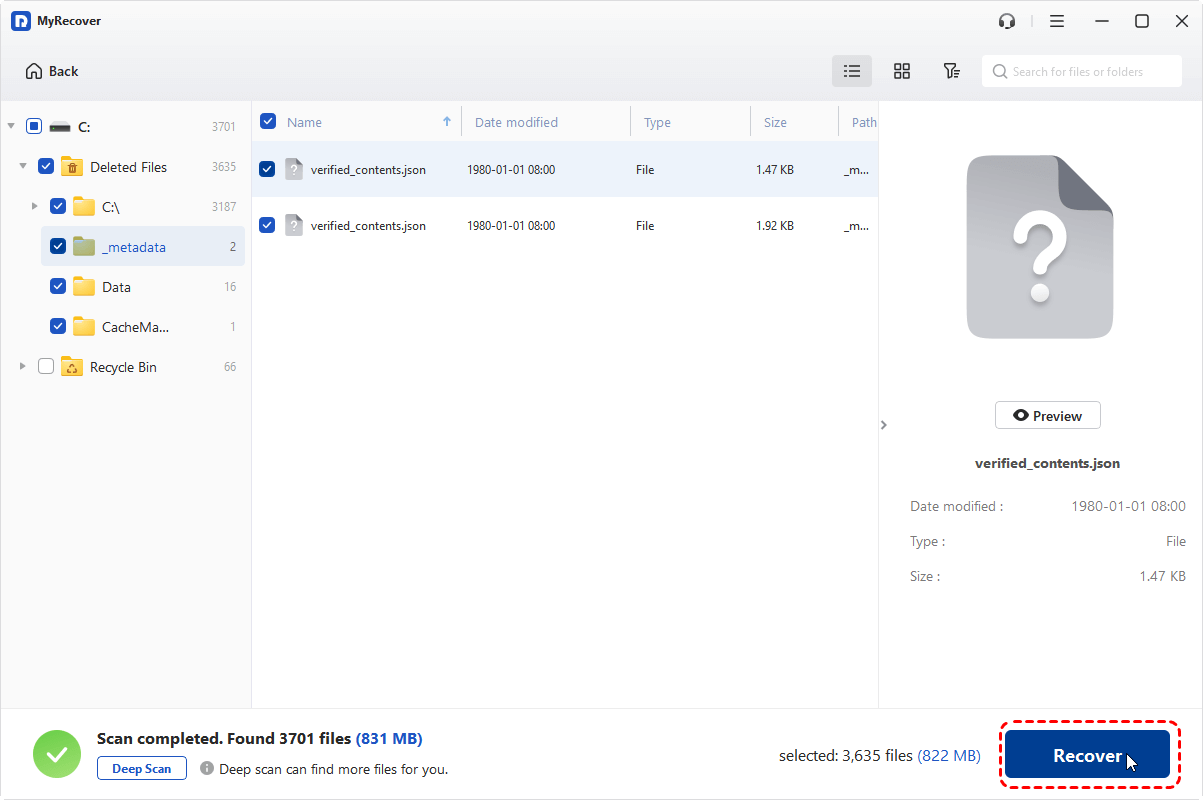
4. Select the files you need, and hit Recover.
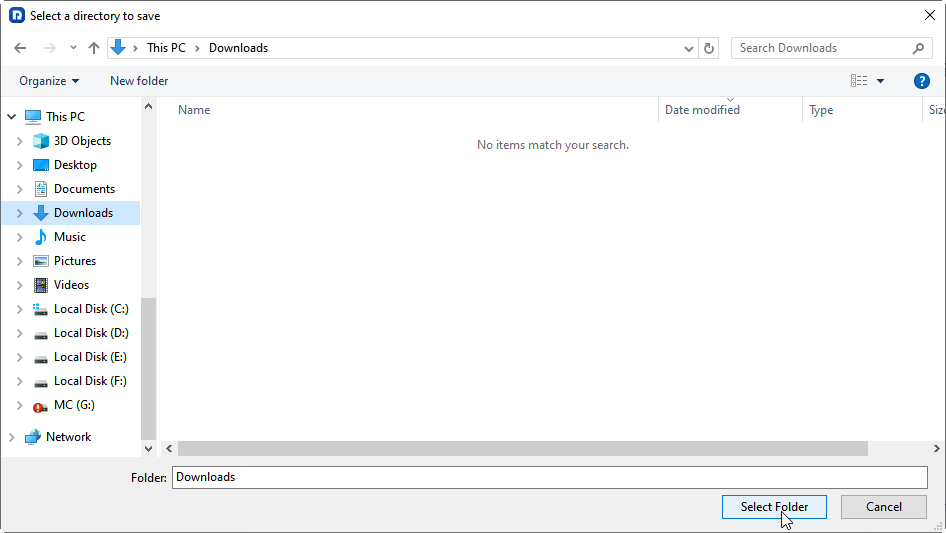
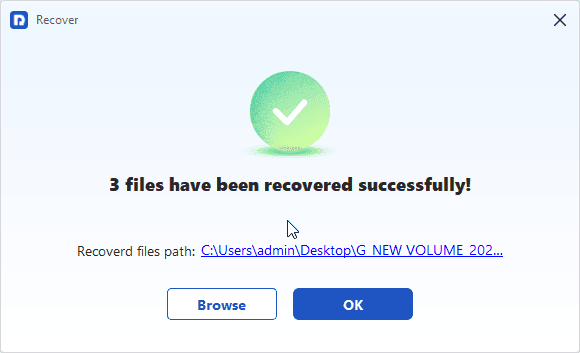
5. Opt for a safe location to keep them, and hit Select Folder to recover Norton deleted files now.
- Notes:✎...
- Powerful filter options at the top let you filter by file type (Document, Picture, Video), filename, or date modified.
- Crucially, double-click on a file to see a preview or click Preview to check. This lets you verify the file’s integrity before recovery, ensuring you’re getting back a working document, not a corrupted one.
- To recover files from unlimited computers within a company if needed, you can upgrade to MyRecover Technician.
 MyRecover
- Recover Deleted Files Easily with Simple Clicks
- 1000+ File Formats Supported
- Support HDD, SSD, External Hard Drive, USB Drive, SD Card, etc.
- Quickly Find Files Using File Types, Name, Size, etc.
- Preview Files Before Recovering
- Recover Unlimited Data
 100% Secure
FAQs About Recovering Norton Deleted Files
Can I recover files that Norton permanently deleted?
A: Yes, often, but it depends.If the file was "Quarantined", restore it from Norton’s History. If "Deleted" and not in the Recycle Bin, the data may still be on your drive. Use professional recovery software like MyRecover immediately. Success is high if you haven’t saved much new data since, as that can overwrite it.
Where does Norton put deleted files?
A: Primarily in Quarantine. This is a secure Norton vault, accessed via "Security History".Sometimes files go to the Recycle Bin. Rarely, severe threats are permanently deleted. Always check Quarantine first.
How do I restore a false positive in Norton?
A: Use Norton’s History. Go to Security > History, find the file entry, and select Restore. To prevent recurrence, choose Restore and Exclude. You can also submit the file as a false positive to Norton.
Why did Norton delete my safe files?
A: Due to a "false positive". This happens when Norton mistakes a legitimate file for malware, often because it's new, encrypted, behaves in an uncommon way, or is a software tool. Norton prioritizes caution, which can affect safe files.
How long does Norton keep files in quarantine?
A: Indefinitely. Files stay until you manually delete or restore them. This allows ample time for review but uses disk space. Periodically check your History to manage quarantined items.
What is the best software to recover files deleted by an antivirus?
A: Software with deep scanning and preview features.MyRecover is a strong choice. Key features are a proven recovery rate, bootable media options, and transparent pricing. Always download from official sites.

Stay Updated With Our
Latest Tips
Add us as a preferred source on Google to never miss helpful guides.
 Add as preferred source >>