 MyRecover



Will Factory Reset Remove Virus in Windows 11? Find the Truth!
We answer the core question: does a factory reset remove virus Windows 11? The article explores its effectiveness for different malware types, provides the secure reset procedure, and analyzes will factory reset remove virus from laptop in common infection scenarios to ensure complete removal.

By Delores / Updated on January 23, 2026


Preface
If your computer is infected by a virus, what should you do? Will a factory reset remove a virus in Windows 11, 10, 8, 7? It's a question for those who are suffering from this situation.
Will a factory reset remove a virus in Windows 10/11? The answer is not a simple yes or no. It's a "usually, but..." and that "but" is the most crucial part you need to understand before you proceed.
This article shows you the answer and gives you the direct facts on when a reset is your definitive solution and when it is an ineffective and damaging action.

Will Factory Reset Remove Viruses in Windows 11?
Let’s come into the core. In the vast majority of everyday cases, performing a completefactory reset(remove everything)on a Windows 11 machine will indeed remove the virus or malware infection. It’s a powerful tool because it essentially rolls your PC back to its original, out-of-the-box software state, wiping out all your files, settings, and—critically—any malicious programs that were installed alongside or disguised within them.
So, if you’re dealing with adware, a Trojan, ransomware that hasn’t fully encrypted your backup drive, or the most common spyware, the reset can remove the virus. However, this effectiveness hinges entirely on you choosing the correct reset options, a detail we’ll dive into headfirst.
How Does AWindows Reset Remove Viruses?
Generally speaking, your computer’s main storage drive, typically the C: drive, contains all the data, including your operating system, applications, personal files, and any malware, which are all stored within this space.
A standard "Remove Everything" factory reset performs two key actions. First, it deletes all user files and installed programs, effectively clearing the stored content. Second, it obtains a new, unaltered copy of Windows 11 from a dedicated recovery section on the drive or from the cloud and reinstalls it, replacing the core operating system files.
This process affirms that a Windows reset removes viruses for any threat located within that primary storage area. The malware is removed because its environment is erased, and a fresh, clean operating system is installed.
When Does A Factory Reset Not Remove Viruses?
However, certain advanced malware, often called firmware or rootkit viruses, can embed themselves deeper than the main storage. They might hide in the motherboard's UEFI/BIOS firmware, in a separate recovery partition that the reset process itself uses, or even on other connected drives. A regular factory reset won't scrub these areas.
Similarly, if the virus has already spread to an external hard drive or a network location, resetting the main PC does nothing to clean those external sources. You could reinstall Windows, reconnect the infected drive, and be right back where you started.
How to Perform A Complete Factory Reset on Windows 11/10?
First, if possible, use a known-clean computer to download a reputable antivirus scanner (like a Malwarebytes standalone scanner) onto a USB drive and run it on the infected machine. Sometimes, this can clean the issue without a full reset.
If it fails, move to backup. You must back up essential files to an external drive or cloud service. Crucially, you must scan this backup with antivirus software from a clean computer before restoring it later, or you risk re-infecting yourself. Ensure you have your Windows product key and Microsoft account details handy, as well as installation files for crucial software.
Learn how to do a factory reset on Windows 11,10 to remove everything here:
If you can boot up your computer, try this:
1. Please click Start >Settings > System > Recovery.
2. Click "Reset PC" behind the "Reset this PC" section.
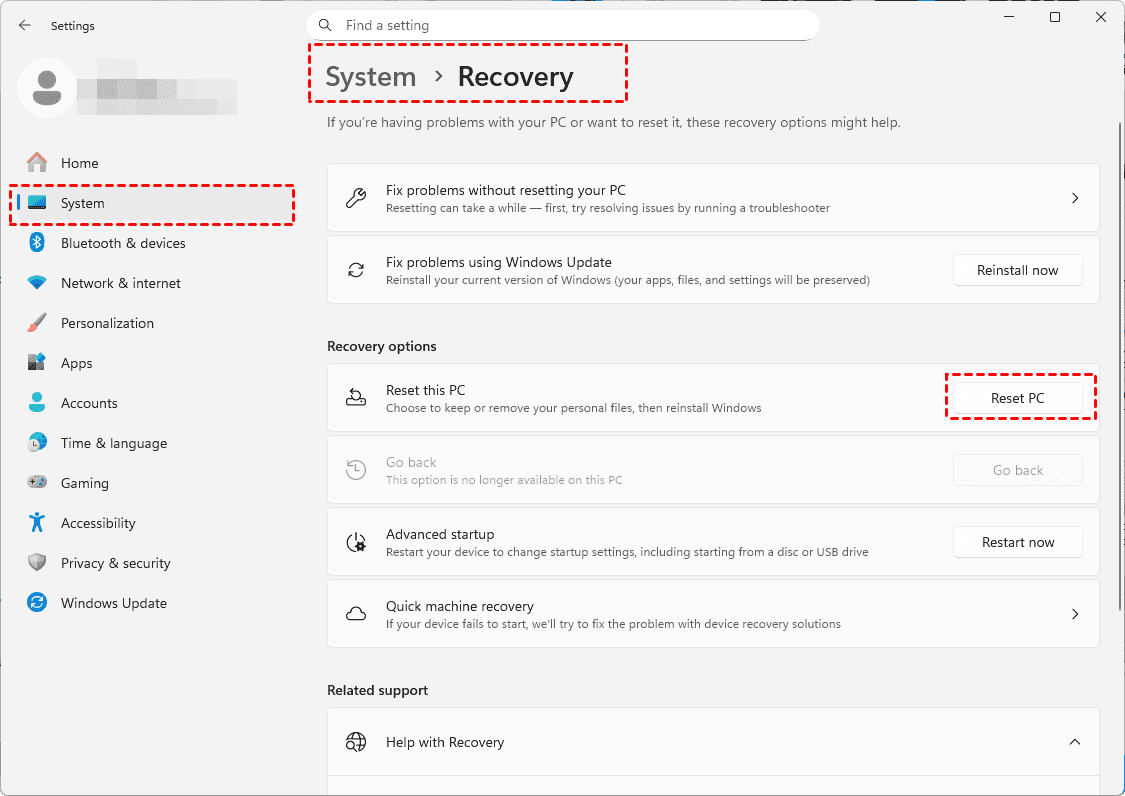
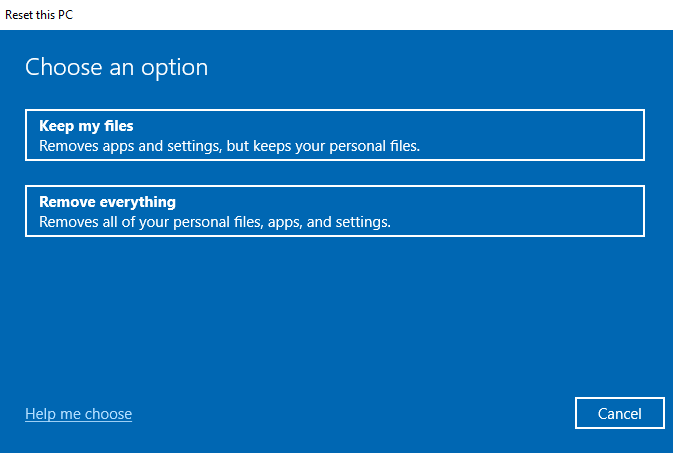
3. Choose "Remove everything".
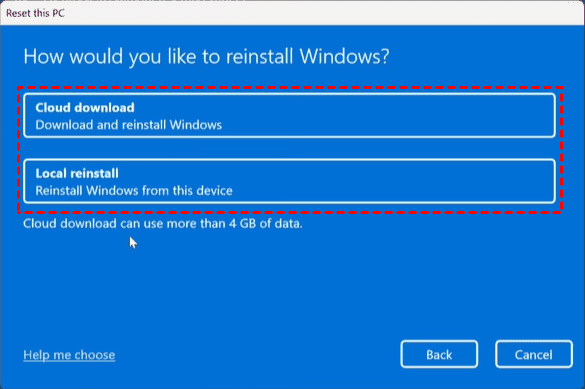
4. On the next screen, for the most thorough clean, select "Local reinstall" (it's faster), but for absolute assurance, especially if you suspect a corrupted recovery partition, choose "Cloud download" to fetch a pristine Windows copy.
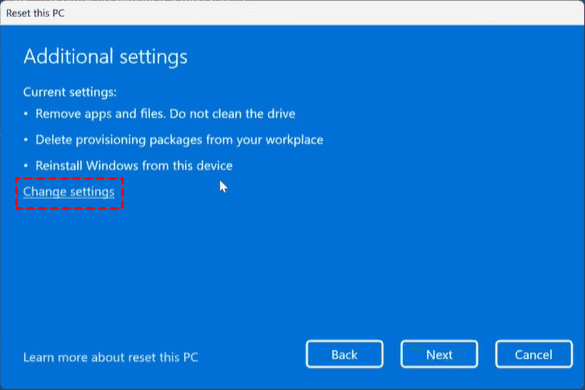
5. In the "Additional settings" window, click "Change settings", and toggle "Clean data?" to ON. This option makes the process longer but overwrites the drive, making file recovery nearly impossible and giving any hidden malware an extra shove toward oblivion.
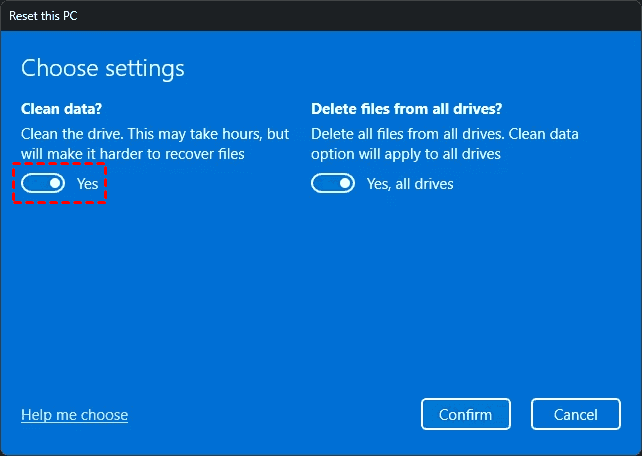
6. Finally, confirm and let the process run.
This meticulous approach is what users mean when they ask, will a factory reset remove viruses pc effectively, and following these steps maximizes your chances.
If you can’t log in or boot into Windows, you can try the following steps:
1. Your computer will lead you to the Choose an option window if you can’t boot up Windows.
2. Click Troubleshoot > Reset this PC.
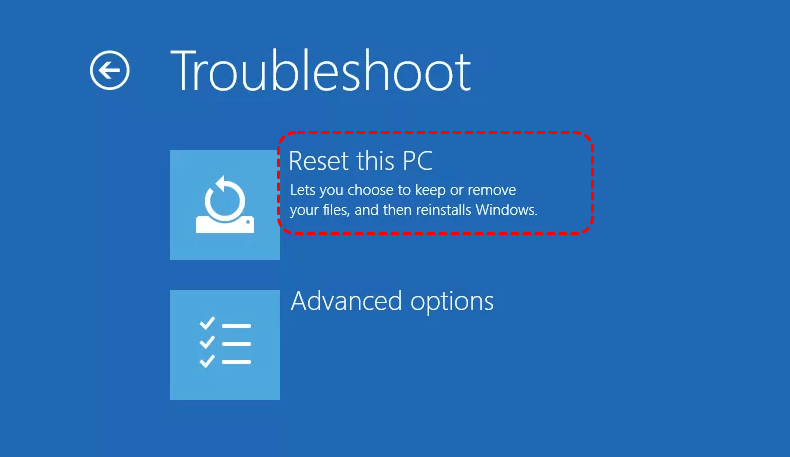
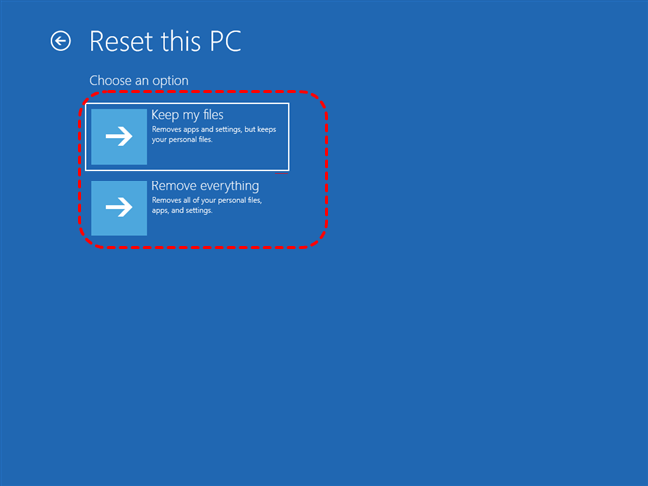
3. Choose Remove Everything.
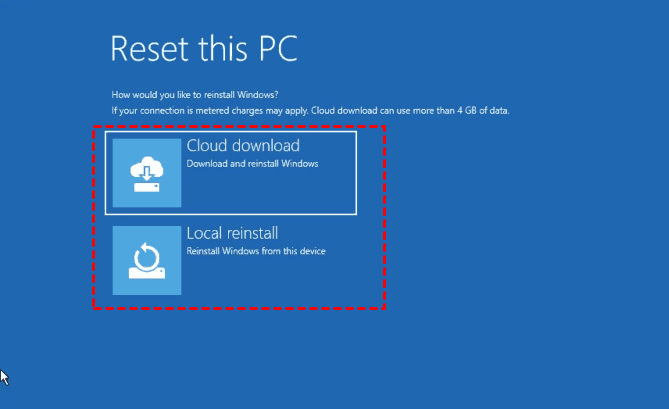
4. Select Cloud Download or Local Reinstall.
5. It will ask you if you want to keep this PC set up. Click No.
6. Then you have to choose if you want to fully clean your drive, click Fully clean the drive.
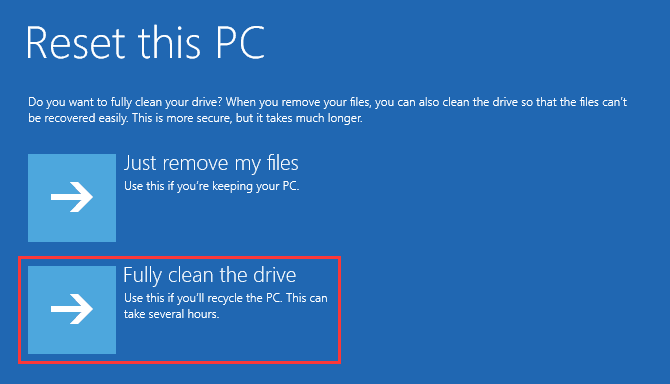
7. Click Reset to start the process.
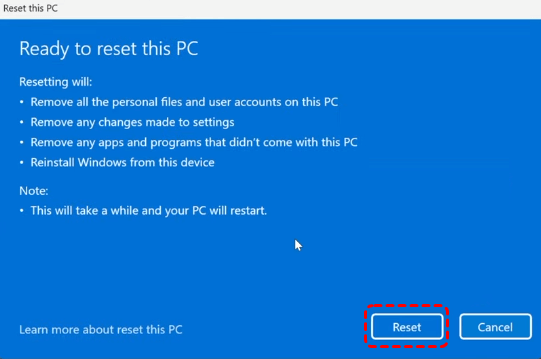
- Tips:✎...
- If you’re trying to kill a virus, you must select "Remove everything".
- The "Keep my files" option tries to preserve your personal data while reinstalling Windows, but this process can inadvertently preserve the malware as well.
Restore Your System After a Factory Reset
Once your PC is clean, the restoration begins. First, install a robust antivirus program. Then, meticulously scan your backup drive with this new antivirus before copying any files back.
Reinstall your essential applications from their original, official sources—never from old, potentially infected installers.
Finally, change all your important passwords, as many viruses are designed to steal such data.
Your system is now not just clean, but potentially more secure than before.
Recover Deleted Files in the Future
It’s very important to back up your files before bad happens. So you can easily recover files to minimize the loss. However, if your files get lost with a backup in the future, you can recover files fast with the powerful Windows data recovery MyRecover.
With MyRecover, you can enjoy:
- Fast data recovery with the highest recovery rate, 99%.
- Selective recovery instead of recovering everything that you don’t need.
- 1,000+ file formats are supported.
- 500+ devices, such as HDD, SSD, USB flash drive, SD card, media player, PS4/5, and so on.
- Easy file preview, which allows you to ensure the file integrity before recovery.
- Recover files from any complex situation, like recovering files from a crashed computer, an emptied recycle Bin, a formatted SSD, a corrupted SD card, etc.
So, why not give it a try now?
 100% Secure
FAQs About Will Factory Reset Remove Virus
Does a factory reset remove all viruses from Windows 11?
A: No, it does not guarantee the removal of all viruses. It is highly effective against the most common malware on the main drive. However, sophisticated threats like firmware rootkits can survive. A proper "Remove Everything" reset usually solves the issue, but advanced threats may require a clean install from external media.
Is a factory reset better than antivirus software?
A: No, it's a different tool. Antivirus is ongoing prevention and removal. A factory reset is a last-resort solution when an infection is severe, and the antivirus fails. Always try a full antivirus scan first. Use the reset only if that doesn't work.
Will I lose my Windows 11 license if I do a factory reset?
A: Almost certainly not. For most pre-built computers, the license is embedded in the motherboard and reactivates automatically. If you have a retail license, it's linked to your Microsoft account; signing back in reactivates it. Losing activation from a standard reset is very rare.
Can a virus come back after a factory reset?
A: Yes, if you're not careful. The main risks are restoring files from an infected backup or reconnecting an infected external drive (like a USB stick) to your clean PC. You must scan all backups and external data sources before using them again after the reset.
How long does a factory reset take on Windows 11?
A: Times vary. A standard "Remove Everything" reset typically takes 30 minutes to 2 hours. Adding the "Clean the drive" security option can add several hours. "Cloud download" depends on your internet speed. Plan for it to take an afternoon and keep your laptop plugged in.
Should I factory reset my laptop if it has a virus?
A: It's a strong solution, but not your first step. First, run a full antivirus scan. If that fails, try a dedicated malware scanner. If the infection persists or the system is unstable, then a factory reset is the most reliable fix. Remember to choose "Remove Everything" and have safe, scanned backups.

Stay Updated With Our
Latest Tips
Add us as a preferred source on Google to never miss helpful guides.
 Add as preferred source >>