 MyRecover



The Answer: Can You Reverse a Factory Reset? Steps for Phone & Laptop
Discover the truth about whether you can reverse a factory reset. We outline the preconditions for successful data recovery and provide a clear action plan for smartphones and laptops, detailing how to approach can you undo a factory reset on a laptop.

By Delores / Updated on January 8, 2026


Accidentally Perform A Factory Reset!
It’s frustrating if you perform a factory reset by accident for your Android phone, iPhone, or computer. Can you reverse a factory reset? How to get my files back? Don’t worry, we will show you the truth and ways to get your files back.

How Did You Perform the Factory Reset?
We will discuss the situation on different platforms. Check them now!
In Windows 11, 10:
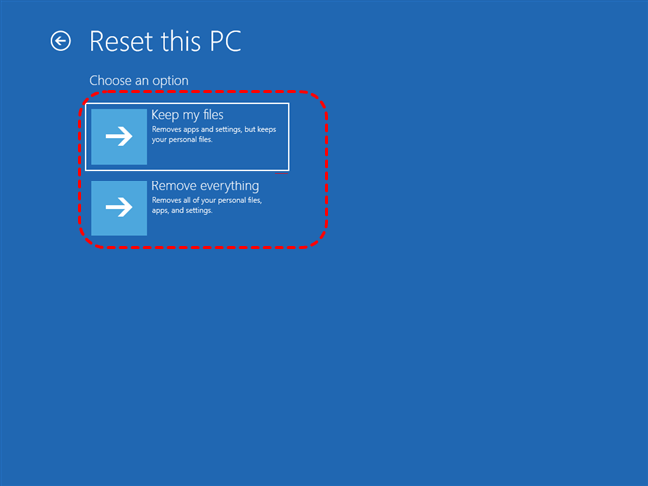
When you perform a Factory Reset in Windows 11, 10, there are two options to choose: Keep my files, or Remove everything.
- If you choose Keep my files and reset your Windows computer, your personal files are still on your computer. Choosing "Keep my files" during a Windows factory reset reinstalls Windows, removes all installed apps and settings, but preserves your personal data like documents, pictures, and music, effectively performing a refresh rather than a complete wipe, though you'll need to reinstall your software and reconfigure settings afterward.
- However, if you choose "Remove everything" during a Windows factory reset, which deletes all personal files, installed apps, and settings, returning the PC to its original factory condition, but it also gives you the option to clean the drive for secure erasure (making data unrecoverable) or just remove files from the Windows drive, and you'll need your Microsoft account/BitLocker key if encryption is on. This process reinstalls Windows, removing all user-added software and settings for a fresh start, making it ideal for selling or troubleshooting deep issues, but it requires backing up data first.
On Android Phone:
Performing a factory reset on Android erases all personal data, apps, and settings, restoring the phone to its original out-of-the-box state, like a digital "wipe" or "fresh slate". It deletes your photos, messages, contacts, downloaded apps, and accounts from the device's internal storage, but doesn't touch the SIM card or data already backed up to your Google Account or cloud services.
This process can fix performance issues, malware, or prepare the phone for a new owner, but requires you to back up important data first, as it's permanent.
On iPhone:
Performing a factory reset on an iPhone erases all personal data, settings, and apps, returning it to its original "out-of-the-box" state, which removes photos, messages, accounts, and installed software but can preserve eSIM info if chosen.
It's ideal for selling or giving away the device, but you must back up your data first, as this process effectively wipes the phone clean and reinstalls the latest iOS, requiring you to set it up as new afterward.
The Truth: Can You Reverse a Factory Reset in Windows, Android, or iPhone?
The short, direct answer is no—you cannot directly "reverse" or "undo" a factory reset through any built-in feature on any of these platforms. The process is intentionally designed to be a one-way street, wiping user data and restoring the device to its original system state. There is no official "Control+Z" for a factory reset.
However, that doesn't mean all hope is lost. The possibility of recovering some of your lost data after a reset is a different question entirely, and the answer varies significantly between Windows, Android, and iPhone. Your chances depend almost entirely on your preparation and the specific circumstances.
Here is the essential breakdown for each platform:
- Windows (10 & 11): There is no built-in "undo".Your chances hinge on whether you created a System Image Backup or enabled File History before the reset. Without these, you must rely on third-party data recovery software to scan the drive for residual files, which is never guaranteed. The moment you start using the PC after the reset, your chances plummet.
- Android: There is no built-in "undo".Recovery primarily depends on whether you had Google One Backup or similar manufacturer cloud backups activated. If so, you can restore your apps, settings, and some data during the initial device setup. If not, you must immediately stop using the phone and attempt recovery with specialized software, a process with low and uncertain success rates, especially on modern devices.
- iPhone: There is no built-in "undo".Recovery is almost exclusively dependent on having a pre-existing iCloud or computer (Finder/iTunes) backup. Apple's strong encryption means that once a factory reset is performed, the data key is destroyed, making any direct data recovery from the device itself impossible for users and extremely difficult even for professionals. Your backup is your only realistic option.
Can you undo a factory reset on a laptop, Android, or iPhone? It’s impossible to reverse a factory reset. But you still have ways to undo a factory reset depending on your situation.
Backup Important Files Before a Factory Reset(Recommended)
Developing a consistent backup habit transforms a potential disaster into a manageable event.
Backup Files on Android or iPhone Before Factory Reset
Smartphones benefit from robust, automated backup systems.
iPhone users should ensure iCloud Backup is enabled, which secures photos, contacts, calendars, and a complete device snapshot before any significant update.
Android users can utilize Google One to automatically back up app data, call history, and system settings to the cloud. Services including Google Drive, OneDrive, and Dropbox facilitate this off-site storage automatically.
Backup Files on Windows 11/10 Before Factory Reset
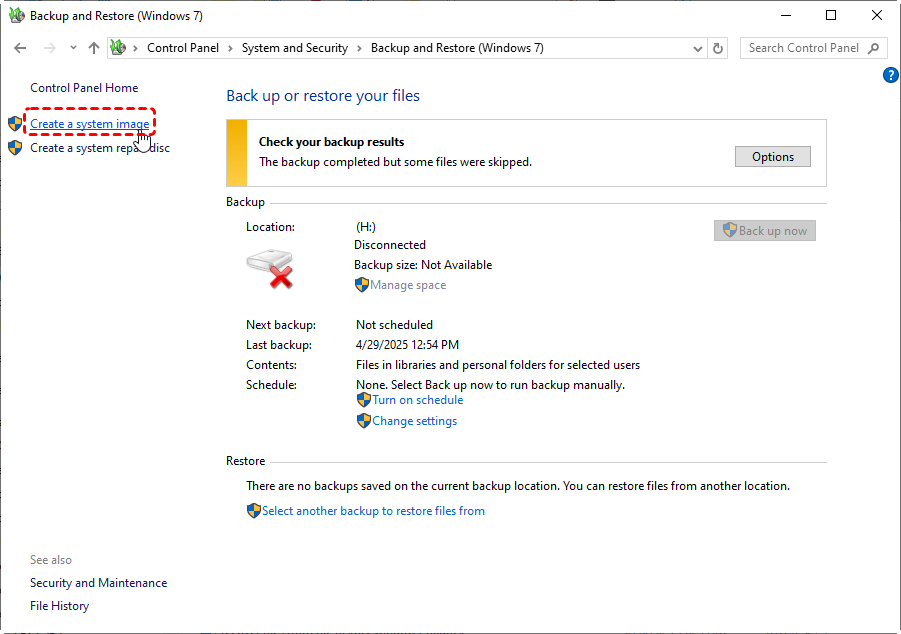
A System Image provides the most comprehensive recovery solution for a laptop. This creates a complete snapshot of the entire Windows drive, including the operating system, applications, and all files.
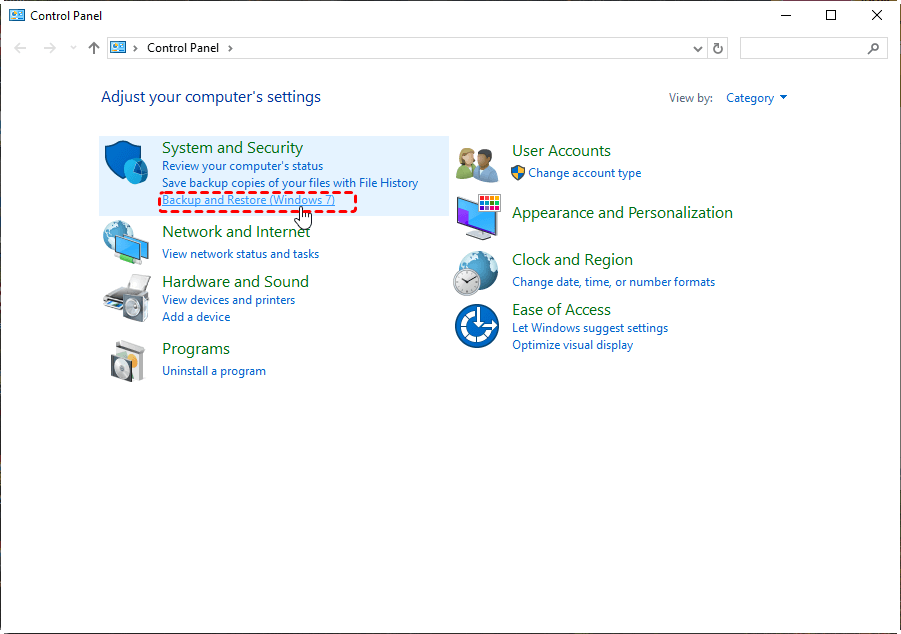
1. To create one in Windows 11, navigate to Control Panel > System and Security > Backup and Restore (Windows 7).
2. Select "Create a system image" and choose a destination with sufficient capacity, such as a large external USB drive.
Following a factory reset, you can boot from a Windows installation USB, access the "Repair your computer" options, and select "System Image Recovery" to fully restore the laptop to its previous exact state.
Critical Factors That Influence Recovery Potential
Your odds aren't based on luck, but on specific conditions.
First, the type of storage matters. Older devices with traditional hard disk drives (HDDs) have a better recovery prognosis than modern smartphones and SSDs (Solid State Drives), which often use a feature called TRIM. TRIM actively cleans up deleted data blocks to maintain performance, effectively shredding those library shelves much faster.
Second, encryption is a game-ender. If your device was encrypted (standard on modern iPhones and many Androids), and you reset it, the encryption key is destroyed.
Finally, your backups are key. Had backups been enabled? That’s your golden ticket.
Undo A Factory Reset With A Backup
You can restore files from a backup to undo a factory reset on Windows, Android, or iPhone after the factory reset, which isn't the real undo, but restores to the previous state.
Undo A Factory Reset on Android via Google Backup
If you had Google backup enabled on your Android before, this is straightforward to undo the factory reset from that backup.
1. After the reset, power on the device and walk through the initial setup.
2. When you reach the "Copy apps & data" screen, tap "Next" and then "Can't use old device?".
3. You'll be prompted to sign in to your primary Google Account. After signing in, you should see a list of available backup copies from your previous device, showing the device name and backup date.
4. Select the most recent one.
5. The restore process will then re-download your installed apps and restore your call history, device settings, and SMS messages (if backed up).
6. Photos and documents rely on separate Google Photos and Drive syncing.
Undo A Factory Reset on iPhone from iCloud or iTunes
For iPhones, you can undo a factory reset using iCloud or iTunes to restore the iPhone to a previous state if you have enabled them. Here is how to do:
1. During the initial setup screen (Apps & Data)screen on setup, choose "Restore from iCloud Backup".
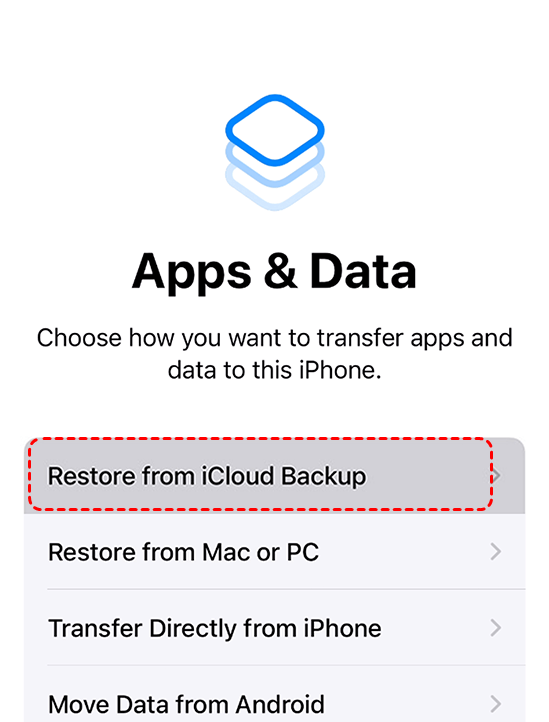
2. Sign in with your Apple ID, and you'll be presented with a list of available backups, showing size and date. Choose the relevant one.
3. The phone will restore settings and app data, and apps will begin re-downloading from the App Store.
For a more complete, local backup (which includes all data and doesn't rely on internet download speeds), you would need to have previously created a backup in iTunes (on PC) or Finder (on Mac). Connect the reset iPhone to the computer you used for backups, select it, and choose "Restore Backup".
Undo a Factory Reset Windows 11/10Using System Restore
Windows offers a feature called System Restore. It doesn't back up personal files, but it does take snapshots of system files, registry settings, and installed programs. If you had System Protection turned on before the reset, you might get lucky.
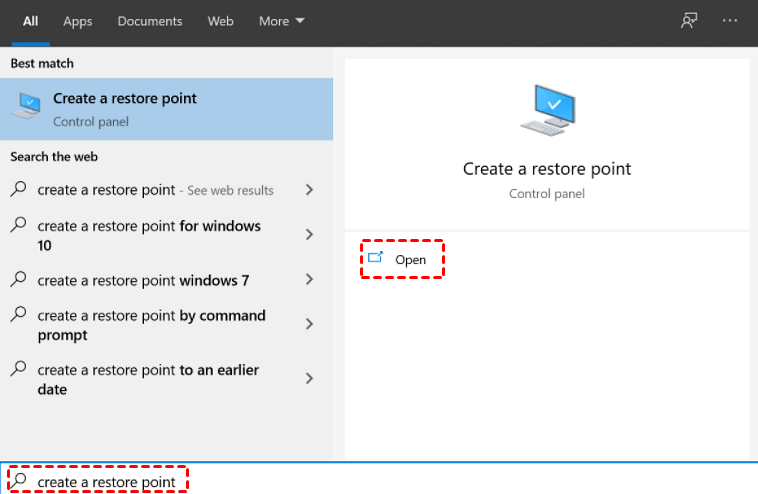
Search for "Create a restore point" in the Start menu, and click it.
Go to the System Protection tab, and click "System Restore".
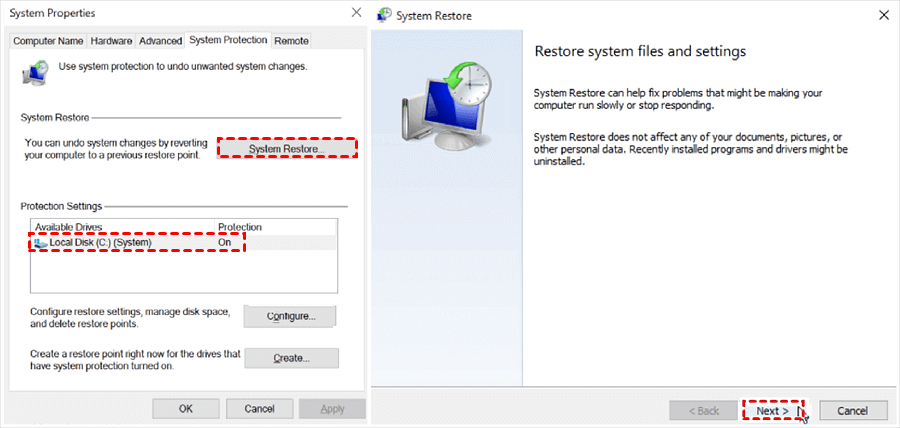
If a restore point from before the reset exists, you can follow the wizard to revert system files.
This might re-establish a previous user profile, but it is not a guaranteed method for personal file recovery and is less comprehensive than a full System Image.
Recover Lost Files without Backup in Windows 11, 10
When backups have failed, and you're facing a blank drive, MyRecover is a powerful tool designed to scan storage media deeply for traces of lost files. It supports HDDs, SSDs, USB drives, external hard drives, and SD cards, making it a versatile option for attempting to reverse a factory reset on a laptop or external drive where new data hasn't overwritten the old.
1. On your working computer, download and install MyRecover. Launch the application.
 100% Secure
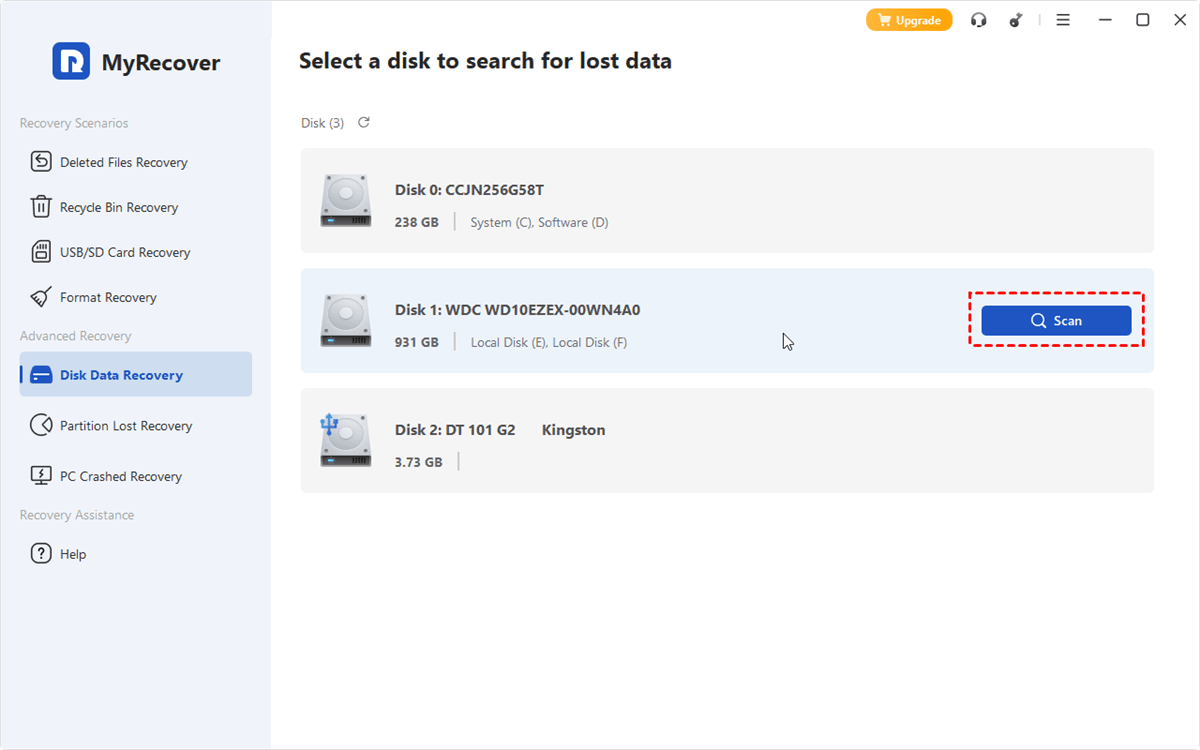
2. Tap Disk Data Recovery, choose your drive, and hit Scan. Wait for it to complete and hit OK.
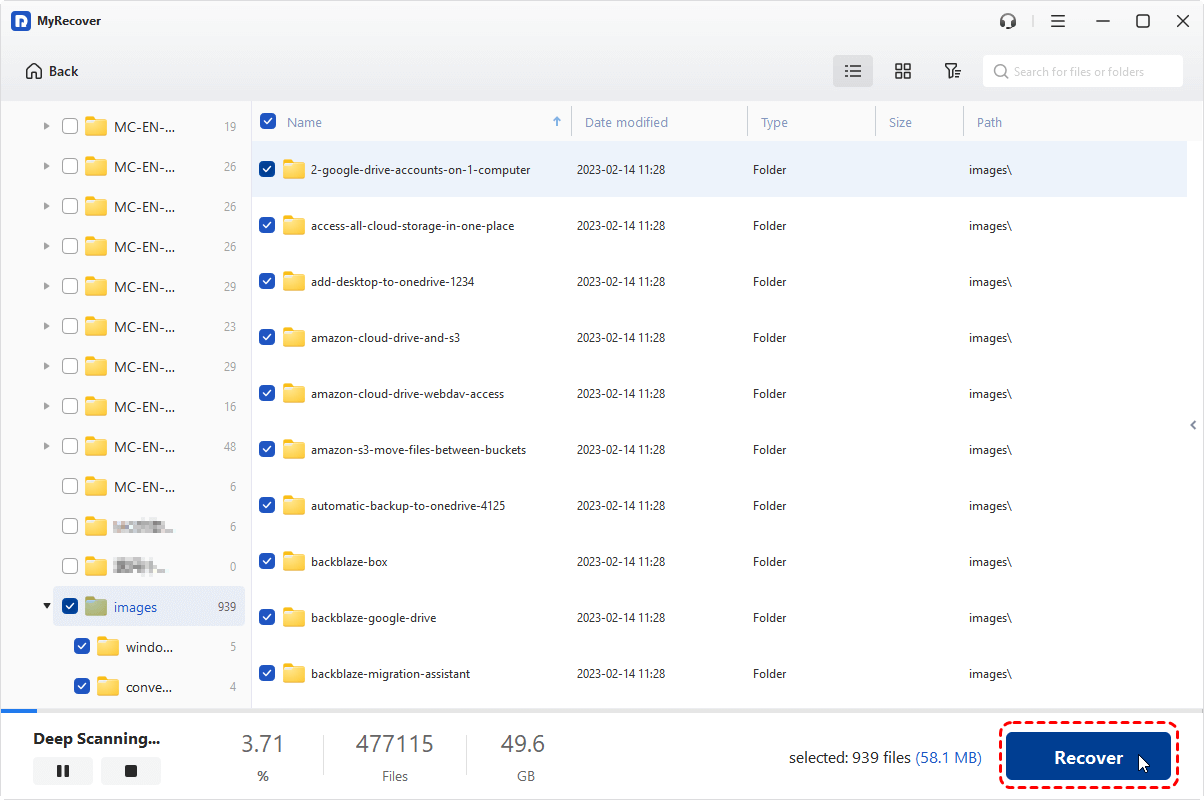
3. Preview and check the boxes next to the files you wish to recover, and hit Recover.
4. Choose a safe location to save these recovered files.
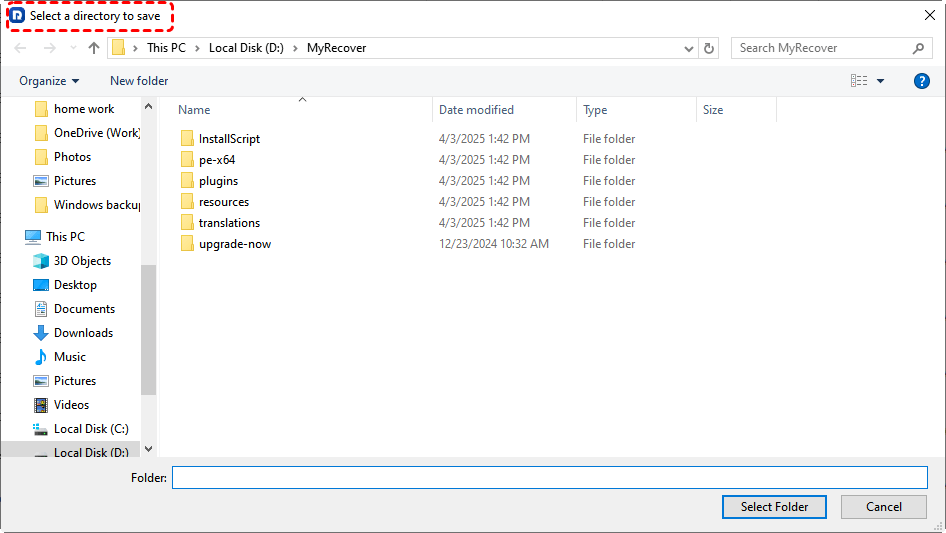
- Tips:✎...
- Once the scan finishes, MyRecover will present a tree-view of recoverable files, often organized by original folder structure and file type. Use the filters to narrow down the files using file name, size, data modified, and more.
- A key feature is the preview function, which allows you to view the contents of many common file types before recovery, verifying their integrity.
- You can also recover files from an emptied Recycle Bin, a corrupted SD card, a formatted SSD, a crashed computer, or an SSD that cannot be detected, etc.
- Upgrading to MyRecover Technician is another option if you need to recover files from unlimited computers.
 MyRecover
- High Recover Rate
- 1000+ File Formats
- 500+ Devices
- Easily Filter by File Types, Name, Size, etc.
- File Preview
- Recover Unlimited Data
 100% Secure
Conclusion
Can you reverse a factory reset? There is no direct "undo", but data recovery is often possible, though uncertain. The path forward depends on your preparation and speed after the reset. Ideally, you can restore from a cloud backup. Alternatively, you might use recovery software like MyRecover.
Enable automatic cloud backups on your phone. Schedule weekly system image backups for your laptop to an external drive. Treat your data as the invaluable asset it is. While knowing how to attempt recovery is useful, the true peace of mind comes from never needing to.
FAQs about Reversing A Factory Reset
Is it ever possible to fully reverse a factory reset and get everything back exactly as it was?
A: No. A perfect, full reversal is impossible through recovery alone. A reset destroys the system's file map and settings. You can only salvage individual files, not apps with their data. A true "undo" requires a complete system backup made before the reset, like an iCloud or Google One backup. Otherwise, you're just salvaging files, not restoring the system.
Does performing a factory reset once or twice make data unrecoverable even for experts?
A: Yes. Each reset drastically lowers recovery odds, and a second one is often fatal. The first reset marks data as free. Setting up the device for a second reset writes new data over it. A second reset triggers processes like TRIM that actively wipe data. For experts, one reset is hard; two usually make recovery extremely unlikely and cost-prohibitive.
What is the single most important thing to do immediately after accidentally factory resetting a device?
A: Immediately power off the device and do not use it. Do not complete setup, connect to Wi-Fi, or log in. Every action writes new data, overwriting what you want to recover. Your goal is to freeze the drive in its post-reset state to give recovery tools the best chance.
Are free data recovery programs reliable for undoing a factory reset, or do I need a paid tool?
A: Free tools are limited; for a serious attempt, paid software is recommended. Free versions may recover a few files, lack deep scans, or omit previews. Paid tools like MyRecover or Disk Drill are built for this—they perform sophisticated scans, better categorize files, and offer support. The cost is usually worth it against the value of lost data.
If my device were encrypted (like an iPhone or Android with lock screen security), is there any point in trying recovery?
A: For encrypted devices (default on iPhones/Androids), standard recovery is futile. A reset destroys the encryption key, permanently scrambling all data. No software can reconstruct it. Your only hope is a pre-existing iCloud or Google backup created before the reset.
Can cloud services like Google Drive or iCloud automatically back up my device so a factory reset doesn't matter?
A: Yes, but only if you enabled backups before the reset. Services like iCloud or Google Drive don't automatically back up everything unless configured. They back up specific data or create a device backup only if you turned the feature on. They are a perfect safety net, but you must have set up the net before the fall.

Stay Updated With Our
Latest Tips
Add us as a preferred source on Google to never miss helpful guides.
 Add as preferred source >>