 MyRecover



How to Recover Deleted Wedding Photos from HDDs/SD Cards
Wedding photos always hold unforgettable memories, but they can get lost due to various reasons. Whether your drive was deleted or simply formatted, this guide helps ensure your wedding memories are never truly gone.

By Aria / Updated on November 17, 2026


Are Deleted Photos Actually Gone Forever?
Few things are more heartbreaking than losing your wedding photos, the once-in-a-lifetime memories that capture your happiest day. Whether they vanished due to accidental deletion or a formatted hard drive, the fear of losing them forever can be devastating. But here’s the truth: deleted photos are not always gone forever.

When you delete a photo on your computer or camera, it isn’t instantly erased. Instead, the system marks that storage space as "available", meaning the data remains until it’s overwritten by new files. That’s why quick action is critical.
How Do Wedding Photos Get Deleted?
Understanding how wedding photos are lost can help determine the best recovery approach. In most cases, the photos are not intentionally removed but disappear due to common operational mistakes or technical issues. The following are the most frequent causes of wedding photo loss from HDDs or SD cards.
❌Accidental deletion: This is one of the most common scenarios. Photos may be mistakenly deleted while organizing files, clearing storage space, or selecting multiple images at once. On cameras and SD cards, pressing the wrong button during review can also remove photos instantly.
❌System or software errors: File system corruption, interrupted transfers, or crashes during photo import can make images disappear or become inaccessible. For example, if a computer shuts down unexpectedly while copying wedding photos from an SD card, the files may not save properly.
❌Hard drive or storage device problems: Physical damage, bad sectors, or failing storage devices can lead to missing photos. External hard drives may disconnect unexpectedly, while SD cards can become corrupted due to improper ejection or repeated use.
How to Recover Deleted Wedding Photos from HDDs/SD Cards
When photos disappear, the key is to stop using the affected device immediately. Every new write action (like saving new files) risk overwriting your deleted photos. Once you’ve stopped using it, try the recovery options below.
Check Backup First
Before using other complex methods, checking for backups is the simplest and most effective approach. If you have the good habit of backing up regularly, your wedding photos can be easily retrieved.
👉Windows File Explorer
If you’ve ever transferred wedding photos from an external hard drive to your computer for viewing or editing, you can check if they still exist in Windows File Explorer.
👉Cloud backup services
If you've synced your wedding photos to cloud services like OneDrive, Google Drive, Dropbox or iCloud, you can restore the photos from backups.
Windows File Recovery [Command-Line Tool]
If there's no backup, it's time to turn to professional data recovery tools. Windows File Recovery is a command-line data recovery tool provided by Microsoft, which supports recovering data from local storage devices like HDDs, USB drives and more. But it is only compatible with Windows 10 and 11.
Step 1. Download and install Windows File Recovery from Microsoft official channel.

Step 2. If the drive containing the deleted wedding photos is an external hard drive or SD card, connect it to your computer and note its drive letter.
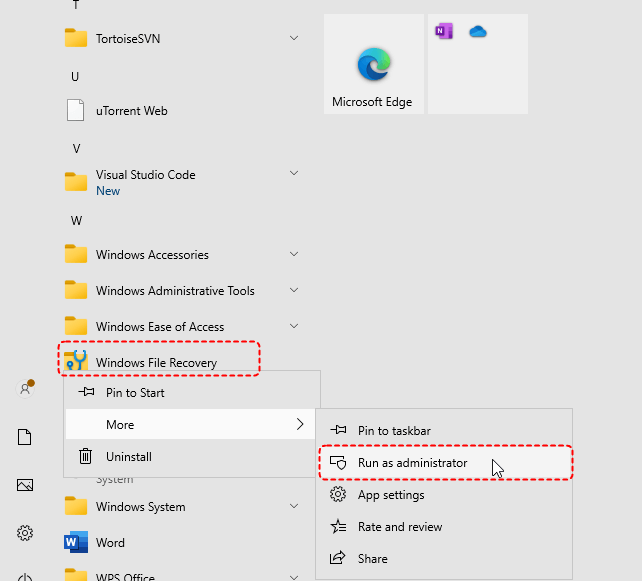
Step 3. Open Windows File Recovery and run it as administrator.
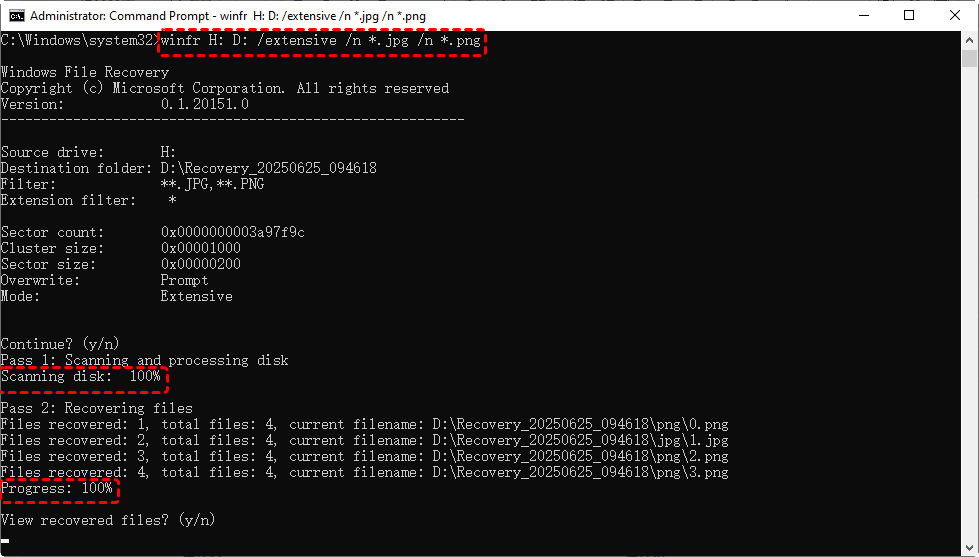
Step 4. Type the following command "winfr H: D: /extensive /n *. jpg /n *. png" and hit "Enter" key. Replace the drive letters "H" and "D" with your actual drive letters.
- ★Tips:
- H: the source drive letter.
- D: the destination drive letter.
- /extensive: the scan mode. If you want to perform a quick scan for the target drive, please switch to "regular" mode.
- /n *. jpg /n *. png: the filter command. Only recover files with ".jpg" or ".png" extension.
Wait for the process to complete, you can check the recovered files by pressing "y".
Recover Deleted Wedding Photos with MyRecover
While Windows File Recovery is a powerful tool, it can be challenging for most novice users. This is because even small mistakes, such as typos, symbol errors, or missing spaces can cause data recovery to fail. If you want a simpler yet equally effective tool, MyRecover comes highly recommended.
Its user-friendly interface simplifies the data recovery process, allowing users of all levels to easily complete data recovery. Additionally, it supports recovering deleted photos on Windows from various storage devices, such as HDDs, SSDs, USB drives, SD cards, camera memory cards, and more.

 MyRecover
- 500+ Devices Supported | SSD, HDD, USB Flash Drive, SD Sard, etc.
- 1000+ File Formats Supported | PNG, MP4, MP3, TXT, ZIP, MSG, etc.
- 500+ Data Loss Scenarios | Deletion, Format, System Crash, Virus Attack, etc.
 100% Secure
Step 1. Download and install MyRecover on your computer from Microsoft Store, avoid installing it on the drive with deleted wedding photos.
Step 2. Run it and select the drive where the deleted photos were stored, then click "Scan".
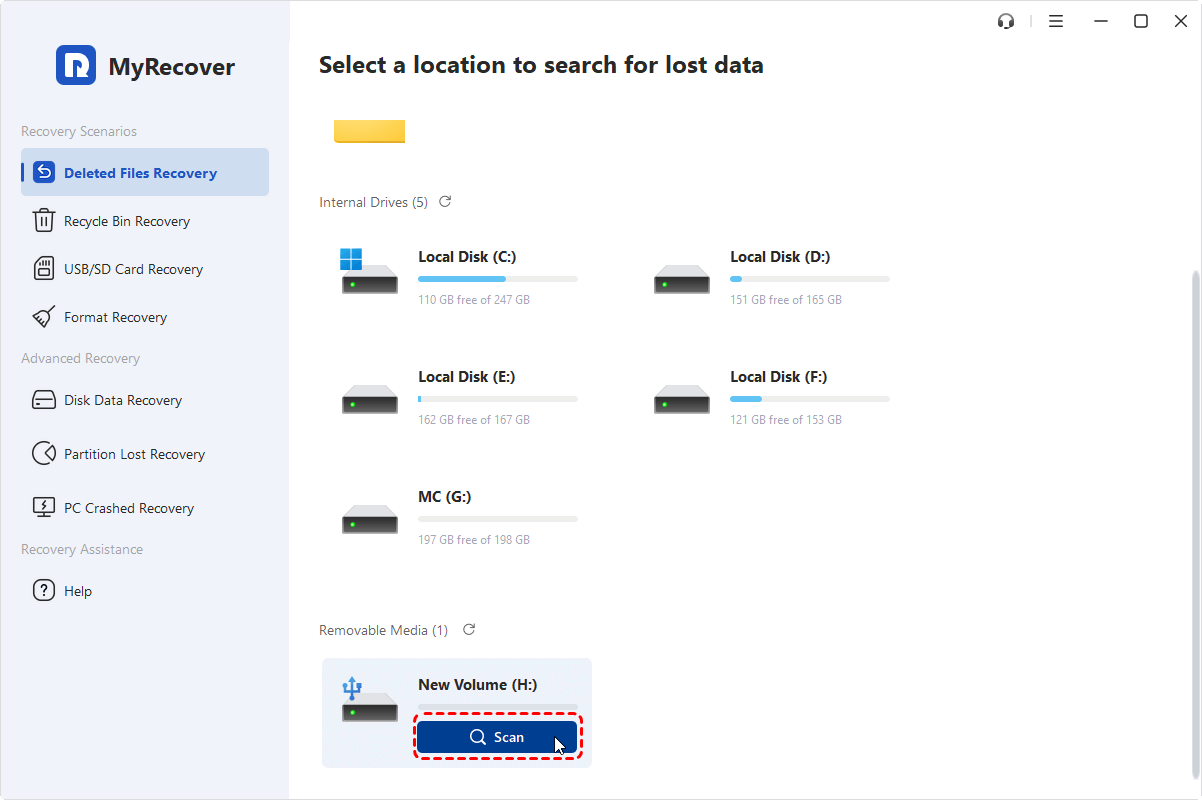
If the hard drive containing the lost photos is an external one, don’t forget to connect it to your computer with a correct cable.
Step 3. Choose the files you wish to recover from the recoverable lists and click "Recover".
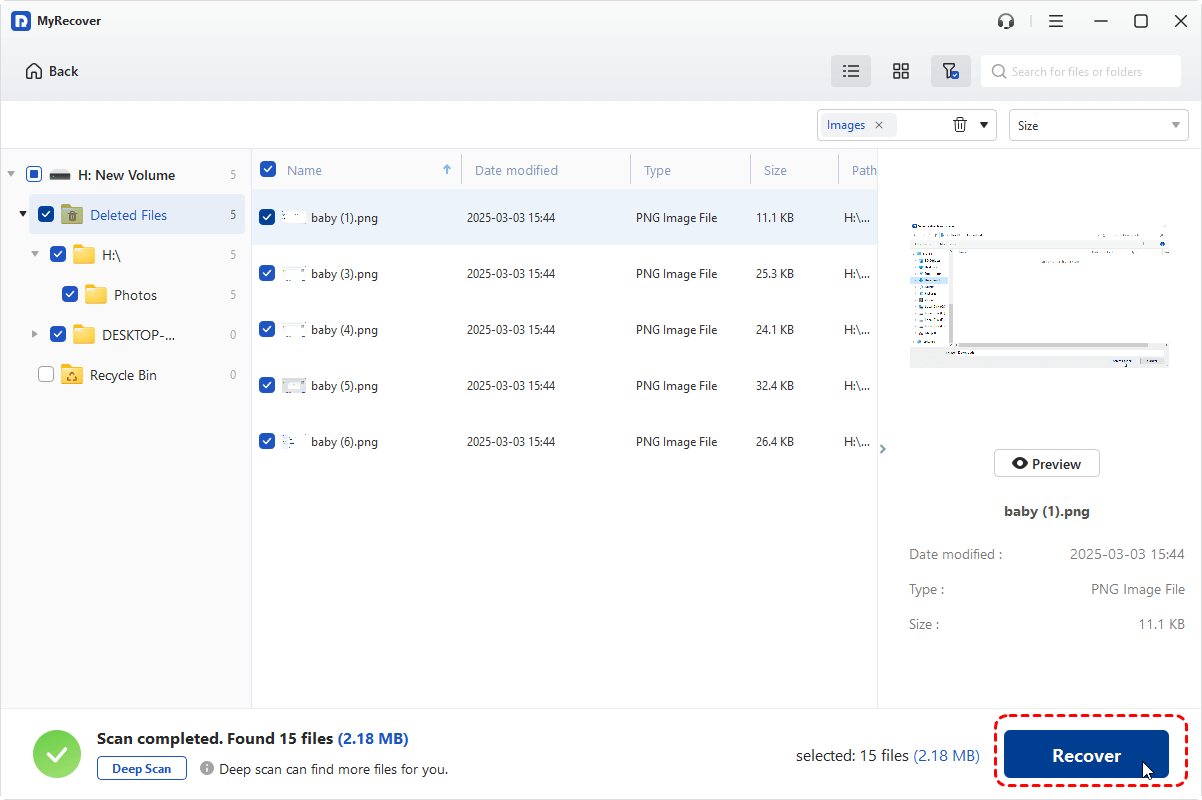
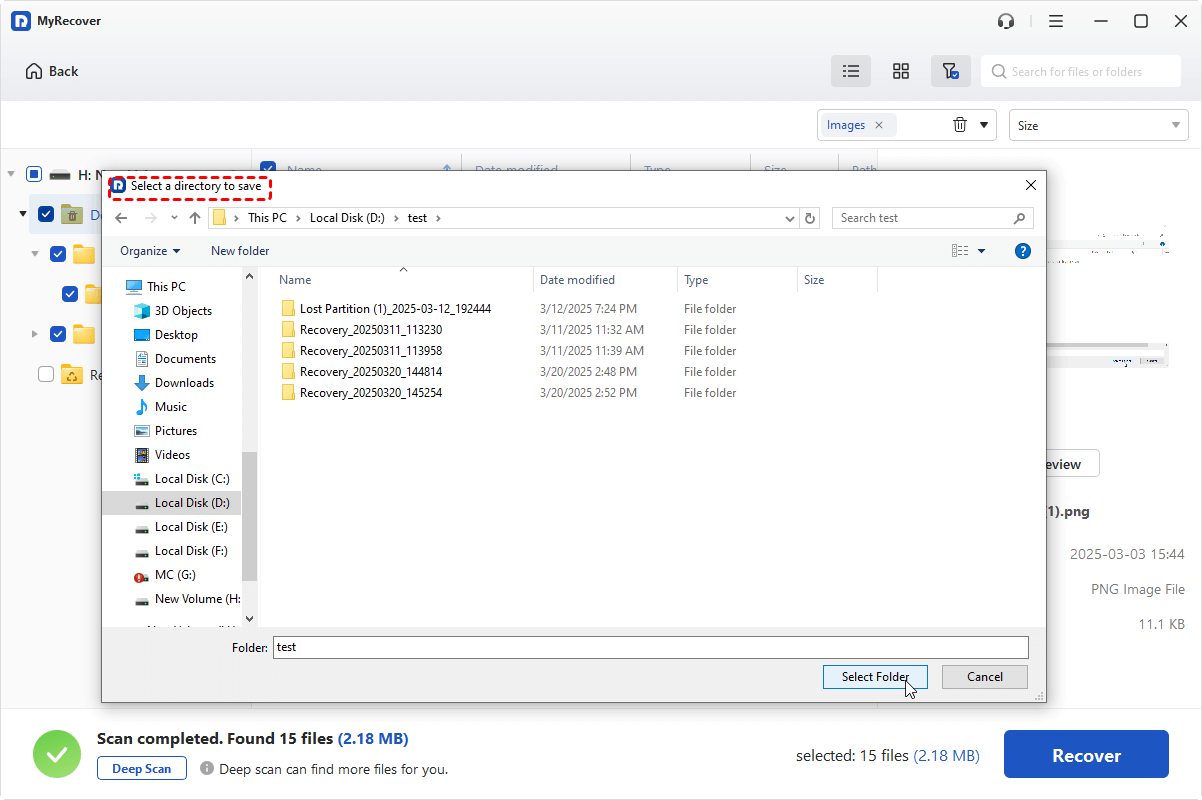
Step 4. Select a destination drive (not the original one) to save the recovered files.
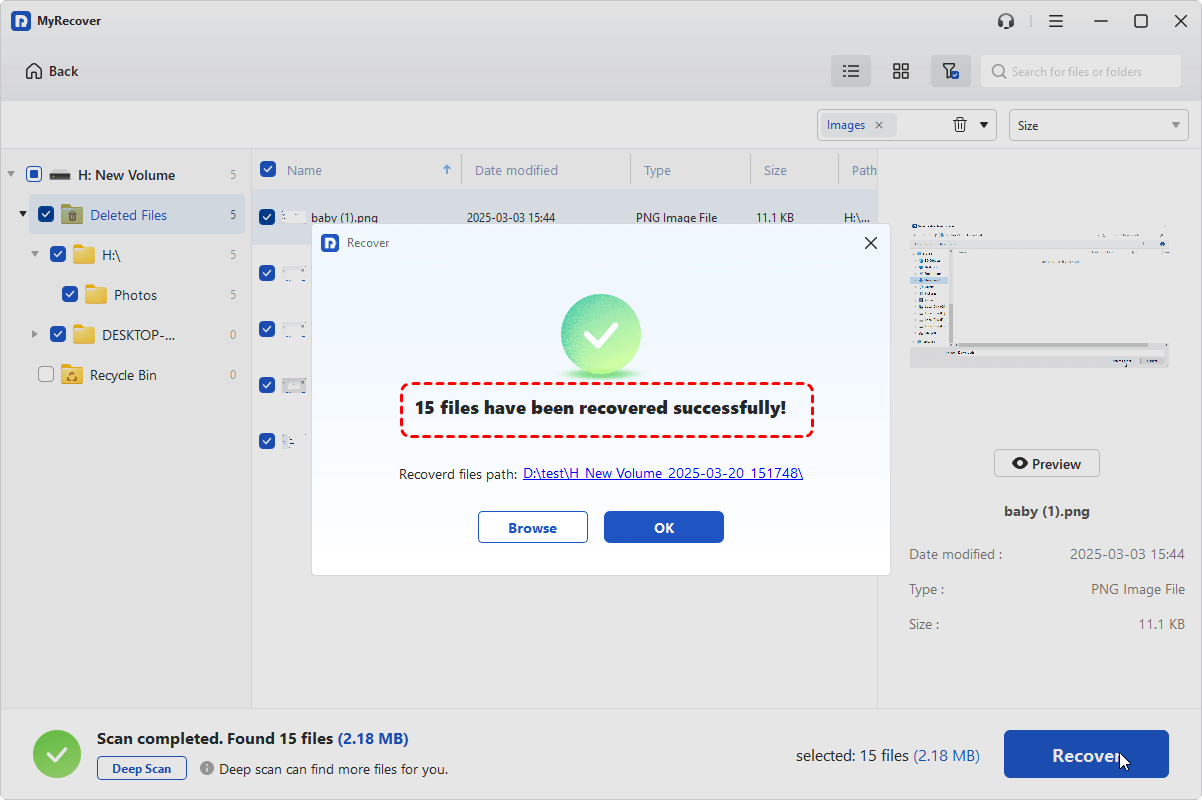
When the process is completed, you'll see the message "Files have been recovered successfully". Then you can check the recovered wedding photos in the destination folder by clicking on "Browse" button.
How to Recover Deleted Wedding Photos on iPhone
Additionally, apart from hard drives, wedding photos can also be accidentally deleted when you view them on your phone. This section will walk you through recovering deleted wedding photos on an iPhone.
Check the Recently Deleted Folder
When you delete a photo on an iPhone, it goes into the Recently Deleted folder and stays there for 30 days. Follow these steps to recover deleted wedding photos:
Step 1. Open "Photos" app on your iPhone.
Step 2. Then go to "Albums" > "Recently Deleted".
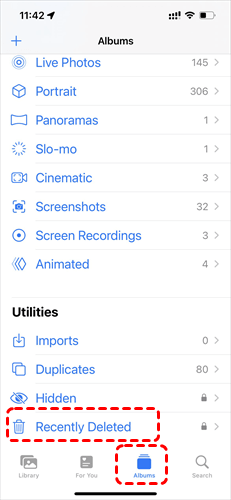
Step 3. Select the photos you would like to recover and click "Recover".

If more than 30 days have passed, or the photos were deleted from "Recently Deleted" folder, this method won't work. In that case, the professional data recovery tool can rescue your deleted wedding photos.
Restore Wedding Photos from Saved Cloud Copies
If your wedding photos are no longer in Recently Deleted, check whether you previously saved them to another cloud service or received copies from your photographer.
Step 1. Sign in to Google Photos, Dropbox, or another cloud account where you may have saved the pictures.
Step 2. Look for the wedding album or previously uploaded photos. Check the service's Trash if necessary.
Step 3. Download any available photos to your iPhone or another safe storage location.
If you use iCloud Photos, you can also check Recently Deleted on iCloud.com. However, deleting photos while iCloud Photos is enabled normally removes them from other synced devices as well.
FAQs:
Q1: Can I recover wedding photos from a formatted SD card?
Q2: Will recovered wedding photos keep their original quality?
Q3: Can I recover wedding photos after emptying Recently Deleted on iPhone?
The Bottom Line
Losing your wedding photos feels like losing a part of your life’s story — but thanks to today’s technology, those moments aren’t necessarily gone forever. Whether they were deleted from your SD cards, or other hard drives, the right tools and quick action can make all the difference.
After all, your wedding memories deserve more than a "delete", they deserve a second chance to shine. If you have more advanced needs, such as unlimited data recovery capacity or the ability to preview file contents, upgrading to MyRecover Professional edition is a worthwhile investment.

Stay Updated With Our
Latest Tips
Add us as a preferred source on Google to never miss helpful guides.
 Add as preferred source >>