 MyRecover



Camera Files Missing After Import: How to Locate, Fix, and Recover Them
Camera files missing after import rarely means permanent loss. A move, a hidden folder, or a camera folder missing on Samsung can hide images from view. This guide covers where Windows 11 saves camera videos, how to check the card before scanning, and when recovery software is appropriate.

By Delores / Updated on November 20, 2026


Quick Answer
If your camera files are missing after import, the files usually still exist. A failed transfer most often leaves the originals on the memory card, places them in an unexpected folder, or marks them as hidden, so the first job is to locate a surviving copy rather than to format or rescan the card. Work through the checks below in order, and use recovery software only when the files are genuinely absent.
Windows 11 adds one common twist: the Camera app does not save captures into a general Videos folder. Microsoft documents that photos and videos go to Camera Roll by default and that this folder can move when OneDrive backs up Pictures, which is why an import can look empty even though the files are on the PC. Microsoft's Camera Roll guidance lists the save location and folder-permission checks in detail.

Camera Files Missing After Import!
Digital camera photos disappeared HELP
Hi, I’m useless at anything technical, but half of my digital camera photos randomly disappeared and won’t show up. Does anyone have any idea how to recover these randomly lost photos?
It’s just a cheap camera from Amazon, so it’s nothing crazy, but those photos mean a lot. If anyone can help, I’d be so grateful. Thank uuu.
- Question from reddit.com
Why are my camera photos missing after import?
I went to import pictures from a session today, and it’s saying there are no images. We literally looked through them when I got done. My camera was turned off in the bag, so they didn’t magically delete. Please help!!
- Question from facebook.com
If you are stuck in the same situation, please don’t worry; you will learn the real causes and solutions to recover camera files quickly with the step-by-step guide.
Why Camera Files Go Missing After Import
- Move Instead of Copy, and Delete After Import
Copy leaves the original on the card; move deletes it once the transfer completes. Many photo applications expose this as a checkbox labelled Delete after import or Erase card after transfer, and a cut-and-paste in File Explorer behaves the same way. If the copy step is interrupted or the destination fills up, the original can be gone while the destination file is incomplete. Import utilities also skip files whose names and timestamps match existing ones; because camera filename counters restart on a new card, a new shoot can be passed over silently with no error message.
- The Files Land in an Unexpected Folder
If you are asking "Where does Camera app save videos in Windows 11", the answer is the same Camera Roll folder as photos: C:\Users\\Pictures\Camera Roll, unless the save drive was changed under Settings > System > Storage > Advanced storage settings > Where new content is saved. When OneDrive backs up Pictures, Camera Roll sits inside the OneDrive Pictures folder instead. The Photos app is a viewer rather than storage, so files can exist on disk but stay invisible until that folder is added to Gallery. On the card itself, cameras write into numbered subfolders under DCIM, and a RAW file can be present while its JPEG companion is not, or the reverse.
- Interrupted Transfers, Hidden Files, and Corruption
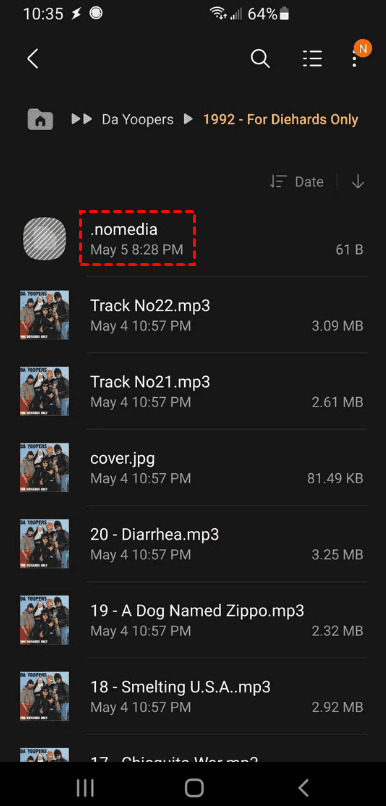
Removing the card before all write operations finish, or losing power during a transfer, can corrupt the file system and make a folder unreadable. Files may also be marked hidden in Windows, or a .nomedia marker may stop Android's media scanner from indexing a folder on a Galaxy phone. Neither a full used-space bar nor an apparently empty card proves anything about the specific photos you want, so inspect the actual files before concluding.
How to Locate Missing Camera Files Before You Recover
1. Stop writing to the camera card and the destination drive; new photos, installs, or an accepted format prompt can overwrite deleted file records.
2. Open the destination folder you chose during import, then check Pictures, Downloads, the Desktop, and any dated subfolders; search for JPG, JPEG, and your camera's RAW extension, and sort by both Date modified and Date taken.
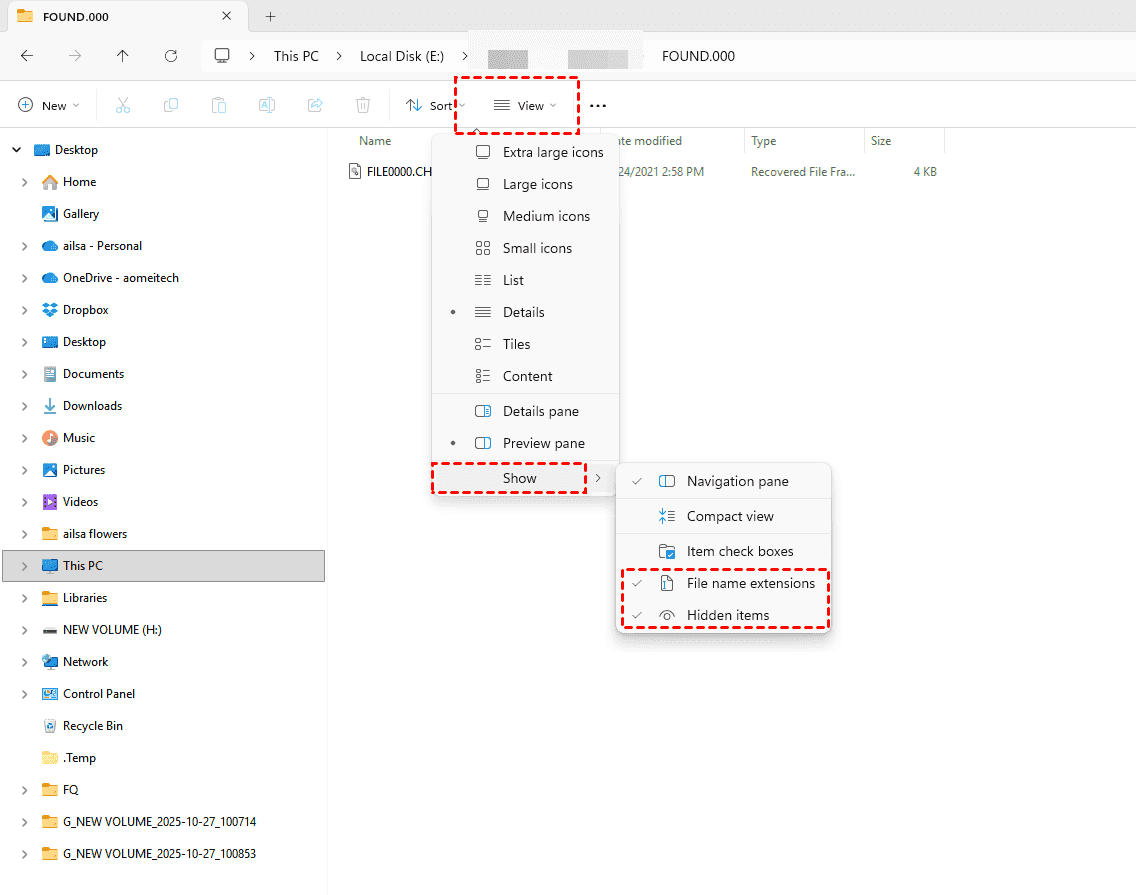
3. In File Explorer, select View > Show > Hidden items, enable File name extensions in the same menu, and open DCIM and its numbered subfolders on the card without changing anything.
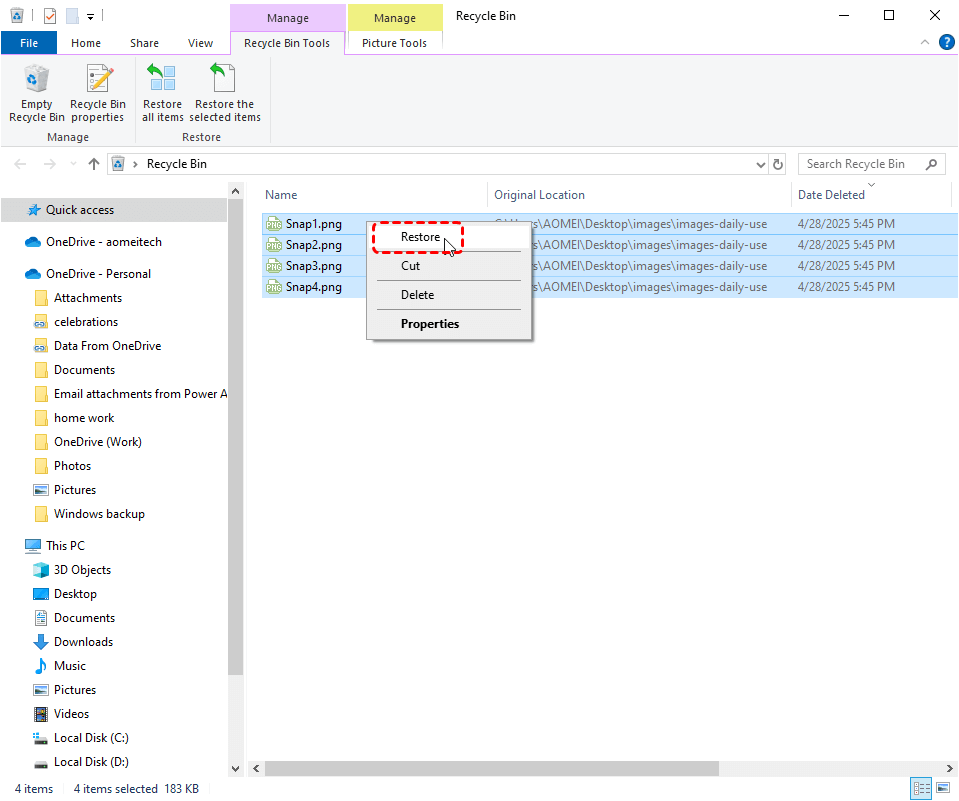
4. Check the Recycle Bin, OneDrive, and any cloud backup; a move operation can delete the card originals while leaving a recoverable copy in the Trash.
5. Compare the file count on the card with the count at the destination, then decide which device to scan: the source card in almost every case, or the destination drive when only the copy failed.
How to Fix a Camera Folder Missing on Samsung?
When the camera folder is missing on Samsung, but My Files still lists the images, the Gallery app is usually failing to scan the folder rather than the photos being deleted.
1. In Gallery, tap the grouping icon beside Search to turn off image grouping, then open Albums and check Hide albums and your essential album selection.
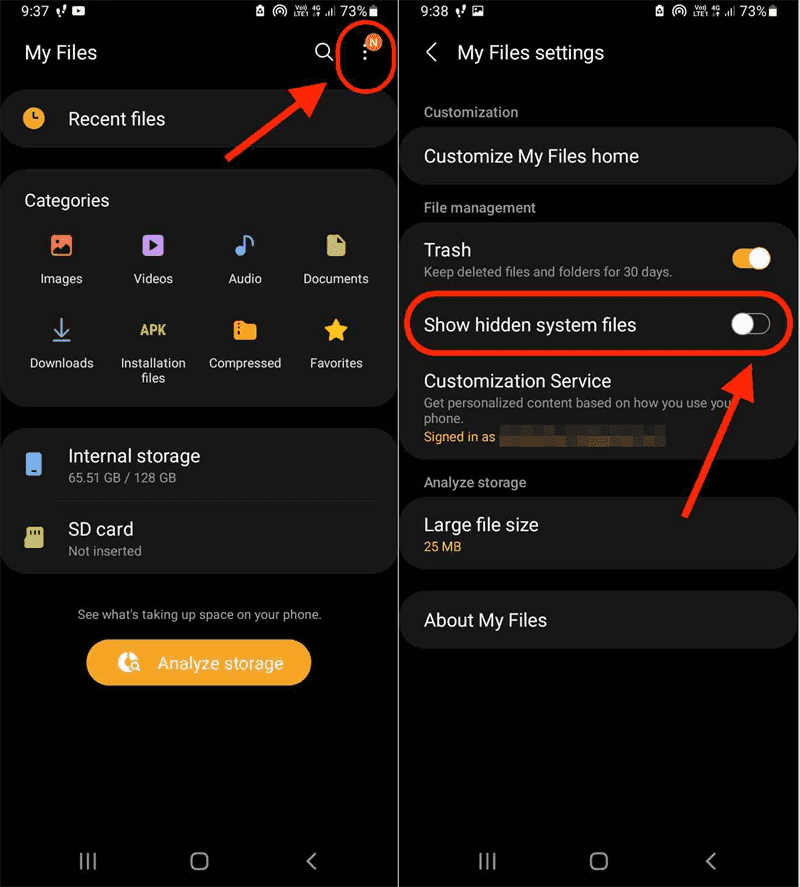
2. Open My Files > More options > Settings, switch on Show hidden system files, and look inside DCIM, Pictures, and app folders for a file named .nomedia; delete only that marker if present.
3. Check Gallery > Menu > Trash and My Files > Trash and restore anything you need; Samsung notes that Gallery Trash items are permanently deleted after 30 days.
4. Open Albums > Downloads, then use My Files to copy images into DCIM or Pictures so Gallery can index them.
5. Go to Settings > Apps > Gallery > Permissions > Photos and videos, set Always allow all, and restart the phone.
Samsung states the same checks in order, including the 30-day Trash limit, on its official Gallery troubleshooting page; treat it as the reference before trying bigger changes.
How to Recover Camera Files That Are Truly Gone
If no copy turns up and the card is still detected, a graphical utility can scan the source without the drive-letter guessing that makes command-line recovery syntax error-prone. That convenience has a cost: it is one more install, and it makes sense only after the checks above. So, you can try the powerful Windows data recovery software, MyRecover, to recover missing camera files. This walkthrough of recovering deleted photos from an SD card shows:
Use the following procedure when the camera's SD or microSD card is still readable in Windows 11/10, but the photos and videos are no longer listed.
1. Install MyRecover on the PC's system drive, then launch it and connect the card through a reader until Windows assigns it a drive letter.
 100% Secure
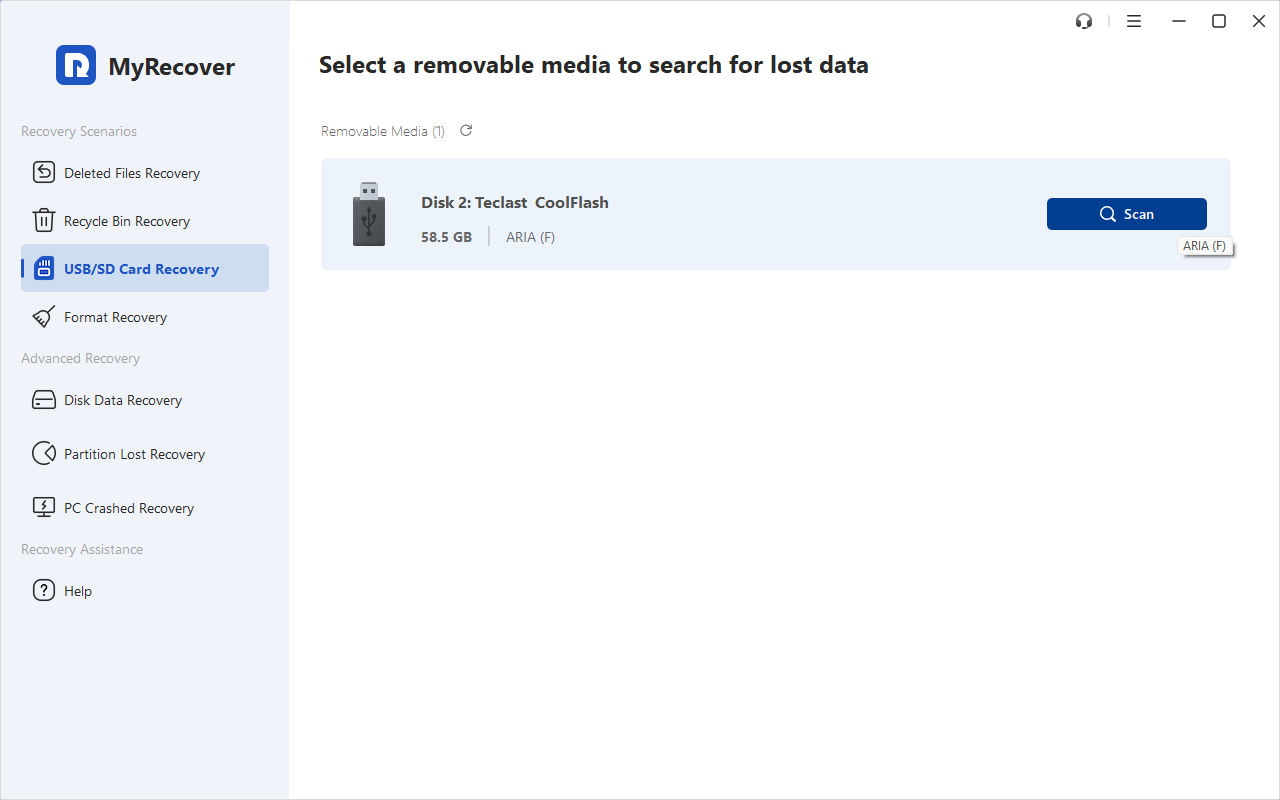
2. Select USB/SD Card Recovery, hover over the card's drive according to the capacity, disk number, and labels, and press Scan; let the scan finish instead of stopping it early.
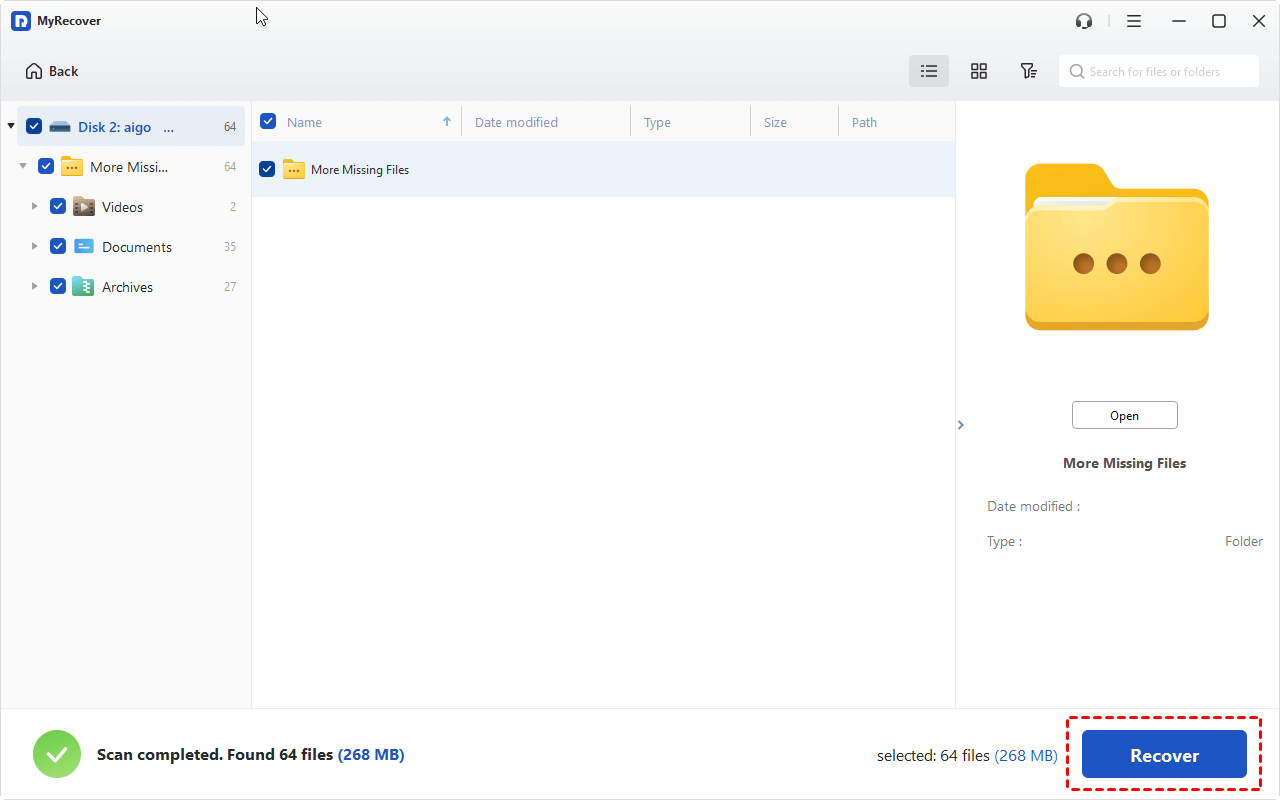
3. When the scan completes, preview the photos or videos you recognize before selecting them. Tick the files you need and press Recover.
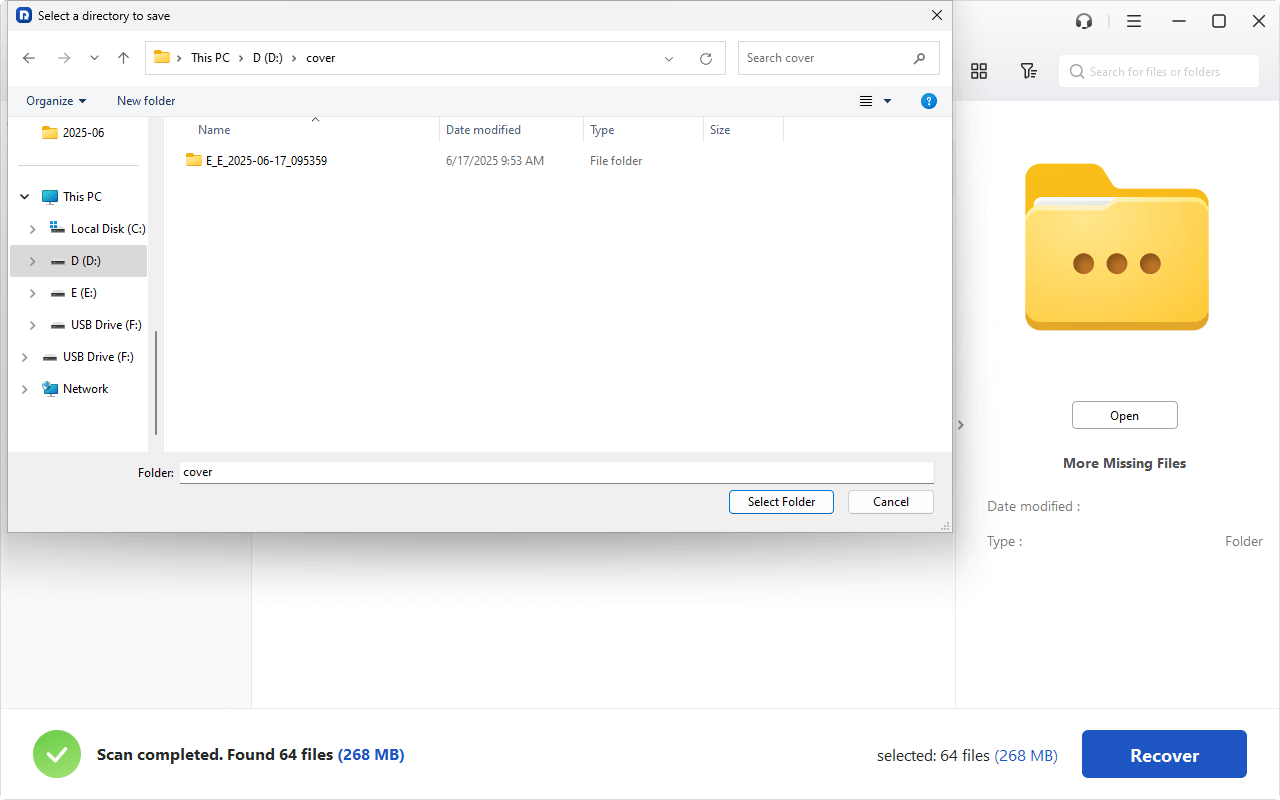
4. Choose a folder on a different physical drive as the destination.
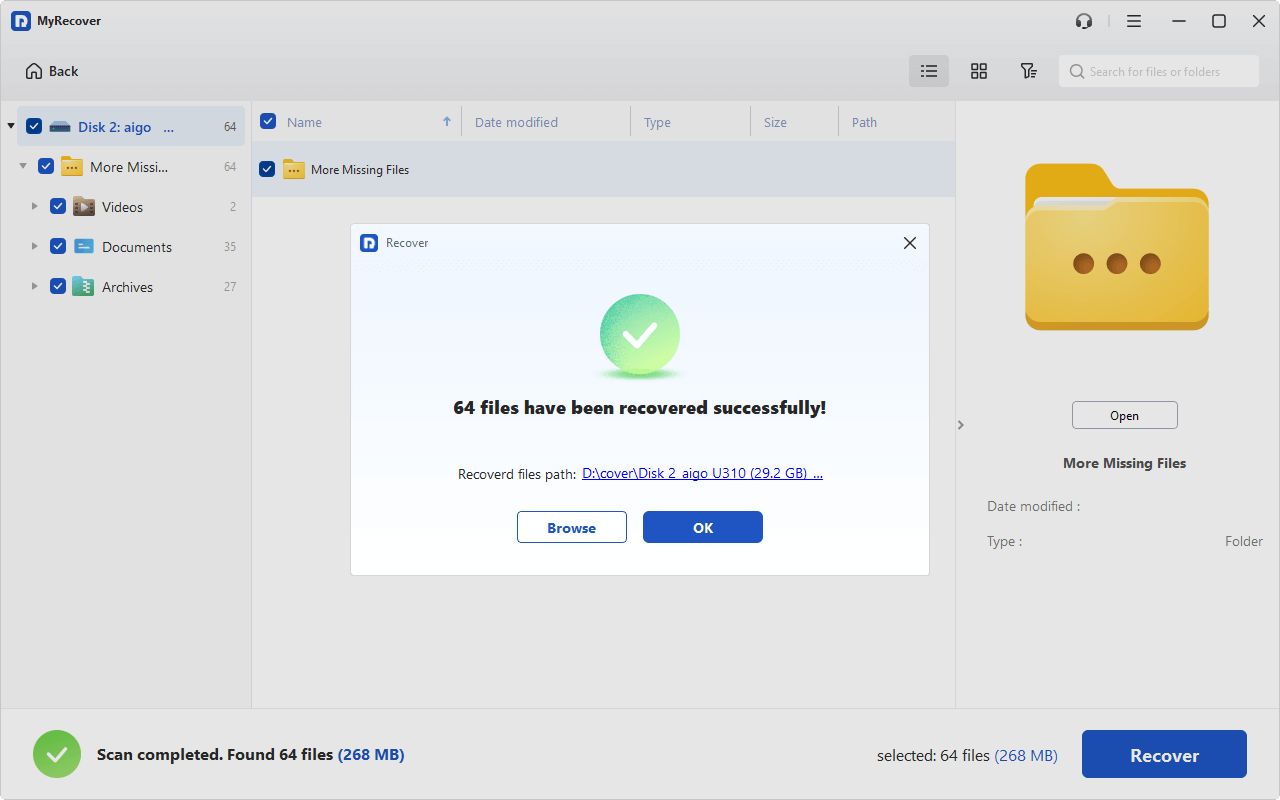
5. Open several recovered files at full size in the destination before you format or reuse the card.
- Tips:✎...
- To recover unlimited files, please try upgrading to MyRecover Professional or Technician. Then you can enjoy all premium features, including recovering files from a crashed computer, recovering files from a deleted partition, etc.
- Once scanned, you can search for files by file name (or file path, modified date, size, etc.) if you remember, to quickly find what you need, instead of selecting manually.

 MyRecover
- Recover Deleted Files Easily with Simple Clicks
- 1000+ File Formats Supported
- Supports HDD, SSD, External Hard Drive, USB Drive, SD Card, etc.
- Quickly Find Files Using File Types, Name, Size, etc.
- Preview Files Before Recovering
- Recover Unlimited Data
 100% Secure
FAQs about Camera Files Missing After Import
Where does the Windows 11 Camera app save videos?
Photos and videos captured with the built-in Camera app go to Pictures > Camera Roll by default, normally C:\Users\\Pictures\Camera Roll. If OneDrive backs up the Pictures folder, Camera Roll sits inside the OneDrive Pictures folder instead. The drive for new captures can be changed under Settings > System > Storage > Advanced storage settings > Where new content is saved.
Why are my camera files not showing in Gallery but visible in My Files?
That pattern points to an indexing or visibility problem, not deletion. Check image grouping and hidden albums, remove a .nomedia marker if one exists, confirm Photos and videos permission is set to Always allow all, and copy the files into DCIM or Pictures so Gallery can scan them.
Can photos be recovered after a cut-and-paste import?
Sometimes. Cut copies each file to the destination and then deletes the source, so an interruption can leave a partial copy at the destination and a deleted record on the card. Check both locations first, then scan the source if the originals are gone; any new writes reduce the chance of a complete result.
Does a full or empty card prove the photos are gone?
No. Used space reports allocation and can coexist with hidden files, unfamiliar folders, or damaged directory information, while an apparently empty card does not confirm that earlier data was erased. The only reliable step is to inspect the files, then scan the source if they are genuinely missing.
How to recover a file from a camera?
Check the DCIM folder on a computer via USB and copy files manually. If deleted, use recovery software (e.g., MyRecover) on the SD card and stop using the card immediately.
Why did my files disappear from my SD card?
Usually a failing/counterfeit card (test with H2testw) or file system corruption from unsafe removal. Files may still be there but unreadable.
The End
Camera files missing after import are usually misplaced rather than destroyed. Check the destination, hidden files, and platform-specific folder rules first; fix the Gallery index if the files appear in My Files; and scan the source card only when no copy remains. Stop writing to the affected device, save recovered files elsewhere, and verify full-size files before reusing the card.

Stay Updated With Our
Latest Tips
Add us as a preferred source on Google to never miss helpful guides.
 Add as preferred source >>