 MyRecover



Recover Lost Photos: Expert Patriot SD Card Recovery Guide Now
Facing a patriot sd card not recognized error or data loss? This definitive guide to patriot sd card recovery explains safe software, repair steps, and how to retrieve files when the drive shows up but data is missing. Get your memories back.

By Delores / Updated on January 23, 2026


What Are Patriot SD Cards?
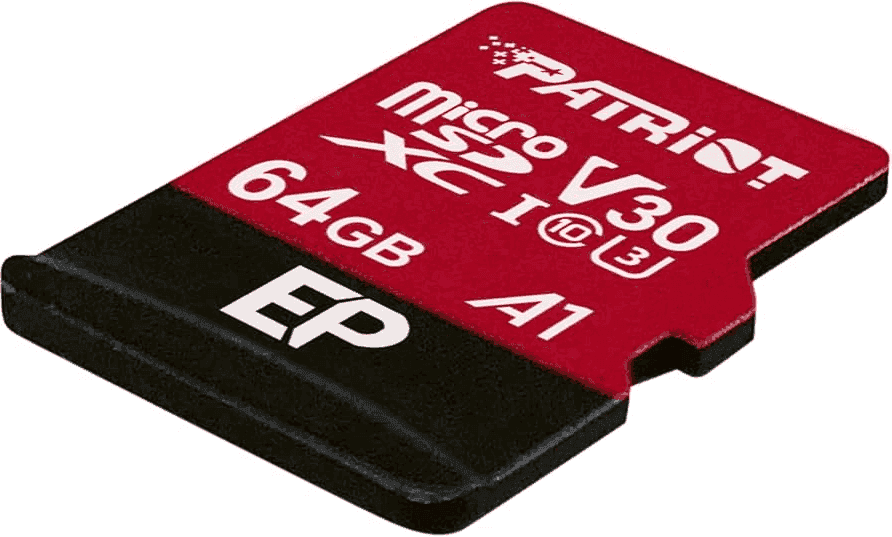
Patriot SD cards are flash memory cards from Patriot Memory, designed for a range of uses. They offer professional-grade series like V90 for 4K/8K video and high-speed transfers, as well as more affordable EP/LX series for everyday devices. These cards support various speed classes (UHS-II, V30, A1/A2) to match the needs of cameras, drones, phones, and dashcams, and often include durable, waterproof, and shockproof designs.
When your camera displays an SD card error, or your Patriot SD card is not recognized by a Windows computer, it's very important to perform a Patriot SD card recovery. Because these data on the Patriot SD card are very important for you, regardless of the data type.
This guide will show you the reasons why your Patriot SD card gets corrupted, and how to recover files from the SD card effectively. Check the detailed steps below.
Patriot SD Card Failure Symptoms
Generally speaking, your Patriot SD card will warn you of something before you need data recovery. There are different situations in which you might need a Patriot SD card recovery:
- You plug the Patriot SD card into your computer or slot it into your camera, and you can't see it. The device fails to detect it. Your Patriot SD card might be damaged physically.
- Sometimes, your computer may sound the alert when a new cardis plugged in, but no drive letter appears in File Explorer.
- Your computer detects the Patriot SD card, and you can double-click it, but it shows you the error "The file or directory is corrupted and unreadable" or "You need to format the disk" (never format at this stage if you want your data back), etc.
The last two scenarios typically indicate logical corruption. The card's physical components are likely fine, but the software structure organizing your data has become scrambled. Your data remains, but the system for locating and assembling it is broken, so you need a safe SDcard recovery software to recover files.
Immediate Actions to Prevent Further Data Loss
- First things first: stop using the card immediately. The moment you suspect failure, power down the camera or safely eject the card from your computer. Why? Because most devices write data constantly, even for background tasks, which may overwrite the data you're trying to recover.
- Next, if the card is physically dirty or wet, gently clean the metal contacts with a dry, soft cloth and let it air dry completely—never use heat.
- Write-protect the card if it has a physical lock switch.
This readies the card for the main event: a proper scan with professional software.
Best Patriot SD Card Recovery Software
Choosing the right tool is critical for a successful recovery. Here are the essential features and capabilities you must look for in data recovery software designed for SD cards:
- Broad File System & Media Support
It must support the common file systems used by cameras, phones, and devices, specifically FAT32(common for cards 32GB and below), exFAT (common for cards 64GB and above), and NTFS (less common, but sometimes used).
- Deep Scan Ability
The software must perform a Deep Scan (or "RAW Recovery"). This feature scans the card sector-by-sector, looking for the unique "signatures" or headers of file types (like JPEG, MP4, DOCX, etc.) to recover files even if the directory is severely corrupted or the card was formatted.
- File Preview Functionality
Before recovery, the software should allow you to preview the found files to verify their integrity. This confirms the files are usable and not just corrupted fragments.
- Intuitive Filtering and Search
After a scan, you may face thousands of recovered files. The software needs robust filtering options by file type, date, name, size, and original folder structure to quickly locate specific items.
- Highest Recovery Rate
The Patriot SD card recovery software should recover files with a high recovery rate, typically 99%.
- Complex File Recovery
Software must reconstruct fragmented files and restore data from encrypted cards, corrupted partitions, a crashed computer, a damaged partition, etc, to ensure recovered data is usable.
Fortunately, here comes the powerful Windows data recovery software MyRecover to help. It meets all the requirements above and provides a comprehensive data recovery path to recover files.
Patriot SD Card Recovery in 4 Steps
Here, we will show you how to recover files from a Patriot SD card with MyRecover. Here is the simple guide:
1. Please download and install MyRecover on your computer. Connect your Patriot SD card to your computer.
 100% Secure
2. Tap USB/SD Card Recovery, choose the Patriot SD card, and hit Scan. Wait for the process to complete and hit OK to confirm.
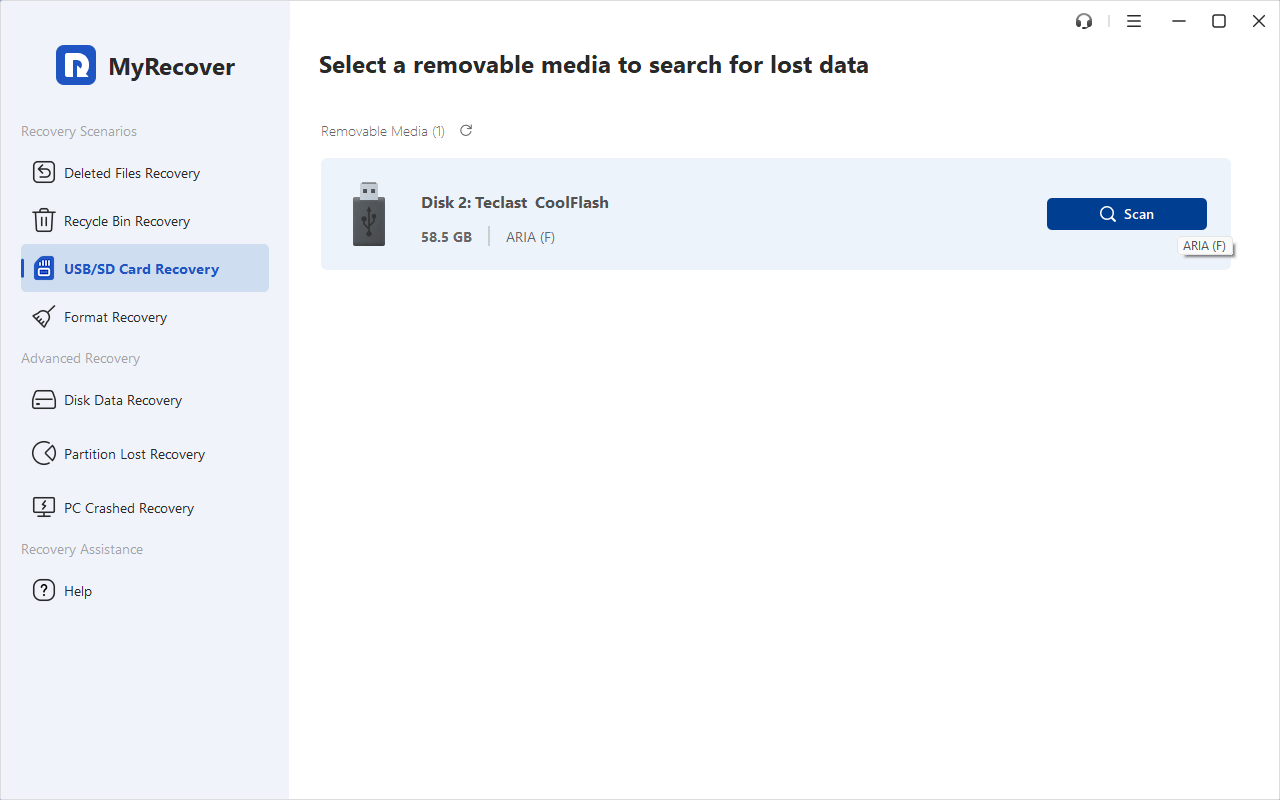
Tip: If your files don't show up, proceed with the Deep Scan. And it costs much more time scan sector by sector to find all missing files.
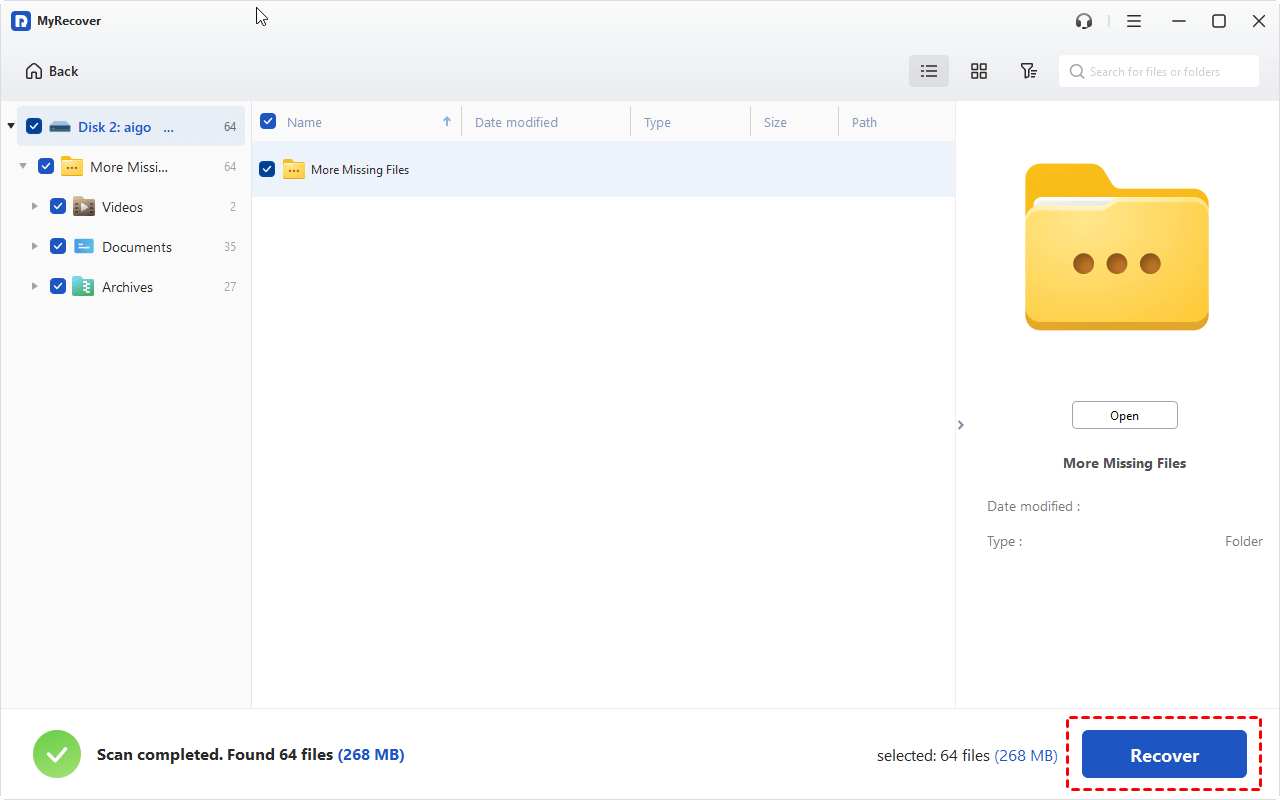
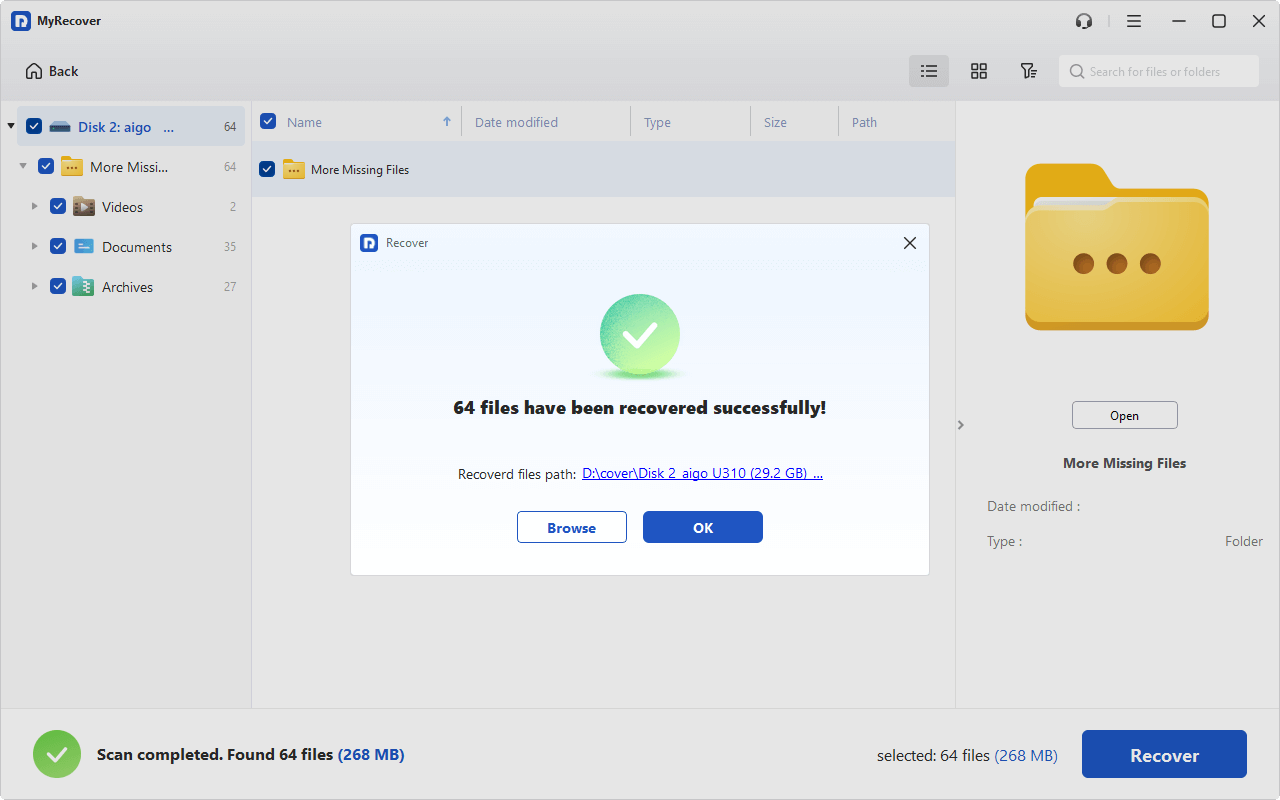
3. You can hit Preview while selecting the file to check its integrity. Then tick all the boxes before the files, and hit Recover.
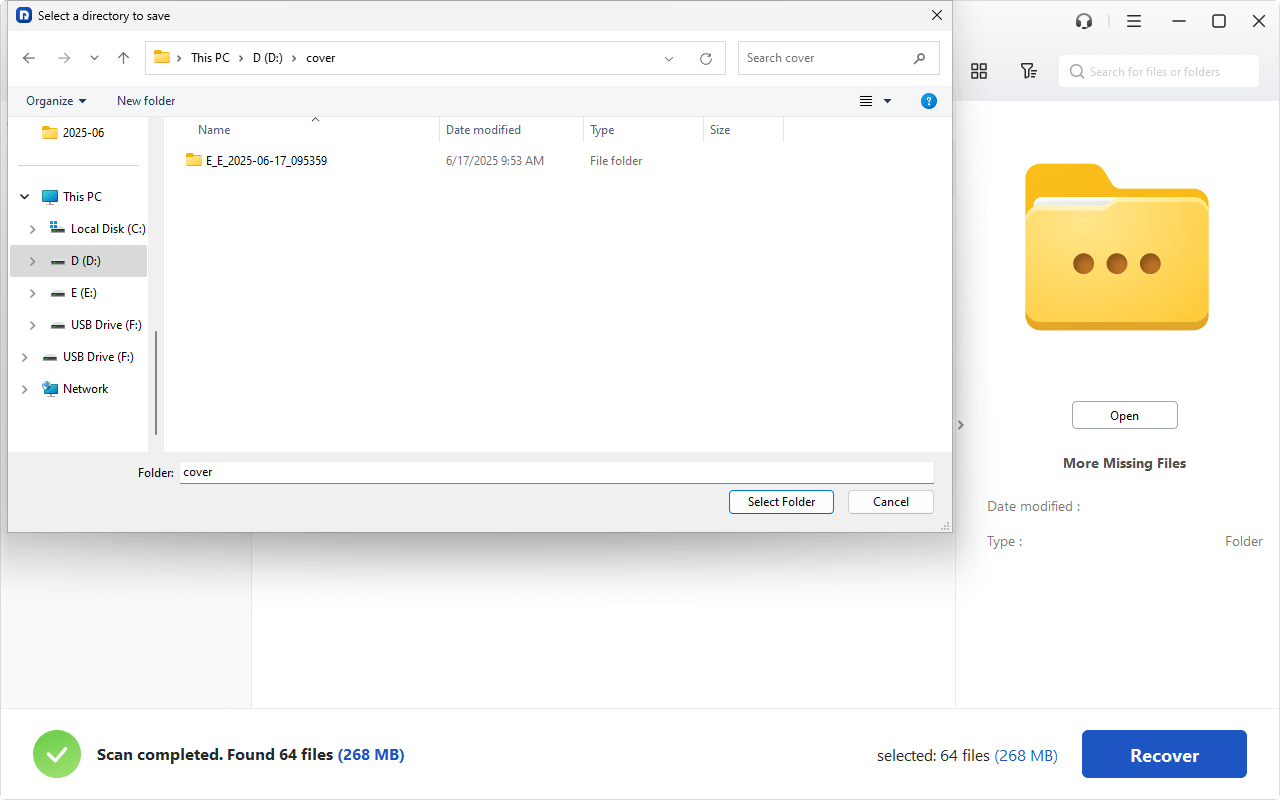
4. Choose another safe location to keep them.
- Notes:✎...
- By default, MyRecover lists your missing files by file type, so you can find them quickly. Besides, you can click Path to find files by folder structure, search files by file name, file size, modified date, etc.
- You can recover unlimited data all at once.
- Upgrading to MyRecover Technician is another option if you need to recover files from unlimited computers within your organization. Try to enjoy the easy recovery.
After the recovery is complete, don’t just close the software and celebrate. Take a moment to open a few of the recovered files, especially the most important ones, to ensure they are not corrupted and open correctly. Check if photos render fully and documents are readable.
 MyRecover
- Recover Deleted Files Easily with Simple Clicks
- 1000+ File Formats Supported
- Support HDD, SSD, External Hard Drive, USB Drive, SD Card, etc.
- Quickly Find Files Using File Types, Name, Size, etc.
- Preview Files Before Recovering
- Recover Unlimited Data
 100% Secure
Attempt Patriot SD Card RepairAfter Data Recovery
Sometimes, the goal isn't just to get files off the card but to get the card itself working again for future use. This is the realm of Patriot SDcard repair.
If your card is accessible but buggy, try the following built-in tools to fix or replace the card.
Way 1. Repair Patriot SD card using CHKDSK
On Windows, you can use the CHKDSK utility.
1. Open Command Prompt as Administrator.
2. Type chkdsk X: /f (where "X" is your SD card's drive letter).
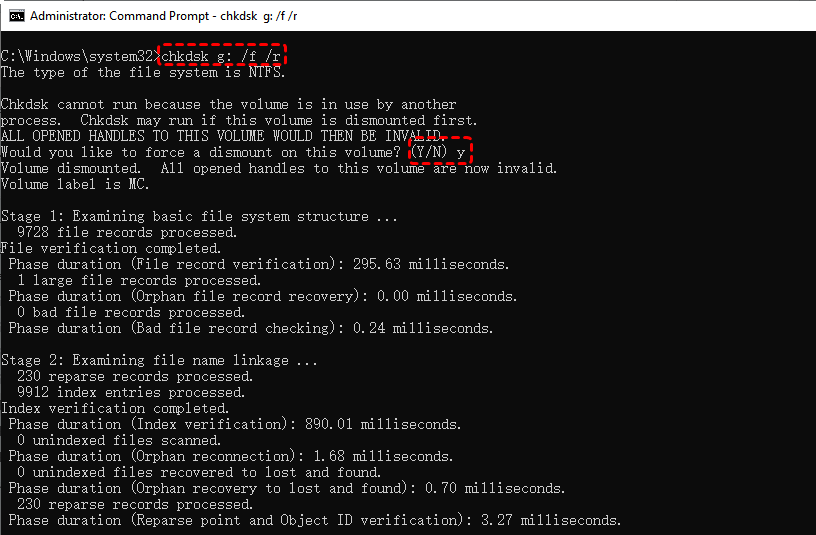
This command attempts to find and fix file system errors.
Way 2. Run First Aid on Mac
On a Mac, you can use Disk Utility's "First Aid" function.
1. Insert your SD card into your Mac's card reader.
2. Go to your Applications folder, open the Utilities folder, and launch Disk Utility.
3. In the Disk Utility menu bar, click View and select Show All Devices.
4. In the sidebar, select your SD card (the parent device) or its specific volume.
5. Click the First Aid button in the toolbar, then click Run in the confirmation dialog.
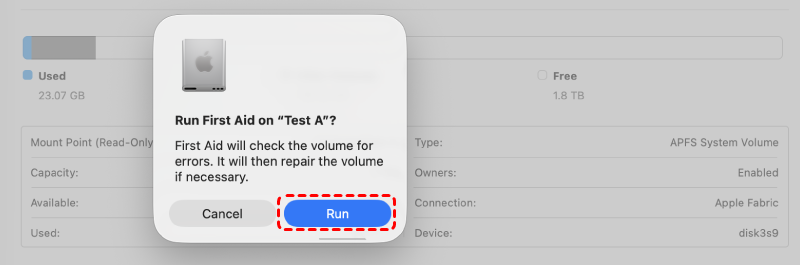
Disk Utility will now check for and attempt to repair any file system errors on the card.
Way 3. Replace the Patriot SD Card
When the above solutions, like CHKDSK, fail, and the card is still not recognized by any device, the problem may be physical. This could be a damaged controller chip, broken memory modules, or corroded circuitry. At this point, it’s better to replace the Patriot SD card.
Maintain Your SD Card After Recovery
Congratulations on recovering your files! Now, let’s make sure you don’t have to revisit this guide anytime soon. Proper care can extend your card's life for years.
- Always eject it safely using your computer’s "Eject" function before physically removing it.
- Don’t remove it from a camera while it’s still on or writing data (the light is often blinking).
- Avoid exposing it to extreme temperatures, moisture, or strong magnetic fields.
- And perhaps most importantly, never, ever use your card as a primary long-term storage device. It’s a transfer medium, not an archive.
- Periodically, it’s a good idea to format your card in the device you use it with most often (like your camera), as this creates a fresh, optimized file system for that device. Always back up your files first!
- You can also use tools like H2testw (for Windows) or F3 (Mac/Linux) to check your card’s true capacity and write speed, which can help spot counterfeit or failing cards before they fail catastrophically.
FAQs on Patriot SD Card Recovery
Q: Can I recover files from a Patriot SD card that my computer says needs to be formatted?
A: Yes. Do not format. The prompt means the file system is corrupted, but your data is likely still there. Use recovery software like MyRecover to perform a deep scan. It finds files by their data signatures, bypassing the corruption so you can recover them first.
Q: My Patriot SD card is not recognized by any device. Is my data permanently gone?
A: Not necessarily, but it's serious. First, try a different card reader and computer. If still unrecognized, it could be severe logical corruption or physical damage. Deep-scan software can tackle logical issues. Physical damage requires a professional data recovery service, making it costly but not always impossible.
Q: What is the difference between Patriot SD card recovery and Patriot SD card repair?
A: Recovery gets your data back; repair fixes the card. Recovery involves copying files to a safe location using software. Repair uses tools like CHKDSK to fix the card's file system so it can be used again. Always perform recovery first, as repair attempts can overwrite your data.
Q: How do I choose safe SDcard recovery software and avoid scams?
A: Pick established, reputable software. It must operate in "read-only" mode and offer a free scan/preview. Read independent reviews. Avoid tools promising 100% success or instant results. Legitimate software shows you what it can recover before asking for payment.
Q: I accidentally deleted files from my Patriot SD card. Can I get them back?
A: Yes, with high success if you act fast. Deleted files remain until overwritten. Stop using the card immediately. Use recovery software and run a "Quick Scan" to find files listed in the recent log. The sooner you scan, the better your outcome.
Q: After a successful patriot recovery, should I continue using the same SD card?
A: It's a major risk. If the failure was a simple deletion, it might be okay after a health check. However, if it failed due to corruption or not being recognized, the card is now unreliable. Retire it from primary use. The small cost of a new card isn't worth losing your data again.

Stay Updated With Our
Latest Tips
Add us as a preferred source on Google to never miss helpful guides.
 Add as preferred source >>