 MyRecover



WD Partition Recovery: Restore a Lost, Deleted, or RAW Western Digital Partition
Lost a partition on a Western Digital drive? This guide explains why a WD partition recovery problem happens, then walks through assigning a drive letter, rebuilding the partition table with TestDisk, and recovering files with a graphical tool when rebuilds fail.

By Delores / Updated on November 19, 2026


WD partition recovery means restoring a Western Digital drive's missing, deleted, or RAW partition to a usable state, or, when the partition structure cannot be saved, extracting the files it held—the order of operations matters. Confirm the drive is not physically failing, stop all writes, recover data before changing the partition table, and only then attempt a structural repair.
A lost partition is usually a logical problem rather than a dead disk, so a methodical approach often restores access without a lab. Many people start by hunting for a WD partition recovery repair tool because Windows reports the disk as unallocated, RAW, or missing a drive letter. Those three symptoms look similar in File Explorer but need different responses: assigning a letter changes nothing, rebuilding a partition table rewrites metadata, and formatting destroys the structures you need. Knowing which symptom you have decides whether recovery is realistic.

Why WD Partition Recovery Problems Happen
- Accidental Deletion and Unallocated Space
Deleting or resizing a partition removes its entry from the partition table but usually leaves the file data in place until new writes overwrite it. In Disk Management, the space shows as a single black Unallocated block. The same result follows a failed resize, an interrupted firmware update, or a disk utility that wrote a corrupt GPT. As long as nothing has been written over the old area, the underlying data often remains.
- RAW File System and Missing Drive Letters
A partition can remain listed while its file system becomes unreadable, shown as RAW. Causes include sudden power loss during a write, unsafe removal, bad sectors in the file-system metadata, and malware. Another symptom is a healthy partition with no drive letter: the data is intact, but Windows has no path to it. That case is fixed without touching data, while a RAW volume needs file-level recovery or a file-system repair.
- WD My Passport Hardware Encryption
Portable WD My Passport models add a recovery constraint that desktop disks do not. According to a documented technical guide to WD hardware encryption and recovery, My Passport drives made since 2015 apply AES-256 hardware encryption at the factory, even with no password set, and the Data Encryption Key sits on the USB bridge board. Two consequences follow. Keep the original enclosure, because the bridge board holds the key; swapping in an identical donor board will not decrypt the data. And if a scan returns only encrypted-looking sectors, the drive may need a lab rather than another software pass.
How to Perform WD Partition Recovery Safely
Work through these stages in order. Each one either restores access or rules out a cause without risking the data, so do not skip ahead to a partition-table write.
Step 1: Rule Out Connection and Physical Failure
1. Stop writing to the drive immediately and disconnect it if a scan or repair is already running.
2. Listen while it spins for repeating clicks, grinding, or a motor that stops and restarts.
3. Try a different USB cable, a different port, and a different computer to separate the drive from the enclosure and interface.
4. Open Disk Management and record the exact status: Unallocated, RAW, Healthy without a letter, Not Initialized, or no disk entry at all.
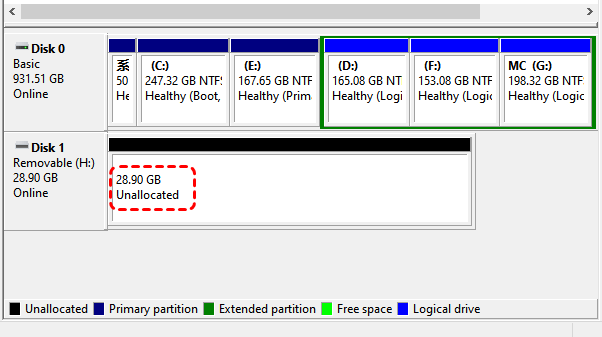
5. If the disk is absent everywhere, reports 0 bytes, or makes unusual noise, stop here and use the fallback section instead of scanning repeatedly.
Step 2: Assign a Drive Letter When the Partition Is Healthy
If Disk Management shows a healthy NTFS or exFAT partition with no letter, the data has not gone anywhere. This is the least invasive fix and the one to try first.
1. Open Disk Management with Win + X and select Disk Management.
2. Right-click the healthy WD partition and choose Change Drive Letter and Paths.
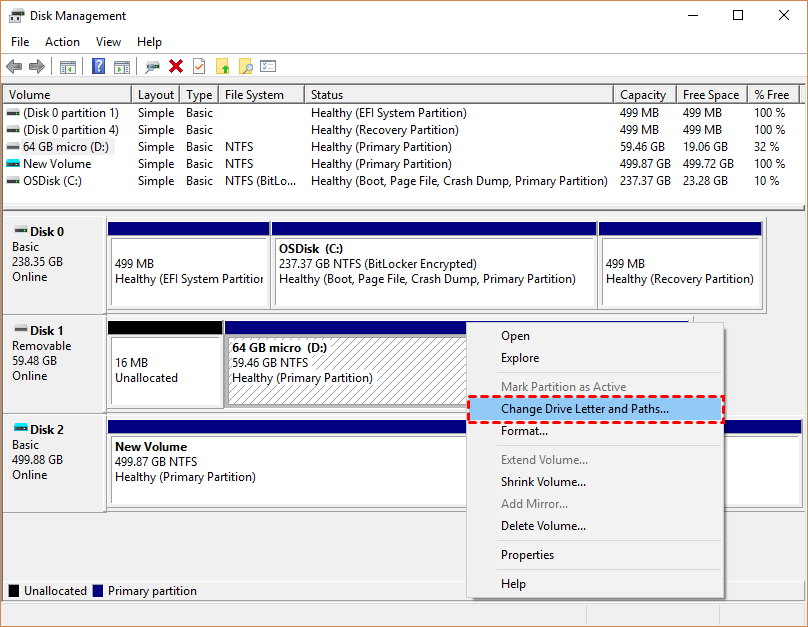
3. Click Add, pick an unused letter from the list, and confirm with OK.
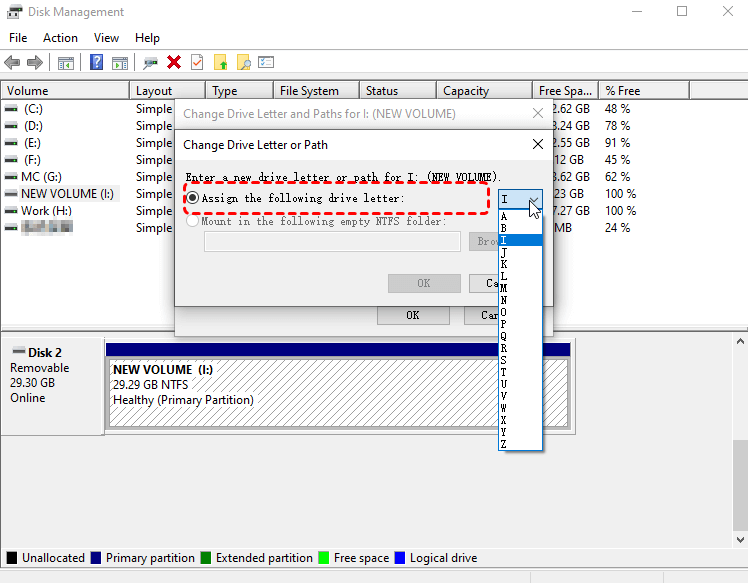
4. Open File Explorer and confirm the files appear and open normally.
5. If the option is greyed out, or the volume reads RAW or Unallocated, close the tool and continue to Step 3.
Step 3: Recover WD Partition And All Files Simultaneously
When the partition is deleted or RAW, extracting files first is safer than reassembling structures, because a bad write can make the only remaining copy unreadable. Text-based tools are powerful but easy to misoperate; when menu-driven partition tools feel risky, a graphical file-recovery utility, MyRecover, narrows the choices. One option is to recover the deleted partition and its files with Partition Recovery, which scans the disk without writing to it.
Here is how to perform WD partition recovery with MyRecover on a Windows 11/10 computer:
1. Please download and install MyRecover on your computer, never on the WD disk being scanned.
 100% Secure
2. Launch it and choose Partition Recovery from the scenario list.
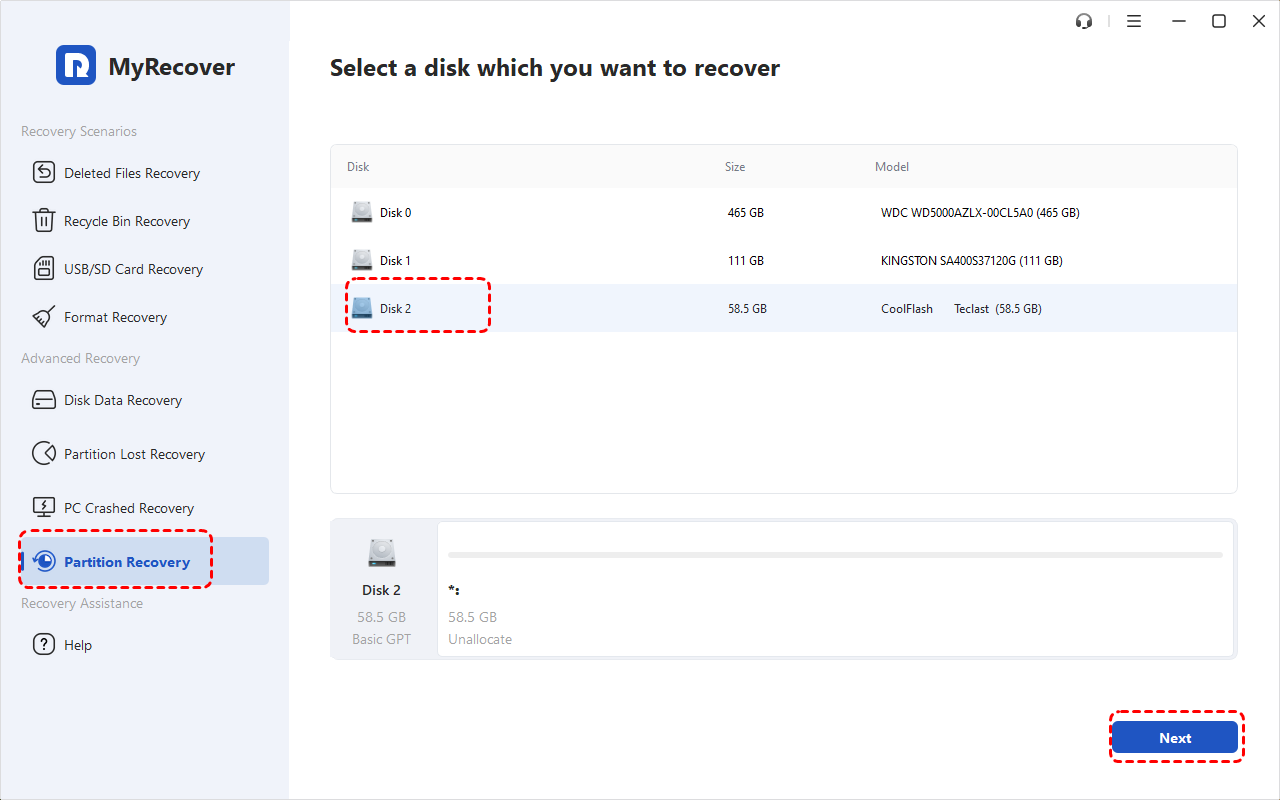
3. Select the WD external drive and start the scan; use Fast Search first, then Full Search if the target partition is missing.
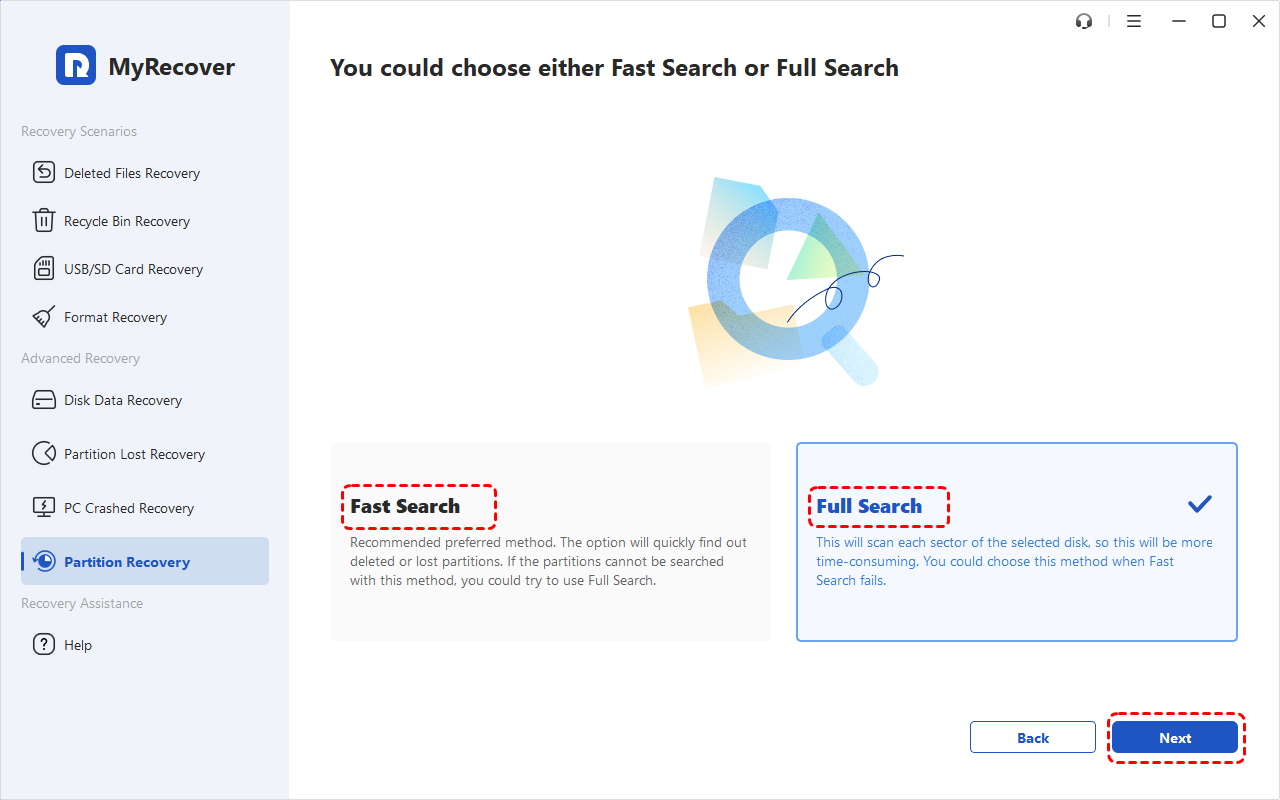
4. Read the candidate partitions by capacity, file system, and start and end sectors, using the Primary or Logical marker to match the original layout. Tick the deleted partitions you need, and hit Proceed.
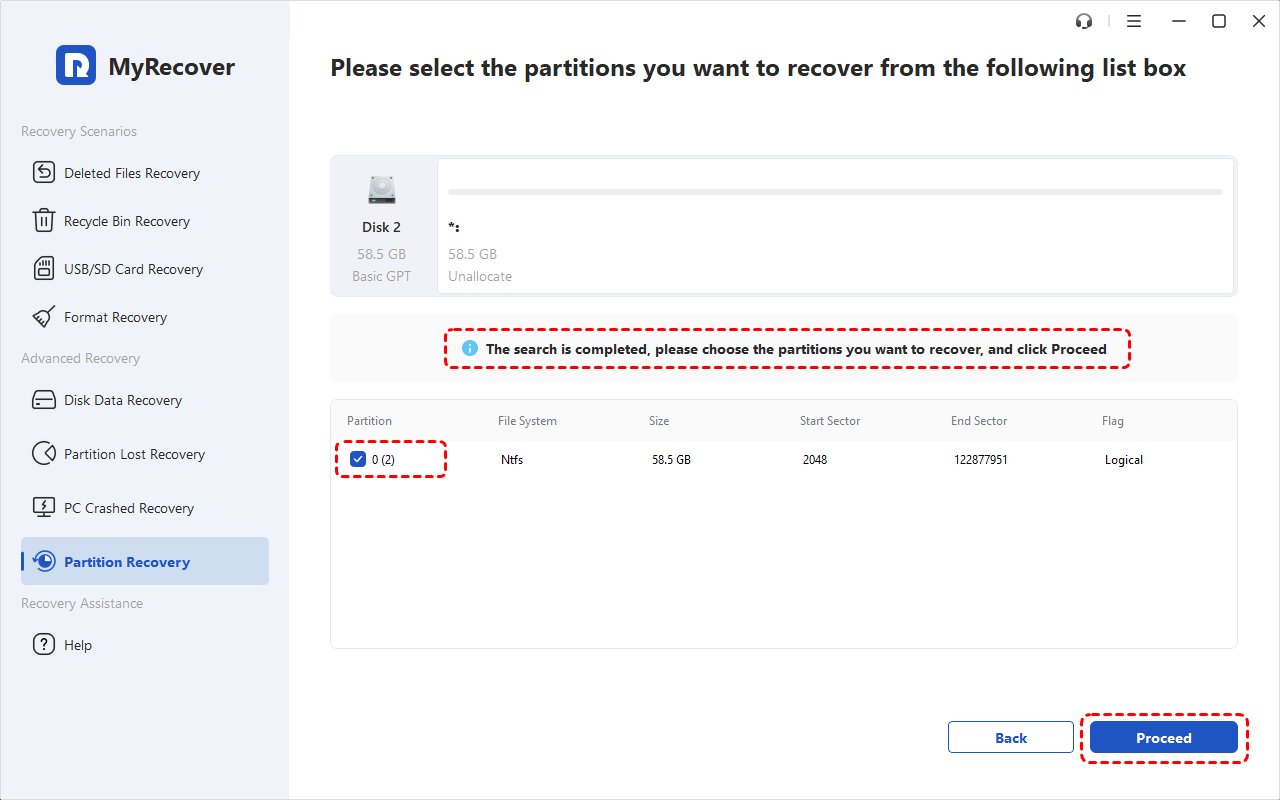
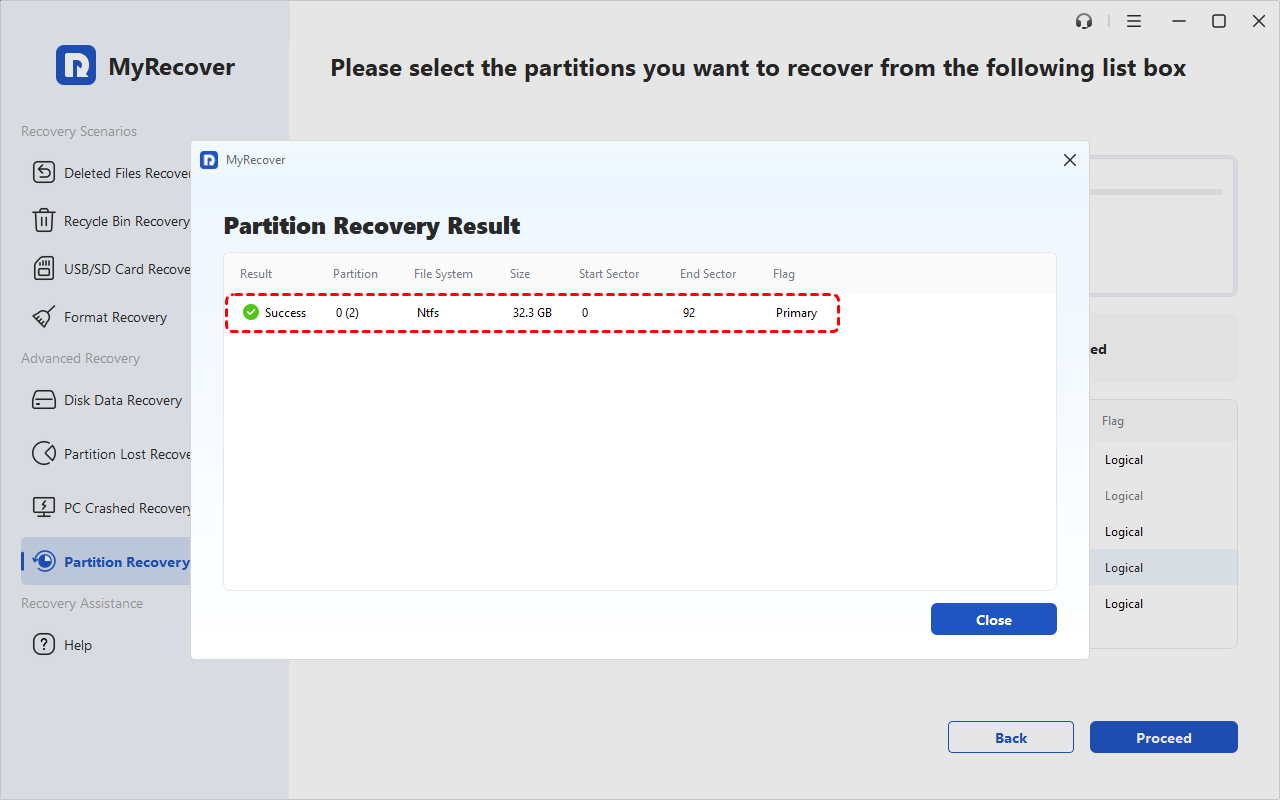
Wait a while; your original WD partitions will be recovered, as well as all the files within them.
You can also recover files from a corrupted SD card, recover files from a crashed computer, recover files from an SSD, recover files from a formatted hard drive, etc. Please choose the version you need: MyRecover Professional or Technician, if you need more advanced features.
 MyRecover
- Recover Deleted Files Easily with Simple Clicks
- 1000+ File Formats Supported
- Supports HDD, SSD, External Hard Drive, USB Drive, SD Card, etc./li>
- Quickly Find Files Using File Types, Name, Size, etc.
- Preview Files Before Recovering
- Recover Unlimited Data
 100% Secure
When a WD Partition Recovery Repair Tool Is Not Enough
A graphical WD partition recovery repair tool handles logical loss, but it cannot fix a failing motor, a damaged bridge board, or sectors that read as encrypted. Pushing repeated deep scans onto an unhealthy disk can widen the damage. Use this fallback path when Step 1 flagged a hardware symptom or Step 3 found nothing.
1. Power off any drive that clicks, grinds, or drops offline, and leave it unplugged.
2. If the disk still reads but shows bad sectors, create a sector-by-sector image to another drive and run all further scans against the image.
3. Keep the original WD enclosure and USB bridge board, since encrypted My Passport models store the decryption key there.
4. If imaging fails or every sector looks encrypted, contact a professional lab; Western Digital lists approved partners such as Ontrack, DriveSavers, and Secure Data Recovery.
5. Request a written record of the recovery attempt so a warranty claim stays intact.
How to Choose Western Digital Partition Recovery Software
Different tools solve different problems. Use these decision rules instead of picking whichever Western Digital partition recovery software appears first in a search result.
1. Try to assign a drive letter in Disk Management when the partition is healthy and only the letter is missing.
2. Choose a graphical file-recovery tool when the partition is deleted, or RAW, and the files matter more than the original structure.
3. Choose a partition-table utility such as TestDisk or MyRecover when you must restore the original layout and the disk reads cleanly.
4. Choose imaging plus a professional lab for noise, 0-byte capacity, or encrypted sectors.
5. Check free tiers before trusting a tool: published limits range from about 100 MB to 1 GB, and some cap the size of a single file, so confirm it can export what you actually need.
WD Partition Recovery FAQs
Can I recover a lost partition without formatting the drive?
Yes. Formatting writes a new file system over the area that may still hold your data. Assign a missing letter, extract the files, or rebuild the partition table instead.
Does assigning a drive letter bring my files back?
Only when the partition is intact but unmounted. If the volume reads RAW or shows as unallocated space, a new letter changes nothing about the missing metadata.
Will TestDisk work on a WD My Passport partition recovery case?
It can, when the problem is a deleted or damaged partition table, and the drive is physically readable. TestDisk is free and open source, runs on Windows, macOS, and Linux, and can search for lost partitions across NTFS, FAT, exFAT, and ext file systems. Preview the file list before you write any changes.
Can I recover data from a WD external hard drive lost partition after unsafe removal?
Often, if the removal interrupted a write and caused logical corruption rather than physical damage. Stop using the drive, check its status in Disk Management, and recover files before attempting any repair.
Is WD partition recovery free?
Several paths cost nothing: assigning a letter through Disk Management and scanning or rebuilding with TestDisk are free, and many recovery tools offer a limited free tier. Check export limits first, since a free scan is only useful if it can save the files you need.
Conclusion
Reliable WD partition recovery follows a fixed order: stop writing, rule out physical failure, restore visibility if that is all that is missing, extract files before touching the partition table, and image the disk before any risky write. A lost partition on a healthy drive is often recoverable with built-in tools or a graphical recovery utility. Clicking sounds, 0-byte capacity, or encrypted sectors are signals to stop and get professional help.

Stay Updated With Our
Latest Tips
Add us as a preferred source on Google to never miss helpful guides.
 Add as preferred source >>